
Zoho Social Toolkit Alternatives for Small Teams
Key takeaways
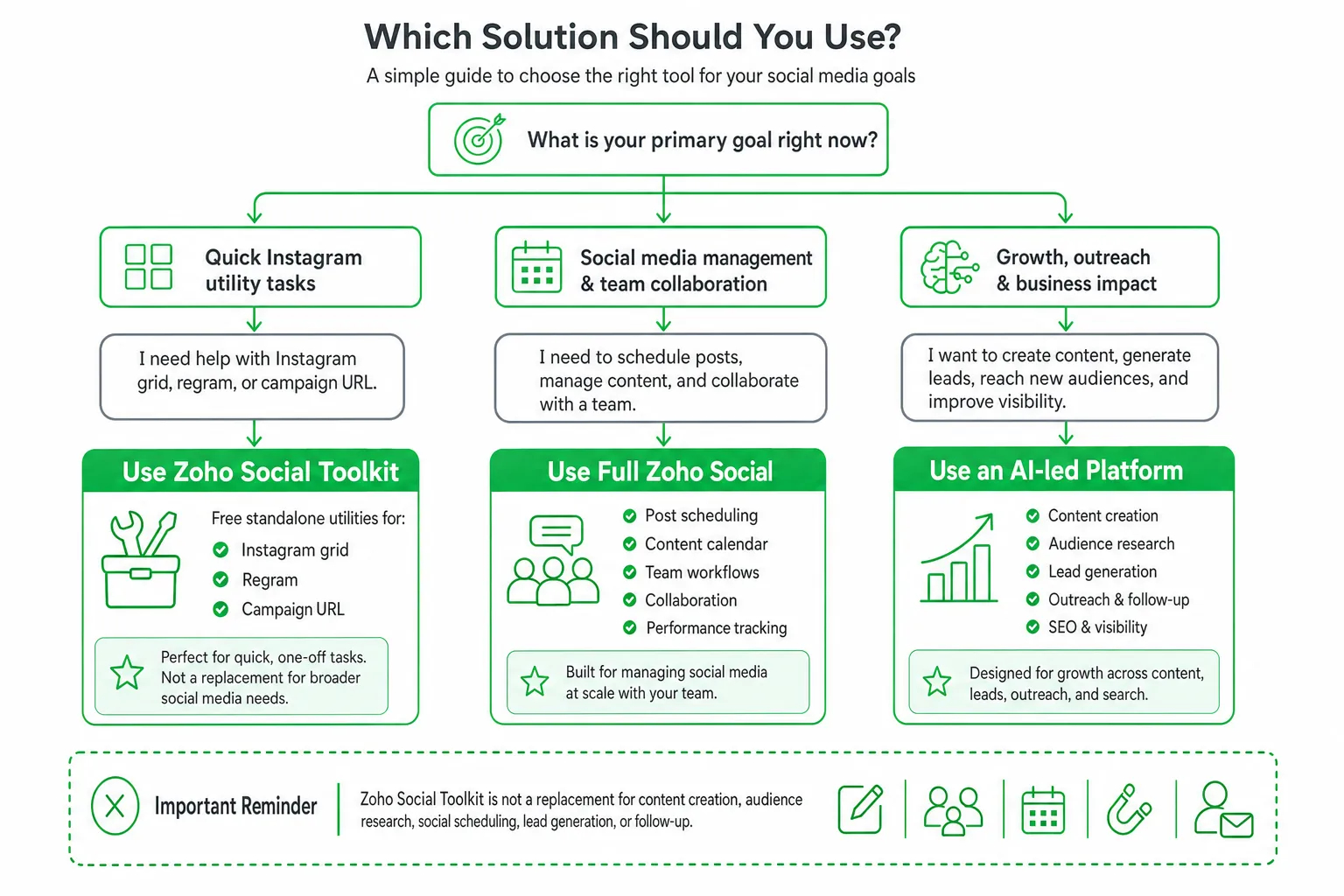
- The Zoho Social Toolkit is a free set of standalone utilities, not a complete social media management platform.
- Use it for Instagram grid preparation, Instagram regram workflows, and campaign URL tagging.
- It does not publish media or links directly to social networks from the Toolkit itself.
- Choose full Zoho Social for scheduling and team workflows. Choose an AI-led platform when lead generation, content creation, outreach, and SEO are the real bottlenecks.
The Zoho Social Toolkit is a good fit when you need to prepare an Instagram asset or create a trackable campaign URL without buying into a larger platform. It is not the right standalone replacement for content creation, audience research, social scheduling, lead generation, or follow-up.
That distinction matters for small teams. A free utility can solve the task in front of you, but it may also leave the rest of your marketing workflow scattered across spreadsheets, native apps, schedulers, and analytics tools.
What Is the Zoho Social Toolkit?
The Zoho Social Toolkit is a free collection of standalone utilities for preparing Instagram content and tracking campaign links. It is separate from the broader Zoho Social platform.
The Toolkit currently includes Instagram Grid Builder, Instagram Regram, and Campaign URL Builder. You do not need a Zoho Social account to access it, and access is free, according to the Zoho Social Help Center.
That makes it useful for occasional marketing tasks. You can format a visual, prepare a regram reference, or add tracking parameters to a link without setting up a complete social management system.
It becomes less suitable when you need a repeatable engine for finding ideas, creating content, publishing across channels, starting conversations, and measuring conversions. The Toolkit helps with preparation. It does not replace the wider acquisition workflow.
What You Can Do With Its Free Tools
Each utility handles a focused job. Use the right one for the task instead of treating the Toolkit as an all-purpose marketing dashboard.
- Instagram Grid Builder: Split an image into a planned Instagram grid. The tool offers 3×1, 3×2, 3×3, and 3×4 presets, according to the Zoho Social Help Center.
- Instagram Regram: Prepare content based on an existing Instagram post, then adapt the resulting media for your own publishing process.
- Campaign URL Builder: Add campaign name, medium, source, content, term, and campaign ID parameters before generating a custom tracking URL. These fields are documented by the Zoho Social Help Center.
Zoho Social also promotes Postify, which turns a webpage, blog post, or article URL into a customizable visual post for social sharing. It appears on the Zoho Social Toolkit page, but it is separate from the Toolkit’s core utilities.
How to Use the Toolkit in a Measurable Workflow
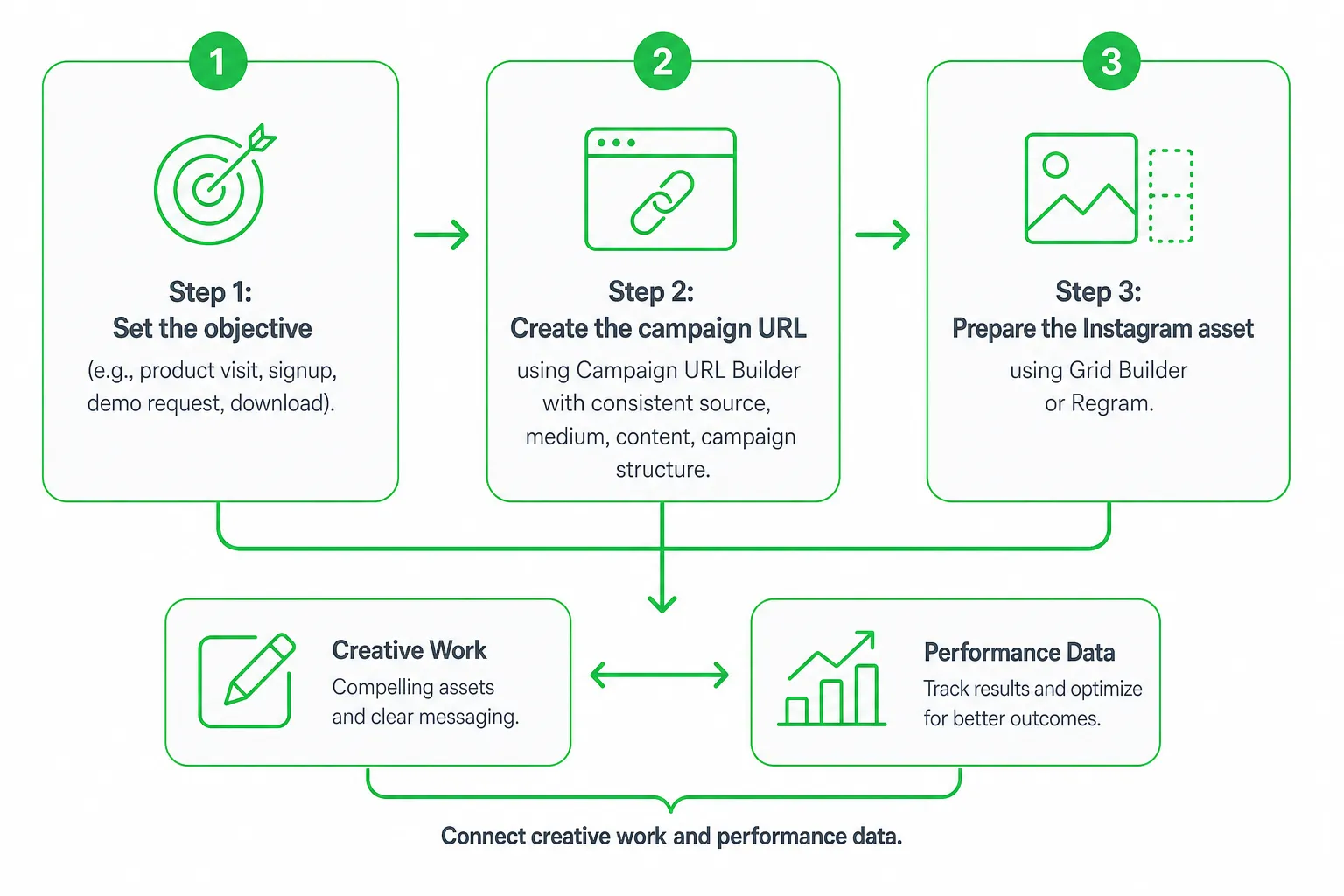
Use the Toolkit as a preparation layer, not as the complete campaign. A simple workflow keeps creative work and performance data connected.
- Set the objective: Decide whether the campaign should drive a product visit, signup, demo request, download, or another conversion action.
- Create the campaign URL: Use Campaign URL Builder to apply a consistent source, medium, content, and campaign structure. Keep the naming readable so you can recognize it later in analytics.
- Prepare the visual: Use Grid Builder for a planned Instagram layout or Regram when adapting an existing post reference. Review the crop, text, branding, and call to action before saving the file.
- Publish elsewhere: Send the finished asset to your chosen scheduler or social network. The Toolkit is not the place where the entire publishing process happens.
- Review outcomes: Compare tracked visits and conversions in your analytics platform. Reach and likes can provide context, but they should not be the only success signals.
- Document the decision: Record the URL structure, creative angle, audience, and destination page. That gives your next campaign a usable reference point.
This workflow works well when you already have a publishing routine. It works less well when every campaign requires manual research, manual drafting, manual uploading, and manual follow-up.
The Important Difference: Toolkit vs. Zoho Social
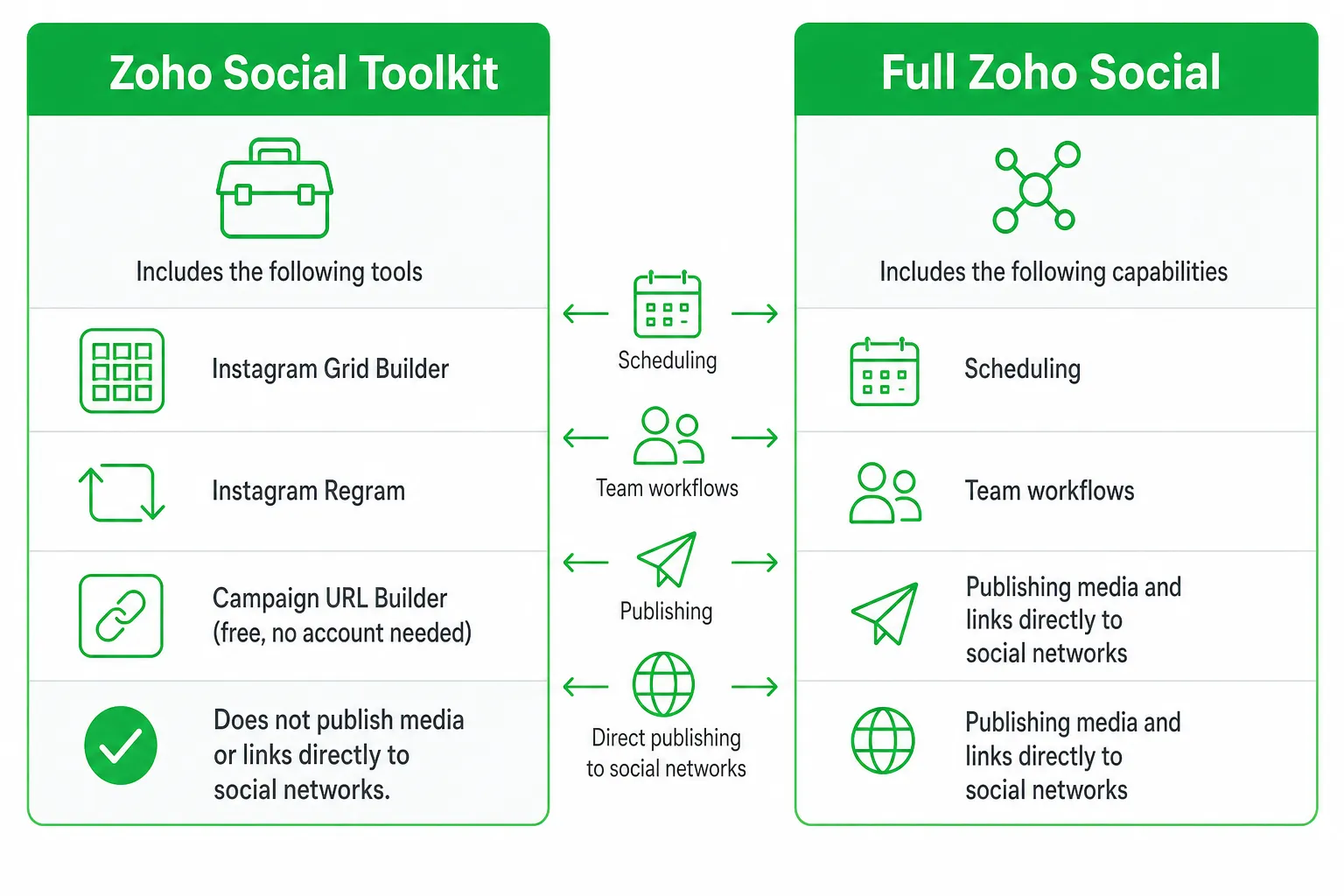
The Toolkit is a set of free utilities. Zoho Social is the broader social management platform for planning, publishing, monitoring, analytics, and collaboration.
The most important practical limitation is the handoff. Media and links cannot be shared directly to social networks from the Toolkit itself. You can send regrammed posts and campaign URLs to Zoho Social, or download the files and upload them manually, as explained by the Zoho Social Help Center.
That means you should ask a simple question: Do you need a utility, or do you need a system?
- Choose the Toolkit when you need occasional visual preparation or campaign-link tagging.
- Choose broader Zoho Social capabilities when you need recurring scheduling, multiple channels, reporting, inbox management, or a shared team process.
- Use another marketing platform when your bigger problem is discovering demand, producing content, generating conversations, or connecting social activity with SEO.
Zoho Social’s broader free plan covers one brand with six social channels and one team member, according to Zoho Social pricing. That is a different offer from the free, no-account-required Toolkit.
Zoho Social also added URL-property and UTM-tracking management in its compose window in 2026, alongside publishing and integration updates such as Snapchat support, according to Zoho Social’s What’s New page. Those updates make the broader platform more relevant when your priority is centralized publishing and tracking.
Zoho Social Toolkit Alternatives for Small Teams
The best alternative depends on the constraint you are trying to remove. Do not compare tools only by feature lists. Compare the work they complete from idea to result.
| Option | Best for | Main tradeoff |
|---|---|---|
| Zoho Social Toolkit | Free Instagram preparation and campaign URL creation | Manual publishing and limited automation |
| Full Zoho Social | Centralized scheduling, channels, reporting, and collaboration | Broader platform commitment |
| Lightweight scheduler | Straightforward publishing across selected networks | Audience research, content ideas, and follow-up stay separate |
| AI-led marketing platform | Lead discovery, content creation, outreach, publishing, and SEO support | Requires review and governance before sending AI-generated work |
Choose the standalone Toolkit when you already have a publishing system and only need visual preparation or link tagging. Its advantages are low friction, free access, and no account requirement.
Choose full Zoho Social when your priority is a conventional social management workspace. It gives you a more centralized process, but you are adopting a broader platform for needs the free utilities do not solve.
Choose a lightweight scheduler when publishing is the only major gap. Expect to manage research, ideas, attribution, and replies separately.
Choose an AI-led marketing platform when your team needs help before and after publishing. That means finding high-intent conversations, drafting relevant responses, repurposing ideas, and tying social activity to acquisition.
Why OneUp Today May Be the Better Alternative
OneUp Today is built for SaaS founders, indie hackers, and small teams that need an AI marketing team rather than another isolated utility. Its agents can find high-intent Reddit discussions, score opportunities, draft personalized DMs, emails, and replies in your voice, publish across multiple platforms, and support SEO, blog creation, website chat, and Google ranking workflows.
The distinction is measurable. In OneUp Today’s own data from 2,269 real Reddit cold DM conversations sent March to September 2026, 29.7% received at least one human reply, compared with the 1-5% typical of cold email. The full benchmark is available at OneUp Today’s Reddit DM benchmarks.
That does not mean every Reddit message will perform well. Audience selection, timing, relevance, community rules, and message quality still matter. It does show why an acquisition workflow can be more valuable than another asset-preparation tool when qualified conversations are the goal.
You also approve every send. That human review keeps the voice authentic and gives you control over which DMs, replies, emails, and posts leave the system.
Which Option Should You Choose?
Use the Zoho Social Toolkit if you need a quick, free answer for Instagram asset preparation or campaign URL creation and you are comfortable publishing elsewhere.
Use Zoho Social if you want a conventional social management workspace with scheduling, channel organization, analytics, and collaboration.
Use OneUp Today if you want to turn social and search activity into a repeatable acquisition system that includes Reddit lead generation, AI content creation, outreach, publishing, and SEO support.
Before choosing, compare the workflow end to end:
- Who discovers relevant opportunities?
- Who creates the content?
- Who approves and publishes it?
- How are campaign links tracked?
- Who handles replies and follow-up?
- Where do you review traffic, conversations, and conversions?
How to Get Started Without Overbuying
Test the free Toolkit first if your immediate task is visual formatting or URL tagging. Confirm whether the manual download-and-publish step fits your routine.
Move to broader Zoho Social capabilities when recurring scheduling, multiple channels, reporting, or collaboration becomes the constraint rather than the creative asset itself.
Start with an AI-led marketing workflow when your growth goal is qualified Reddit conversations, consistent publishing, or keeping SEO and social execution moving with a small team.
Define a single campaign, audience, and conversion action before adding more tools. Approve the first drafts, publish the work through the correct channel, and review both tracked traffic and actual conversations.
Bottom line: The Zoho Social Toolkit is excellent for small, specific jobs. Your next step is to test one campaign with it. If the real bottleneck appears earlier, in lead discovery and content creation, compare that workflow with OneUp Today before paying for another publishing utility.
Frequently asked questions
Is the Zoho Social Toolkit completely free to use without any hidden costs?
Yes, the Zoho Social Toolkit is completely free to use with no hidden costs. You do not need a Zoho Social account to access its utilities like the Instagram Grid Builder or Campaign URL Builder, making it a no-commitment tool for occasional marketing tasks.
Can the Zoho Social Toolkit schedule posts directly to Instagram or other social networks?
No, the Zoho Social Toolkit cannot schedule or publish posts directly to social networks. It is designed for preparation tasks like building Instagram grids or creating tracking URLs, while actual scheduling requires the full Zoho Social platform or another scheduler.
Does the Zoho Social Toolkit include analytics or reporting features for campaign performance?
No, the Zoho Social Toolkit does not include analytics or reporting features. It focuses on asset preparation and URL tagging; you must use external analytics tools like Google Analytics to track campaign performance from the URLs you create.
What file formats does the Instagram Grid Builder in the Zoho Social Toolkit support?
The Instagram Grid Builder supports common image formats like JPEG and PNG. It splits your uploaded image into a grid layout (e.g., 3x3) for a cohesive Instagram feed, but it does not support video or animated content.
Is the Zoho Social Toolkit suitable for managing multiple social media accounts or team collaboration?
No, the Zoho Social Toolkit is not suitable for managing multiple accounts or team collaboration. It is a set of single-user utilities for individual tasks; for multi-account scheduling or team workflows, you need the full Zoho Social platform with its collaboration features.