
Zoho Social vs Hootsuite: Which Fits a Small Team?
Key takeaways
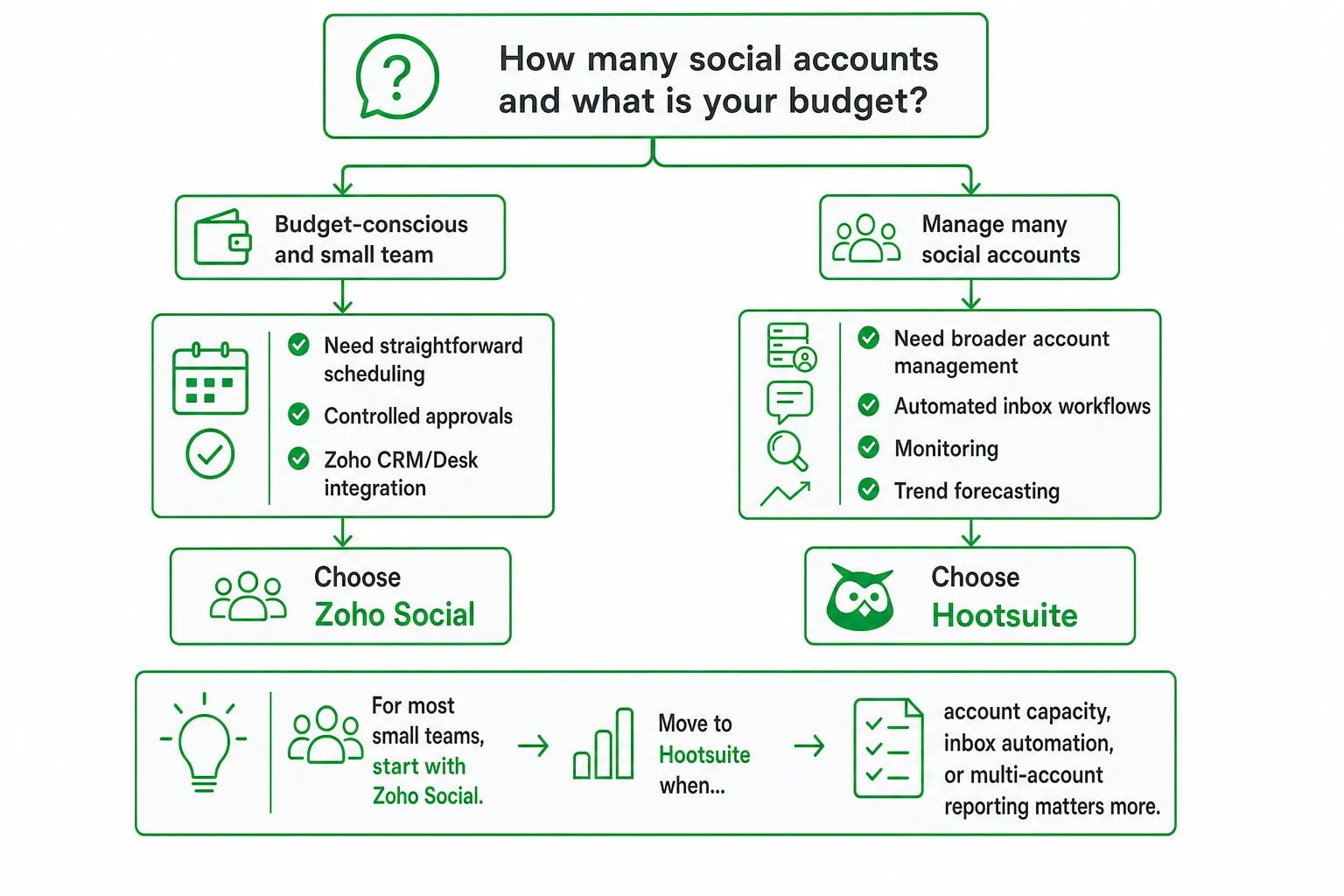
- Choose Zoho Social for affordable publishing, approval controls, and Zoho CRM or Zoho Desk integrations.
- Choose Hootsuite when you manage many social accounts and need automated inbox workflows, monitoring, or trend forecasting.
- Do not compare account limits with channel limits. Zoho Social uses brands, channels, and team members. Hootsuite emphasizes social accounts.
- Test AI-credit limits, approval steps, inbox handoffs, and reporting with a real campaign before you buy.
Zoho Social vs Hootsuite: The Short Answer
Choose Zoho Social if you run a small, budget-conscious team that needs straightforward scheduling, controlled approvals, and Zoho CRM or Zoho Desk integration. Choose Hootsuite if you manage many social accounts and need broader account management, automated inbox workflows, monitoring, or trend forecasting.
For most small teams, start with Zoho Social. Move toward Hootsuite when account capacity, inbox automation, or multi-account reporting matters more than simplicity.
The real decision is not brand reputation. Check your channels, users, approval process, inbox workload, integrations, and AI usage first. A tool that looks cheaper can become awkward when you add another brand, reviewer, account, or reporting requirement.
Plans, Limits, and Included Features Compared
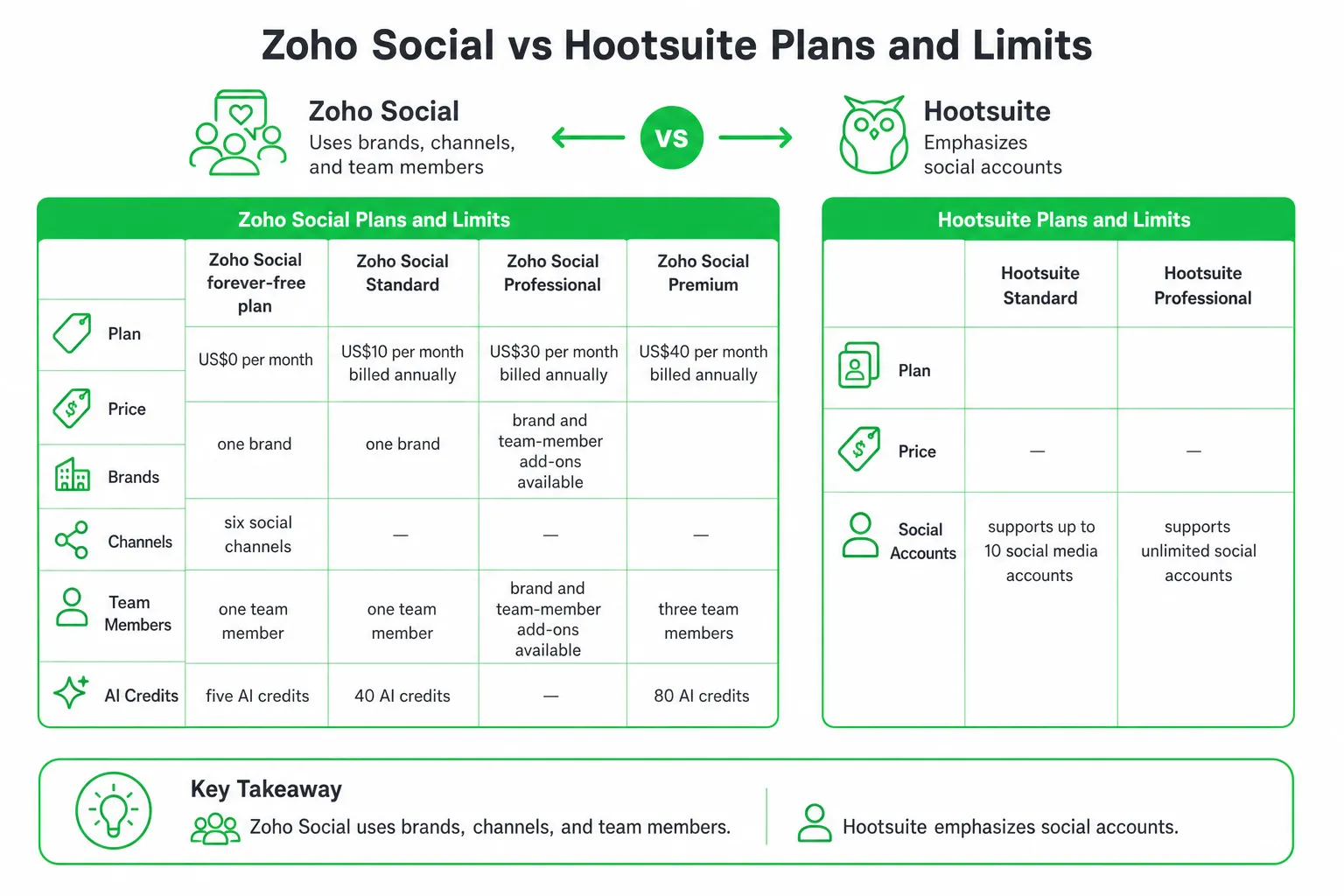
Zoho Social publishes more concrete plan limits for small businesses. Hootsuite frames its key limits around social accounts, so you need to compare like with like.
| Plan or capability | Zoho Social | Hootsuite |
|---|---|---|
| Entry plan price | US$0 per month for the forever-free plan. Zoho Social Plans and Pricing | Not published in the supplied pricing facts. Hootsuite Plans, Prices, and Features |
| Entry plan coverage | One brand, six social channels, one team member, and five AI credits. Zoho Social Plans and Pricing | Not published as a matching brand and channel allowance. The Standard plan supports up to 10 social media accounts. Hootsuite Plans, Prices, and Features |
| Lower paid plan | Standard: US$10 per month billed annually, one brand, one team member, and 40 AI credits. Zoho Social Plans and Pricing | Not published in the supplied pricing facts. |
| Mid-tier plan | Professional: US$30 per month billed annually. Brand and team-member add-ons are available. Zoho Social Plans and Pricing | Professional supports unlimited social accounts. Hootsuite Plans, Prices, and Features |
| Higher plan | Premium: US$40 per month billed annually, three team members, and 80 AI credits. Zoho Social Plans and Pricing | Not published in the supplied pricing facts. |
| Scheduling | Publishing calendars and queues. Professional adds bulk scheduling and repeat posting. Zoho Social Features | Standard supports unlimited social posts. Hootsuite Plans, Prices, and Features |
| Inbox and monitoring | Centralized inbox and listening columns are documented features. Zoho Social Features | Standard includes one shared inbox, brand monitoring, and competitor monitoring. Hootsuite Plans, Prices, and Features |
| Approvals and reporting | Premium includes content approvals, workflows, custom reports, and UTM parameters. Zoho Social Plans and Pricing | Professional includes custom performance reports. Hootsuite Plans, Prices, and Features |
| Integrations | Premium includes Zoho CRM and Zoho Desk integrations. Zoho Social Plans and Pricing | Not published in the supplied pricing facts. |
| Trial | 15-day trial without a credit card, followed by a limited forever-free plan unless you upgrade. Zoho Social Plans and Pricing | 14-day free trial. Hootsuite Plans, Prices, and Features |
Zoho Social’s Standard plan is the obvious low-cost starting point for a solo operator. Its Professional and Premium plans become more relevant when you need bulk scheduling, repeat posting, approvals, reporting, or business-system integrations.
Hootsuite’s account model can work better for agencies and multi-account teams. But “unlimited social accounts” does not automatically mean unlimited users, channels, brands, approvals, or inbox capacity. Confirm those details before signing up.
The Overlooked Details That Decide the Purchase
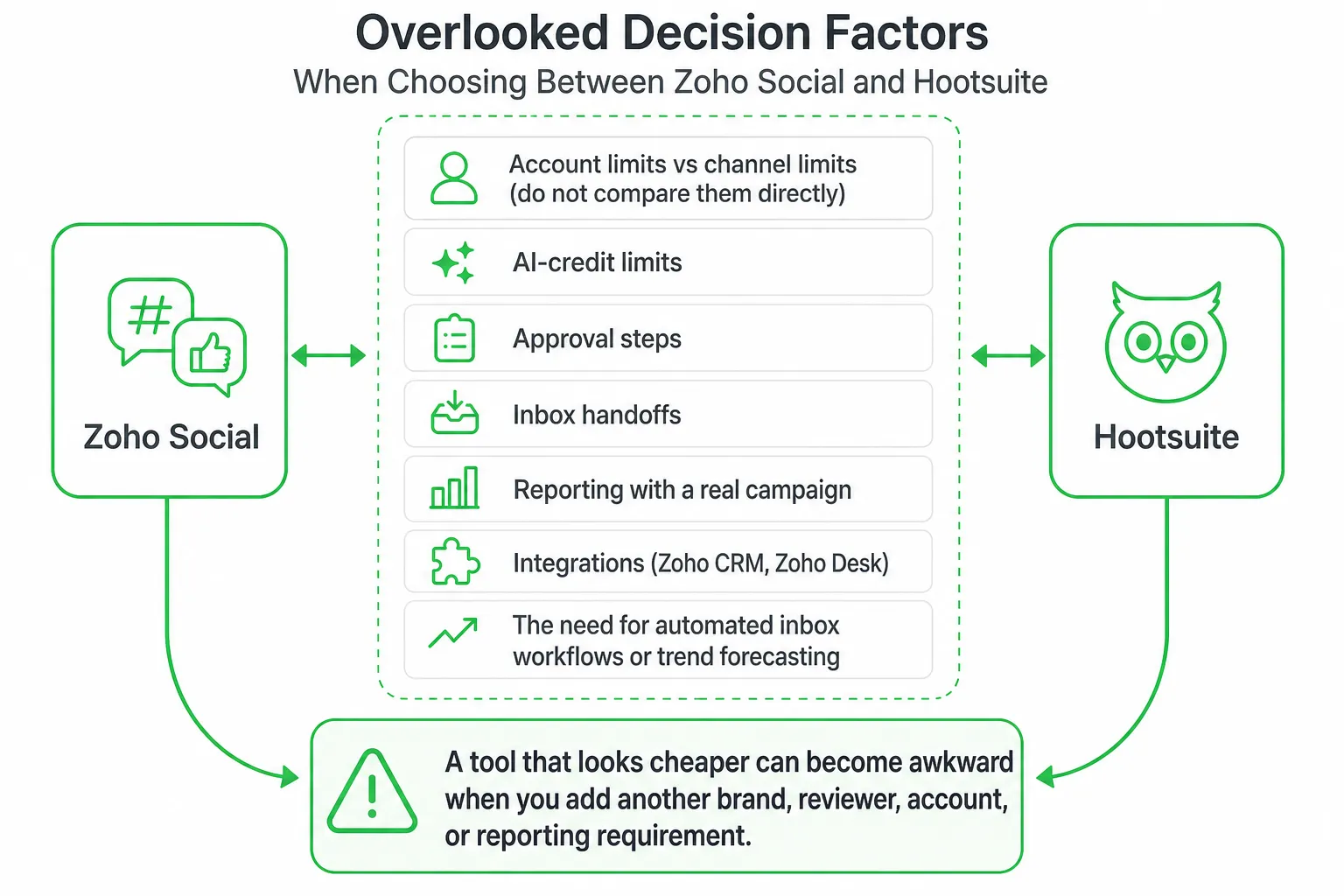
This is where many Zoho Social versus Hootsuite comparisons stop too early. A plan card rarely tells you how the tool behaves during a busy approval cycle or a messy customer conversation.
AI-credit limits
- Ask how many AI credits your plan includes.
- Check which actions consume credits: copy generation, rewriting, images, replies, or other features.
- Confirm whether unused credits roll over.
- Test what happens after you reach the limit.
Zoho Social publishes five AI credits on its free plan, 40 on Standard, and 80 on Premium. Hootsuite’s supplied pricing facts describe AI-assisted post and image generation, but do not provide a matching credit allowance. Treat that as a question for the Hootsuite sales or support team, not as an unlimited entitlement.
Account counting
Zoho Social separates brands, social channels, and team members. Hootsuite highlights social accounts. Those labels are not interchangeable.
For example, your team may think of one company as one account, while the platform counts each connected network separately. Write down every profile before comparing plans. Include regional profiles, client accounts, private groups, and profiles that only need monitoring.
Approval workflow
Ask who drafts, who reviews, who can edit, and who can publish. Zoho Social’s Premium plan includes content approvals and workflows. That makes it more attractive when a founder, client, or compliance reviewer must approve content before it goes live.
Hootsuite may suit a larger operating model, but verify the exact reviewer roles and permissions you need. A shared login or informal message thread is not a reliable approval process.
CRM and help-desk connections
Choose Zoho Social when your marketing workflow already lives in Zoho. Premium includes Zoho CRM and Zoho Desk integrations, along with lead generation and bulk messaging.
If your team needs to connect a social conversation to a customer record or support process, test that handoff directly. Do not assume that a generic integration replaces a native CRM or help-desk workflow.
Publishing, Inbox, Monitoring, and Reporting
Both tools cover the basic publishing job. The difference appears when publishing becomes a team process.
Zoho Social: structured and connected
Zoho Social documents publishing calendars, content queues, a centralized inbox, listening columns, approval workflows, custom reports, scheduled reports, Zoho CRM, Zoho Desk, and a browser extension. Zoho Social Features
Its Professional plan adds bulk scheduling, post insights, messages, and repeat posting. That combination fits a small marketing team that plans content in batches and wants a repeatable queue instead of a collection of spreadsheets.
Its strongest case is operational consistency. You can plan, review, publish, monitor, and report from a workflow that connects to other Zoho products.
Hootsuite: broader account operations
Hootsuite Standard includes unlimited social posts, AI-assisted post and image generation, one shared inbox, brand monitoring, and competitor monitoring. It supports up to 10 social media accounts. Hootsuite Plans, Prices, and Features
Hootsuite Professional supports unlimited social accounts. It also adds automated inbox replies and workflows, social-trend forecasting up to 90 days, and custom performance reports. Hootsuite Plans, Prices, and Features
That upgrade makes sense when your team manages many accounts, receives frequent messages, or needs trend analysis to inform content planning. It is less compelling if you only need a calendar, a small review loop, and a connected CRM.
Separate publishing from inbox work
A scheduler helps you send content. An inbox tool helps you handle replies, mentions, questions, and handoffs. Test both separately.
- Can several people see the same conversation?
- Can you assign or hand off a message?
- Can automation suggest or send replies?
- Can you preserve message history?
- Can a reviewer intervene before a reply goes out?
- Can reports show both publishing results and conversation work?
Which Tool Fits Each Small-Team Scenario?
| Your situation | Better starting point | Why |
|---|---|---|
| Founder-led team with one brand | Zoho Social | Simple publishing, a lower-cost entry point, and clear approval and integration options. |
| Team already using Zoho CRM or Zoho Desk | Zoho Social | Native Zoho connections can reduce workflow friction. |
| Agency managing many client accounts | Hootsuite | Professional supports unlimited social accounts and stronger multi-account operations. |
| Team with heavy inbox automation needs | Hootsuite | Professional includes automated inbox replies and workflows. |
| Team focused on trend analysis | Hootsuite | Professional includes social-trend forecasting up to 90 days. |
| Team needing approval gates and UTM tracking | Zoho Social | Premium includes approvals, workflows, custom reports, and UTM parameters. |
For a SaaS team focused on Reddit conversations, SEO, lead scoring, and approved outreach, neither platform replaces a dedicated growth workflow. Social publishing is one part of acquisition. Finding high-intent conversations, drafting a relevant response, and getting human approval requires a different operating layer.
At OneUp Today, our own data across 2,269 real Reddit cold DM conversations sent March to September 2026 found that 29.7% received at least one human reply. OneUp Today Reddit DM benchmarks That is useful context if your goal extends beyond publishing into conversation-led growth.
A Practical Evaluation and Migration Workflow
Run the same test in both tools. Do not compare feature lists in isolation.
- Map your current setup. List every social profile, brand, user, approval step, inbox owner, CRM connection, help-desk connection, and report your team uses.
- Build one sample campaign. Use the same copy, images, target networks, approval rules, and publishing dates in both tools.
- Test the review cycle. Draft the campaign, request approval, make an edit, reject one post, and approve the rest.
- Test inbox handoffs. Have one person respond, another review the response, and a third person take over a customer question.
- Check monitoring and reports. Monitor a relevant mention, review the available listening view, and export a performance report.
- Test failure cases. Disconnect an account, change a permission, reject a post, create a duplicate publishing attempt, and edit AI-generated copy.
- Record friction. Note every workaround, missing permission, unclear limit, and manual export. Those costs matter more than a polished feature page.
Zoho Social gives you a 15-day trial without requiring a credit card, then moves the account to a limited forever-free plan unless you upgrade. Hootsuite offers a 14-day free trial. Zoho Social Plans and Pricing Hootsuite Plans, Prices, and Features
Final Recommendation
Give Zoho Social the default recommendation when you are a small team that values affordability, simple scheduling, approval gates, and Zoho-native integrations. Its published brand, channel, team-member, and AI-credit limits make it easier to model an initial setup.
Choose Hootsuite when unlimited social accounts, automated inbox workflows, monitoring, trend forecasting, or multi-account operations justify a more expansive platform. Confirm the account, user, AI, and workflow limits before you commit.
A free plan may be too limited for collaboration. A larger account allowance may not mean broader channel coverage. AI credits may limit experimentation. And a social scheduler alone will not create a complete lead-generation system.
Document your channels and workflow, test both tools with one real campaign, and then choose the platform that removes the most manual work. If you also need Reddit lead generation, approved AI outreach, SEO, blog automation, and website chat, use OneUp Today alongside your publishing stack rather than expecting a scheduler to handle the entire growth process.
Frequently asked questions
Can Zoho Social handle multiple brands on a single plan?
Yes, Zoho Social supports multiple brands on its Professional and Premium plans. The Standard plan includes only one brand, but you can add more brands as paid add-ons on higher tiers.
Does Hootsuite offer a free plan for small teams?
No, Hootsuite does not offer a free plan; its cheapest option is the Professional plan at $99 per month. In contrast, Zoho Social provides a forever-free plan for one brand and six channels.
How many social accounts can you manage with Hootsuite's Professional plan?
Hootsuite's Professional plan supports up to 10 social accounts. This is ideal for small businesses, but agencies needing more accounts must upgrade to the Team plan for $249 per month.
Is Zoho Social's AI credit limit restrictive for content creation?
Yes, Zoho Social's AI credit limit can be restrictive, with 5 credits on the free plan and 40 on Standard. Each AI task uses one credit, so heavy users may need to upgrade or supplement with manual posting.