
Social Media Planner: Free Template and Tool Comparison
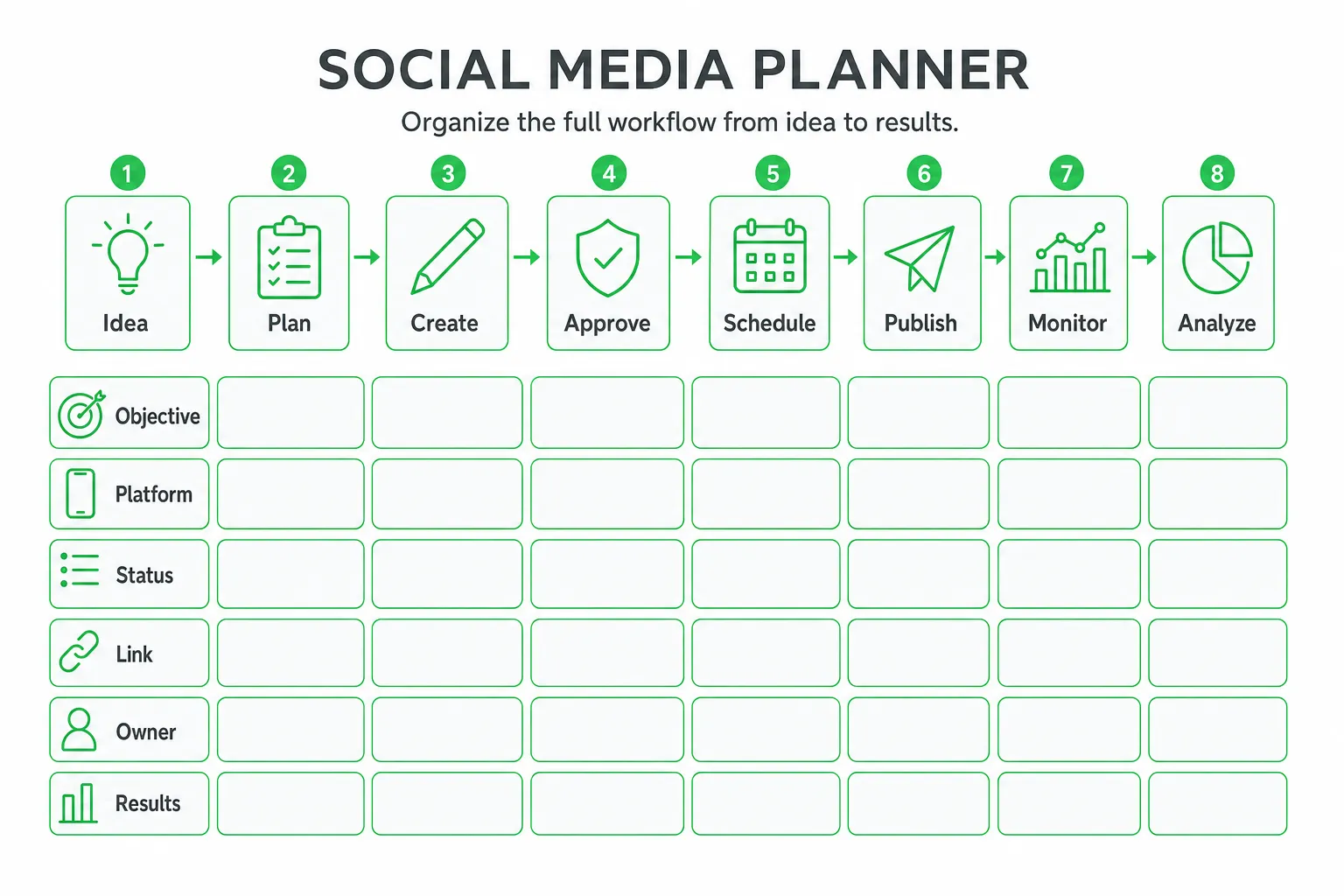
A social media planner is a template, calendar, or software workspace for organizing ideas, creating channel-specific posts, assigning statuses, scheduling publication, and reviewing results. Start with the free template below if you work alone or with a small team, then move to a tool when approvals, reporting, publishing, or lead follow-up become difficult to manage manually.
The right planner does more than make your content look organized. It connects what you publish to search behavior, website traffic, community conversations, and revenue.
Key takeaways
- Use a spreadsheet or printable planner to organize ideas, owners, statuses, links, and results.
- Adapt one core idea for each channel instead of copying the same post everywhere.
- Track social-search keywords, campaign links, leads, and follow-up actions alongside publishing dates.
- Choose a scheduler for publishing efficiency, or an AI marketing platform when you also need content, SEO, outreach, and lead workflows.
What is a social media planner?
A social media planner gives you one place to plan, produce, approve, schedule, and evaluate social content. It can be a spreadsheet, printable worksheet, digital calendar, or complete social media management platform.
These terms overlap, but they solve different problems:
- Social media planner: Organizes the full workflow from idea to results.
- Content calendar: Shows what you will publish, where, and when.
- Social media scheduler: Publishes approved posts automatically or queues them for publication.
- Social media management platform: Adds scheduling, analytics, inbox management, collaboration, listening, and reporting.
Choose based on workflow coverage, not just calendar design. A beautiful calendar will not help much if you still copy posts between platforms, lose approval notes, forget campaign links, or miss buying signals in comments.
Start with a free planning template when you need structure. Upgrade to software when you manage multiple channels, need approval controls, want performance reports, or must connect social activity with lead follow-up.
Free social media planner template
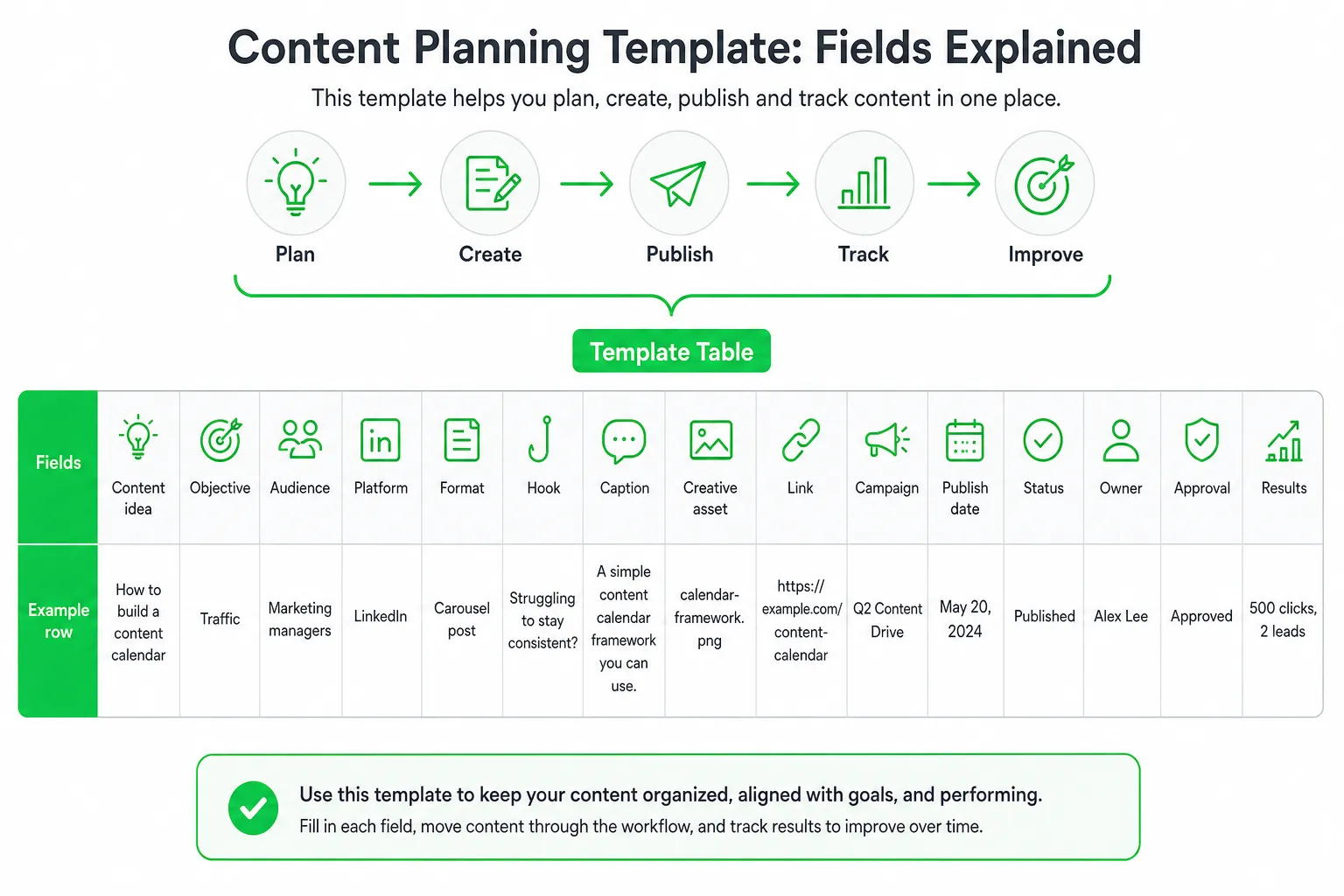
Copy this table into a spreadsheet, project management tool, or document. Add one row for each planned post. Keep the fields that fit your workflow, but do not remove objective, platform, status, link, owner, and results.
| Field | What to record |
|---|---|
| Content idea | The source topic or question |
| Objective | Awareness, engagement, traffic, demand generation, or education |
| Audience | The specific segment or buyer |
| Platform | LinkedIn, Reddit, Instagram, YouTube, X, or another channel |
| Format | Text post, video, carousel, image, thread, poll, or discussion |
| Hook | The opening line, title, or visual idea |
| Caption | The platform-specific copy |
| Creative asset | File name, folder, or design link |
| Link | Landing page, article, signup page, or profile destination |
| Campaign | The launch, product, series, or evergreen theme |
| Publish date | Date, time, and relevant time zone |
| Status | Idea, drafted, in review, approved, scheduled, published, repurpose, or analyzed |
| Owner | The person responsible for the next action |
| Approval | Pending, approved, changes requested, or not required |
| Results | Traffic, conversations, leads, signups, or other agreed outcomes |
Use two planning views. Your weekly view should show daily posts, owners, deadlines, response coverage, and scheduled content. Your monthly campaign view should show launches, evergreen topics, product updates, recurring series, and major calls to action.
Recommended workflow statuses are simple and visible: idea, drafted, in review, approved, scheduled, published, repurpose, and analyzed.
A spreadsheet is enough when you have a small number of channels and one person approves most posts. Use a dedicated planner when you need shared drafts, automated scheduling, asset organization, permission controls, reminders, analytics, or a response queue.
How to build a channel-specific content calendar
Start with a business goal and an audience question. Then map every idea to one primary objective: awareness, engagement, website traffic, demand generation, or customer education.
Do not paste identical copy across every network. Start with one core idea, then adapt the hook, length, visual treatment, keywords, call to action, and conversation prompt for each channel.
- LinkedIn: Lead with an operating lesson, contrarian view, or practical framework.
- Reddit: Answer the question in context before mentioning your product.
- Instagram: Make the first visual and caption line carry the topic quickly.
- YouTube: Build the title, opening, description, and next action around the viewer’s problem.
- Email or blog distribution: Use the social post to create a reason to read, not just a link dump.
Build recurring content pillars so planning stays sustainable. Examples include weekly teardown, customer question, product lesson, founder note, industry observation, and behind-the-scenes build log. Recurring original series are a major audience priority, according to the Sprout Social Q2 2025 Pulse Survey.
Balance educational, proof-driven, promotional, behind-the-scenes, customer, and community content. Leave space for timely replies. Your calendar should guide activity, not prevent you from joining a useful conversation.
Schedule, repurpose, and manage every post
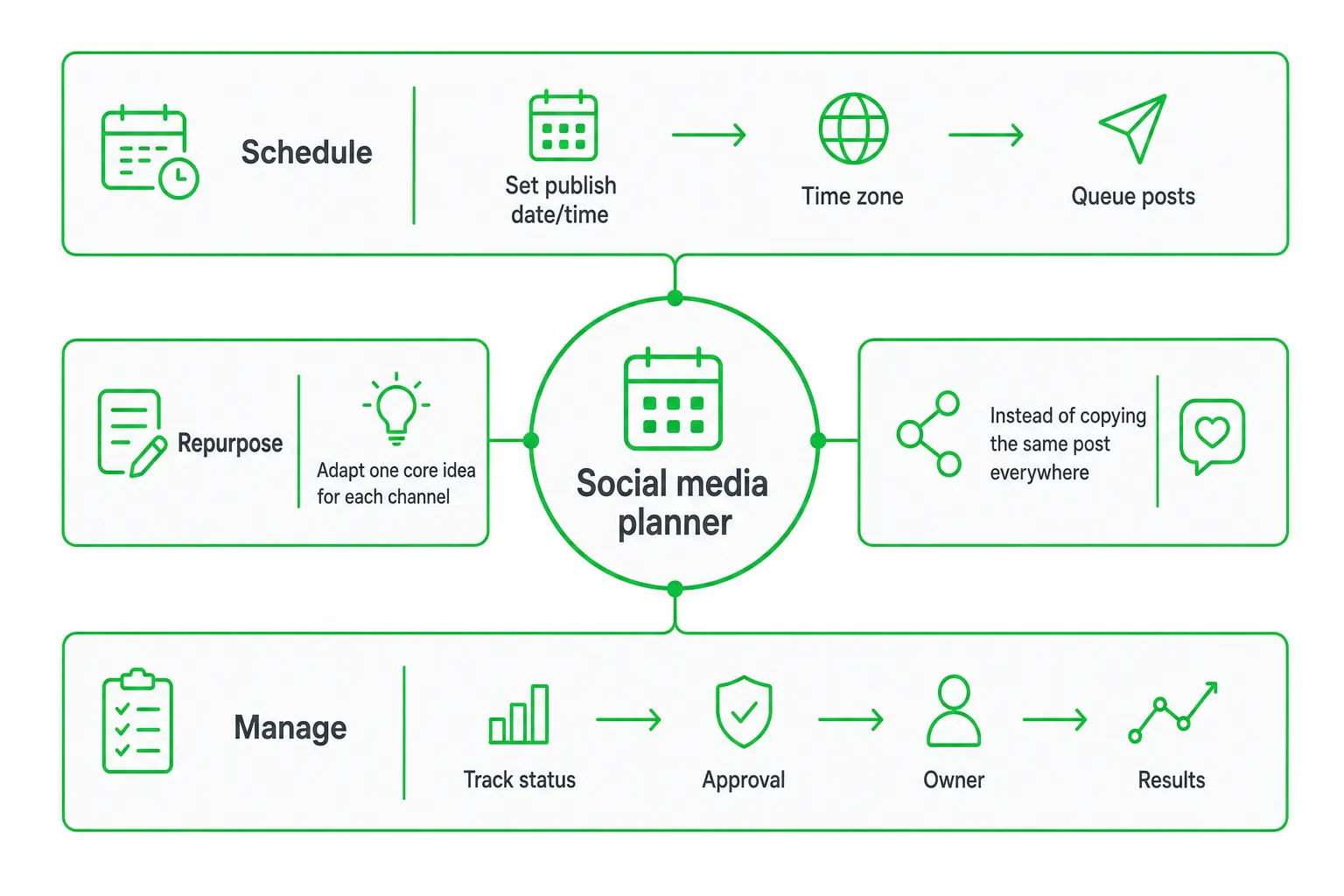
Use a repeatable production process:
- Capture the source idea from customer questions, product work, search research, or community discussions.
- Draft the master version with the central point, proof, and next action.
- Create platform adaptations with different hooks, formats, keywords, and prompts.
- Attach the creative assets, links, campaign tags, and approval notes.
- Approve the final versions and schedule them in the relevant time zones.
- Record the final URLs after publication.
- Move useful posts into a repurpose queue and review results before recycling them.
A blog post can become a short text post, a thread, a carousel outline, a video script, an email angle, and several follow-up discussion prompts. A product update can become a release explanation, customer-use example, objection-handling post, and community question.
Check these capabilities before choosing a scheduler:
- Supported networks and post formats
- Visual calendar and bulk editing
- Drafts, recurring posts, and approval workflows
- Asset storage and version control
- Time-zone handling and failed-post alerts
- Link tracking and campaign reporting
- Comment, mention, and message monitoring
Separate publishing from community care. Schedule the post, then assign someone to monitor replies, mentions, questions, objections, and buying signals after it goes live.
The missing piece: connect publishing to search, traffic, and leads
A useful planner tracks more than publication dates. Add fields for social-search keywords, profile destinations, tagged links, landing pages, lead magnets, response owners, qualification notes, and next actions.
Use the language your audience searches for in hooks, captions, titles, alt text, profile descriptions, and topic tags. 89% of marketers agree that optimizing content for on-platform search is important to their social strategy, according to the HubSpot and Masters in Marketing’s 2025 Global Social Media Trends Report.
Build a measurement loop around business outcomes:
- Give each campaign its own tagged link.
- Send visitors to a relevant landing page, article, demo, or signup flow.
- Record qualified conversations and lead source.
- Track demos, signups, opportunities, and assisted pipeline.
- Review which topics create useful actions, not only visible engagement.
Social is a real revenue channel for many teams. 56% of marketing leaders say social media drives revenue for their businesses, according to Sprout Social’s 2025 Impact of Social Media Marketing Report.
Connect publishing with lead generation by monitoring high-intent questions, scoring relevant conversations, drafting personalized replies or direct messages, and routing approved prospects into a consistent follow-up process.
Community response planning and social listening
Add a response queue beside your content calendar. Include the conversation URL, platform, intent, sentiment, suggested reply, owner, approval status, and follow-up date.
Create playbooks for common situations:
- Product question: Answer directly, then link to the most relevant explanation.
- Buying signal: Clarify the use case and offer a useful next step.
- Complaint: Acknowledge the issue, avoid defensiveness, and move sensitive details to a private channel when appropriate.
- Comparison: Explain differences and avoid unsupported claims.
- Feature request: Record the request and explain what you can confirm.
- Recommendation request: Help first. Mention your product only when it fits the stated need.
Prioritize fast, human responses. 73% of consumers expect brands to respond on social media within 24 hours, according to the Sprout Social 2025 Sprout Social Index.
Include Reddit and other community-driven channels in your workflow. Helpful, context-aware answers can reveal demand earlier than scheduled promotional posts. Treat each conversation as a research signal, not merely a distribution opportunity.
Social media planner tools compared
Choose the lightest system that covers your real workflow. More features do not automatically create better content.
| Option | Best for | Strengths | Trade-offs |
|---|---|---|---|
| Spreadsheet or printable planner | Solo creators and small teams | Low cost, flexible fields, easy export | Manual updates, publishing, approvals, and reporting |
| Canva | Design-led content production | Templates, visual creation, and content organization | May need another system for deeper measurement and lead follow-up |
| Later | Visual scheduling workflows | Calendar-based planning and channel publishing | Advanced sales conversations may require separate tools |
| Buffer or similar schedulers | Reliable multi-channel publishing | Queues, drafts, scheduling, and basic workflow efficiency | Publishing may remain separate from SEO and lead qualification |
| Asana or similar collaboration tools | Teams with complex production | Owners, deadlines, tasks, approvals, and project visibility | Usually needs integrations for native social publishing |
| OneUp Today | SaaS founders, indie hackers, and small teams | Social publishing connected with Reddit lead generation, AI outreach, SEO and blog automation, content creation, lead scoring, and approval before sending | Best when you need a broader marketing workflow, not only a content calendar |
Use this buyer checklist before committing:
- Supported networks and formats
- Calendar usability and bulk editing
- Asset organization and approval controls
- Analytics depth and export options
- Campaign links and conversion tracking
- Social listening and response management
- AI editing and repurposing
- Integrations, permissions, and total cost
Choose a template or scheduler if you only need to organize and publish posts. Choose OneUp Today when you want publishing connected with Reddit conversations, AI-assisted outreach, SEO and blog workflows, lead scoring, and controlled approval before sending.
How to start using a social media planner today
Set up your first planning cycle in one sitting:
- Choose one primary goal, such as qualified conversations, website traffic, or customer education.
- List the active channels that actually reach your audience.
- Define three to five content pillars and one recurring series.
- Populate the template with initial ideas from customer questions, product work, and community research.
- Create channel-specific drafts and attach campaign links.
- Approve and schedule a small batch of posts.
- Assign response coverage and review traffic, conversations, and leads after publication.
Follow a weekly rhythm: research audience questions, plan channel adaptations, create assets, approve drafts, publish, respond to conversations, review outcomes, and recycle winning themes.
Your planner does not need every platform. Automation should not replace judgment. Analytics become useful when each post has a clear objective and a tracked next step.
Bottom line: copy the free template if you need a lightweight way to organize social publishing. Choose a broader workflow when your priority is turning consistent content, community participation, and approved outreach into qualified conversations and measurable growth.
Next step: Create your first weekly view, add five audience questions, and assign each one a platform, objective, owner, and tracked next action.
Frequently asked questions
Can I use a social media planner for multiple team members?
Yes, but only if you upgrade from a spreadsheet to a dedicated tool. Spreadsheets work for one or two people, but shared drafts, approval workflows, and permission controls require a social media management platform to avoid version conflicts and lost feedback.
How often should I update my social media planner?
Update it daily for scheduled posts and weekly for campaign planning. Daily updates ensure statuses, links, and approvals are current, while weekly reviews align content with upcoming launches, trends, and performance data to prevent last-minute scrambling.
What is the difference between a content calendar and a social media planner?
A content calendar shows what to publish, where, and when, while a social media planner covers the full workflow from idea to results. The planner adds fields for objectives, approvals, campaign links, and lead follow-up, making it more comprehensive for managing outcomes beyond posting.
Do I need a social media planner if I only use one platform?
Yes, even a single platform benefits from a planner. It helps track content ideas, posting statuses, campaign links, and results, ensuring consistency and preventing missed follow-ups. A simple spreadsheet suffices for one channel without needing advanced scheduling features.
How do I choose between a free template and paid software?
Start with a free template when you have under five channels and one approver. Upgrade to paid software when you need approval controls, performance reports, automated scheduling, or lead tracking across multiple team members, as spreadsheets become inefficient for these tasks.
Sources
- Sprout Social, 2025 Impact of Social Media Marketing Report
- Sprout Social, 2025 Impact of Social Media Marketing Report
- Sprout Social, 2025 Sprout Social Index
- Sprout Social, Q2 2025 Pulse Survey
- HubSpot and Masters in Marketing, 2025 Global Social Media Trends Report
- HubSpot and Masters in Marketing, 2025 Global Social Media Trends Report
- Sprout Social, 2025 Sprout Social Index
- Sprout Social, Q2 2025 Pulse Survey