
Postiz Alternatives: Cheaper Options With Real Prices (2026)
Key takeaways
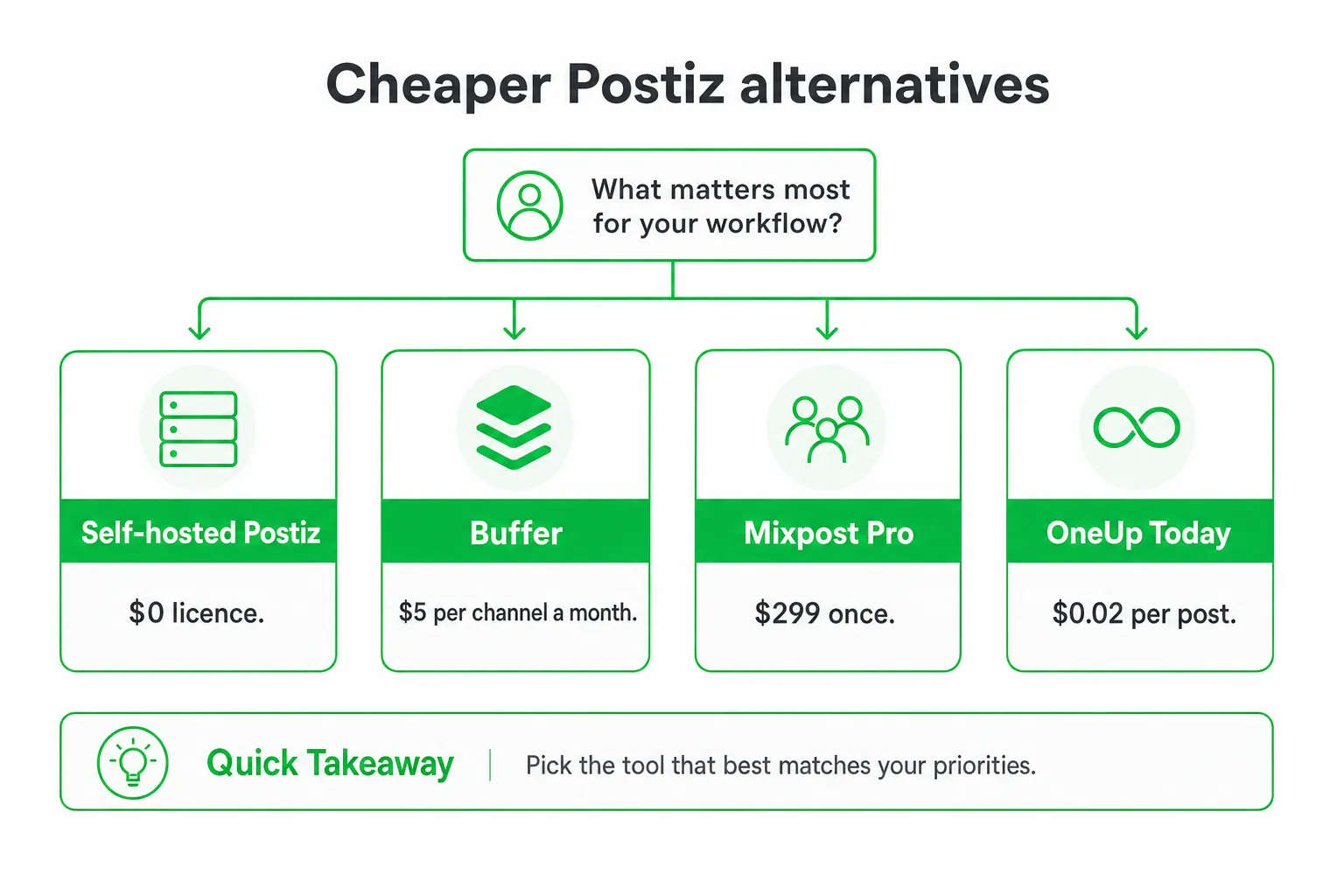
- The cheapest Postiz alternative is Postiz itself, self-hosted: the code is open source under AGPL-3.0, so you pay only for your own server.
- Buffer costs $5 per channel per month on Essentials, so it undercuts Postiz Standard's $29 a month at five channels or fewer.
- Mixpost Pro is a one-time $299 for a self-hosted install, which beats a year of Postiz Standard ($23 a month on yearly billing) in about 13 months.
- OneUp Today charges $0.02 per published post with no monthly fee, so 30 posts a month costs $0.60.
Postiz is a good scheduler, but its cloud plans start at $29 a month for 5 channels. If you publish a few times a week, that is a lot to pay for a calendar. This guide compares the Postiz alternatives that genuinely cost less, using official pricing checked in November 2026.
If you are still choosing a scheduler from scratch, our roundup of social media management tools covers the wider field. This article is only about spending less than Postiz, or getting more control for the same money.
What Postiz costs today
Postiz sells four cloud plans. Every plan includes unlimited posts, plus the MCP server, CLI and API.
| Postiz plan | Monthly billing | Yearly billing | Channels |
|---|---|---|---|
| Standard | $29 a month | $23 a month | 5 |
| Team | $39 a month | $31 a month | 10 |
| Pro | $49 a month | $39 a month | 30 |
| Ultimate | $99 a month | $79 a month | 100 |
The pricing is per channel tier, not per post. That is great value at 30 channels and poor value at two. The alternatives below win in exactly the cases where Postiz's tiers overshoot what you use.
Postiz's official cloud pricing is therefore $29 to $99 a month on monthly billing, or $23 to $79 a month on yearly billing. The yearly figures are the lower headline prices, but they require an annual commitment.
Postiz also provides an API, but the stated limit is 100 requests per hour. That may be enough for a small scheduler. It matters more if you are building an automation, syncing several workspaces, or looking for a Postiz API alternative with a different request policy.
Postiz alternatives at a glance: what each really costs
| Alternative | Free option | Cheapest paid option | How you pay | Watch out for |
|---|---|---|---|---|
| Postiz, self-hosted | Yes, open source (AGPL-3.0) | None needed | Your own server costs | You run updates, backups and fixes |
| Buffer | 3 channels, 10 scheduled posts per channel | Essentials, $5 per channel per month | Per channel, monthly or yearly | Gets more expensive than Postiz past 5 channels |
| Mixpost | Lite: Facebook Pages, X and Mastodon | Pro, $299 once | One-time licence, self-hosted | Updates are free for 1 year; you host it |
| OneUp Today | $3 of starting credit, no card | $0.02 per published post | Prepaid wallet from $5, never expires | Publishes to 6 networks, not 30 |
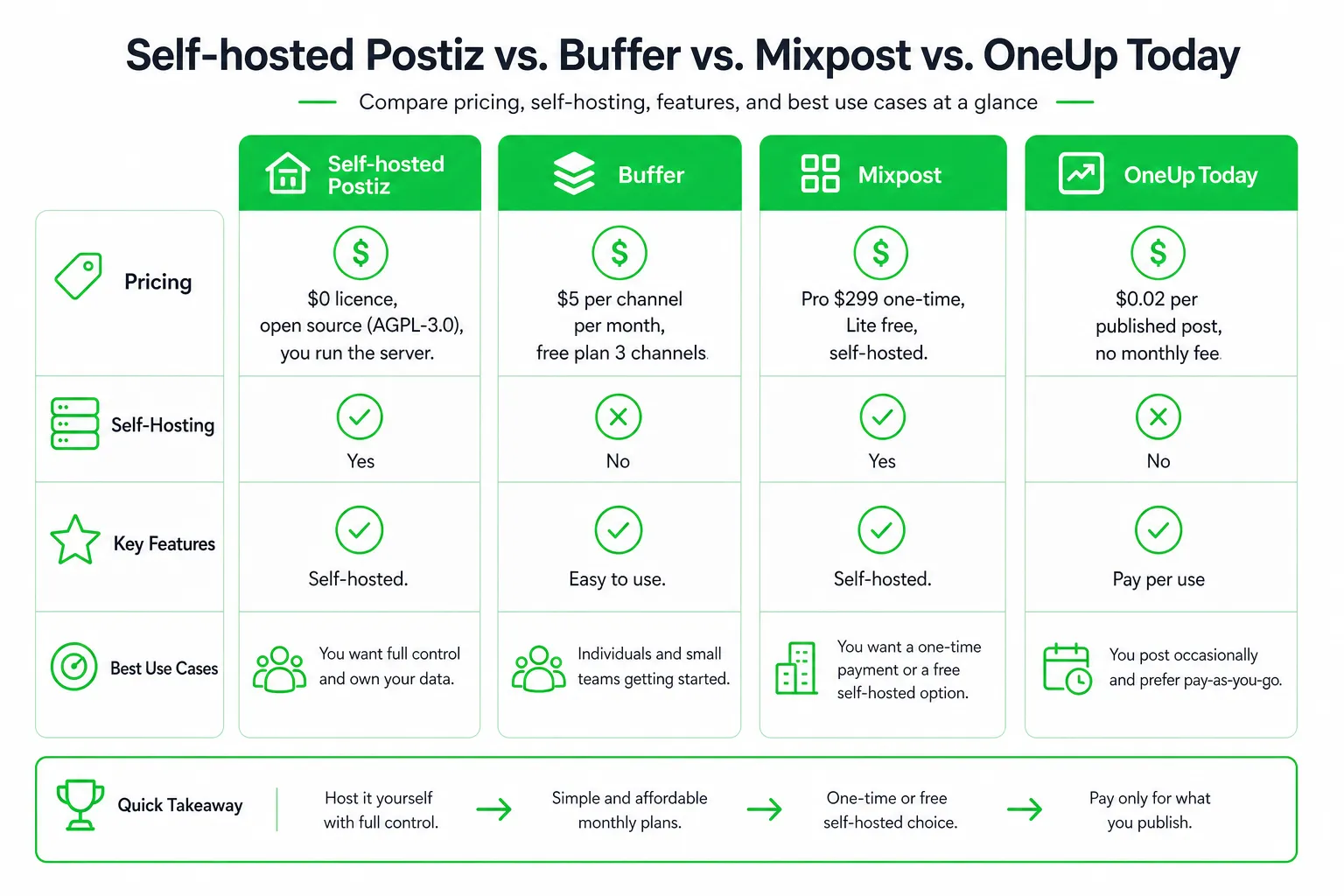
There is no single cheapest tool. The answer depends on three inputs: how many channels you connect, how many posts you publish, and whether you want to maintain your own server.
- Want the same product for no licence fee? Self-host Postiz.
- Use three to five channels? Buffer is often cheaper than hosted Postiz.
- Want a permanent licence? Mixpost avoids a recurring subscription.
- Publish at low volume? OneUp Today charges for published posts instead of a monthly plan.
Postiz pricing breakdown and comparison with alternatives
Postiz: predictable tiers, higher minimum spend
Postiz Standard starts at $29 a month for 5 channels. That makes the effective minimum cost high if you only need two or three channels. Yearly billing lowers the price to $23 a month, but you still pay for the tier rather than the posts you actually publish.
Team costs $39 a month for 10 channels, Pro costs $49 a month for 30 channels, and Ultimate costs $99 a month for 100 channels. On yearly billing, those prices are $31, $39 and $79 a month respectively.
Buffer: per-channel pricing
Buffer Essentials costs $5 per channel per month. Two channels cost $10 a month, three cost $15, and five cost $25. That is cheaper than Postiz Standard until your channel count goes beyond the point where Postiz's larger tiers become better value.
Buffer's free plan gives you 3 channels and 10 scheduled posts per channel. Essentials adds unlimited scheduled posts. Team costs $10 per channel per month, so check whether you need collaboration features before choosing it.
Mixpost: one payment, plus hosting
Mixpost Lite is free and publishes to Facebook Pages, X and Mastodon. Mixpost Pro costs $299 once and adds Instagram, LinkedIn, YouTube, TikTok, Pinterest, Threads, Bluesky and Google Business, plus approvals, an API and webhooks, with a year of free updates. Enterprise costs $1,199 once.
At $23 a month, a year of Postiz Standard on yearly billing costs $276. Mixpost Pro therefore passes that one-year comparison early in the second year. The calculation excludes hosting and the value of your maintenance time.
OneUp Today: usage-based pricing
OneUp Today has no subscription. You load a wallet from $5, and the balance never expires. You pay $0.02 for each post the Content Agent publishes, while scheduling is free. New accounts get $3 of credit with no card, which covers 150 posts.
OneUp Today's own pricing also separates other content types: $0.10 per image and $0.50 per video. The platform lists $0.02 per X post as well. Pick your daily mix and see the week's cost upfront.
It publishes to X, LinkedIn, Reddit, Instagram, Threads and Facebook. That is fewer networks than Postiz, so check your list first. What you get beyond scheduling is a wider content workflow: OneUp Today can turn one draft into platform-specific posts, schedule them, and help automate SEO articles and rank tracking.
At OneUp Today, the DM generator also blocks 23 corporate buzzwords with a hard validator, according to the publisher's own data. That is relevant if you want an alternative that combines publishing with controlled AI drafting, rather than adding a separate writing tool.
Self-hosted Postiz: the same tool for $0 in licence fees
The open-source edition of Postiz is free forever under AGPL-3.0. You pay only for the infrastructure you run it on. If you already keep a small server or a Docker host for other projects, this is the cheapest way to keep every feature you know.
The cost moves from your card to your time. Someone has to apply updates, keep backups, renew certificates and fix a broken social connection when a platform changes its API. If nobody on your team wants that job, a hosted option below will be cheaper in practice.
Best fit: developers and technical founders who already run their own servers.
Buffer: cheaper while you post to a few channels
Buffer's free plan connects up to 3 channels with 10 scheduled posts per channel. Essentials costs $5 per channel per month with unlimited scheduled posts, and yearly billing saves about two months. Team is $10 per channel per month.
Because Buffer charges per channel, it costs less than Postiz Standard ($29 a month for 5 channels) at five channels or fewer. Two channels on Essentials cost $10 a month; five cost $25.
Best fit: solo creators and small teams posting to five networks or fewer who want a hosted tool with no maintenance.
Mixpost: pay once, self-host for good
Mixpost is a self-hosted scheduler sold as a one-time licence. Mixpost Lite is free and publishes to Facebook Pages, X and Mastodon. Mixpost Pro costs $299 once and adds Instagram, LinkedIn, YouTube, TikTok, Pinterest, Threads, Bluesky and Google Business, plus approvals, an API and webhooks, with a year of free updates. Enterprise costs $1,199 once.
At $23 a month, a year of Postiz Standard on yearly billing costs $276, so Mixpost Pro pays for itself early in the second year. Like self-hosted Postiz, you own the server work.
Best fit: agencies and technical teams that want to stop paying monthly and are happy to host.
OneUp Today: pay per post instead of per month
OneUp Today has no subscription. You load a wallet from $5, and the balance never expires. You pay $0.02 for each post the Content Agent publishes. Scheduling is free. New accounts get $3 of credit with no card, which covers 150 posts.
It publishes to X, LinkedIn, Reddit, Instagram, Threads and Facebook. That is fewer networks than Postiz, so check your list first. What you get beyond scheduling is the rest of a growth stack on the same wallet: agents that find people on Reddit already asking for what you sell, draft replies and DMs for your approval, and write SEO articles like this one. See how that works for Reddit lead generation.
Best fit: founders and small businesses who post a few times a week and would rather pay for what they publish than for a monthly seat.
Key factors to consider when choosing a Postiz alternative
- API availability and rate limits. Postiz's stated limit is 100 requests per hour. Compare the actual limit, authentication method, webhooks and endpoint coverage before choosing a Postiz API alternative. A tool that looks cheaper can become restrictive when you automate imports, analytics or publishing.
- Self-hosted versus hosted. Self-hosting removes or reduces licence fees, but adds server bills, backups, updates, monitoring and troubleshooting. Hosted tools cost more directly but give you a vendor to contact when a connection fails.
- Supported social networks. Match the tool against the networks you actually use. Count Facebook Pages separately from Facebook Groups, and check whether features such as video, carousels, first comments and thread publishing are supported.
- Team collaboration. Confirm the number of users, approval steps, roles and client workspaces. A cheap solo plan is not cheap if your team needs review before publishing.
- AI and automation. Look for AI drafting, content suggestions, repurposing, webhooks and browser-based workflows if those replace other tools. Also check whether AI usage is included or billed separately.
Which option is cheapest for your setup?
Take a common setup: 3 channels and 30 posts a month. Here is what each option costs for that, using the prices above.
| Option | Cost for 3 channels, 30 posts a month |
|---|---|
| Postiz Standard | $29 a month, or $23 a month on yearly billing |
| Buffer Essentials | $15 a month (3 channels at $5) |
| Mixpost Pro | $299 once, plus hosting |
| Self-hosted Postiz | $0 in licence fees, plus hosting |
| OneUp Today | $0.60 a month (30 posts at $0.02) |
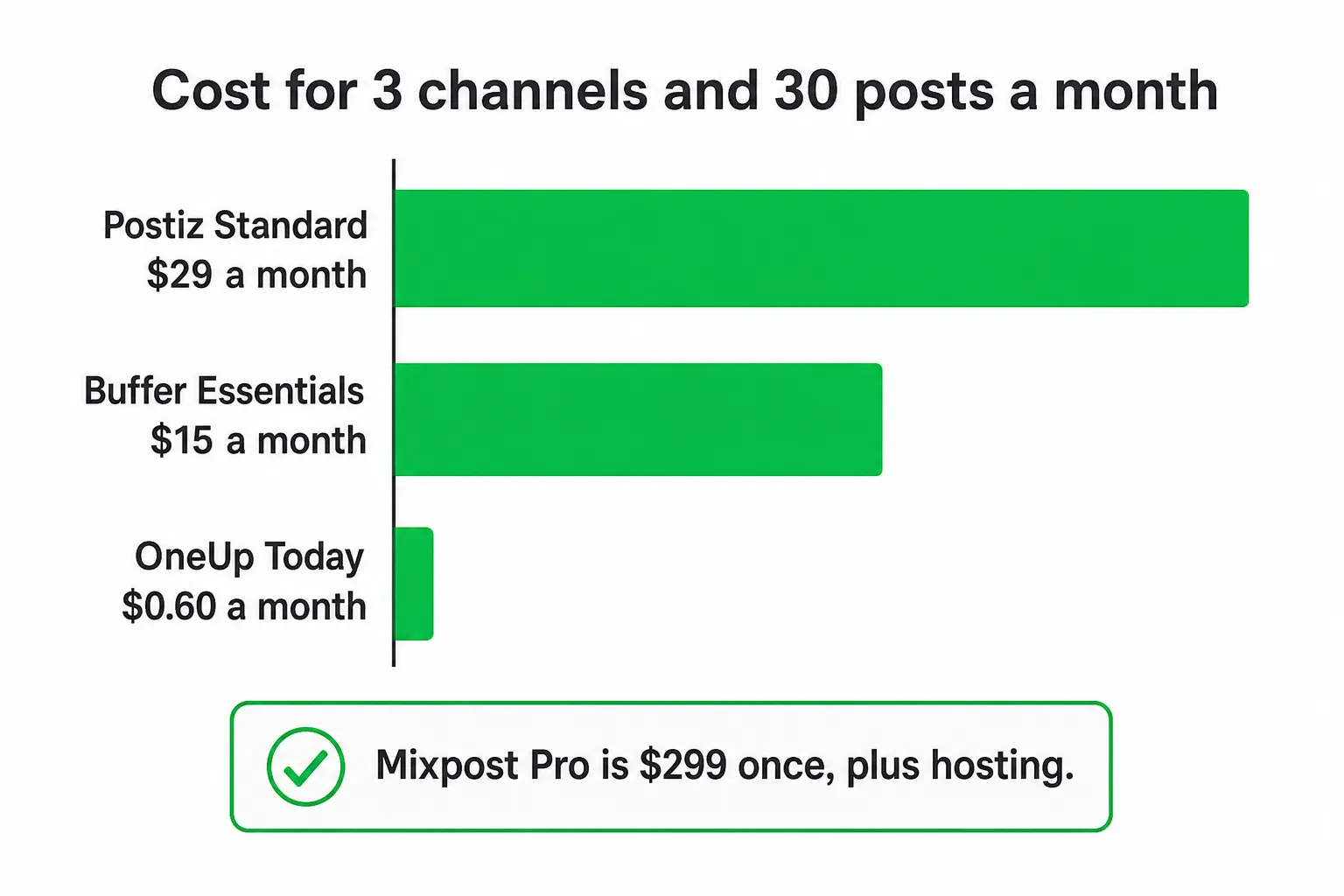
The picture changes with scale. At 20 channels and daily posting, Postiz Pro ($39 a month yearly for 30 channels) is hard to beat on price, and Buffer Essentials would cost at least $50 a month even with its lower rate for channels beyond 10. Price your real channel count and posting volume, not the entry plan.
Costs that do not show up on a pricing page
- Hosting and upkeep. Self-hosted Postiz and Mixpost have no licence fee, but a server, backups, monitoring and your time are real costs. Include setup time, update time and recovery time in your comparison.
- API rate limits. A scheduler may include an API but still restrict how often you can call it. Postiz's stated limit is 100 requests per hour. Check whether failed requests count, whether webhooks are available, and whether higher limits require a more expensive plan.
- Platform reliability. A failed token, expired permission or social network outage can delay a campaign. Check status information, retry behavior, notifications and whether you can export your queue.
- Support quality. Compare documentation, response times, community support and the process for fixing a broken connection. Saving $10 a month is not worthwhile if a failed integration costs you a launch.
- Growth in channels. Per-channel pricing is cheap at 2 channels and expensive at 20. Tier pricing is the opposite. Model the cost at your likely channel count six and twelve months from now.
- Network coverage. A cheaper tool that does not publish to a network you rely on is not cheaper. Check your list before you switch, including content formats and account types.
- Team seats and approvals. If several people publish, confirm the plan you would buy includes the users and approval steps you need. Some tools charge for collaboration even when scheduling is inexpensive.
- Media and AI usage. Image, video, storage and AI generation charges can sit outside the base subscription. OneUp Today, for example, lists $0.10 per image and $0.50 per video alongside its $0.02 per post charge.
How to move off Postiz without missing posts
Do not treat migration as simply copying a calendar. Social platforms may issue new permissions, resize media, change link previews or reject a post that worked in Postiz. Use a short overlap period.
- Export your inventory. List every connected channel, scheduled post, media file, recurring queue, campaign and team member in Postiz today.
- Record the requirements. Note which posts use images, videos, carousels, first comments, threads, links or platform-specific text. Record the time zone and posting time for each queue.
- Choose the replacement. Pick the cheapest option that covers every required network, format, approval step and automation. Test the API or webhook plan if you depend on integrations.
- Back up the content. Save captions, links, media, publishing times, tags and UTM parameters in a spreadsheet or export file. Keep the original media, not only a preview from the calendar.
- Connect accounts carefully. Authorize one network at a time. Confirm the correct page, profile or workspace before importing the full queue.
- Run a publishing test. Publish one real post to each network. Check the text, image crop, link preview, first comment, time zone and notification behavior.
- Move the queue in batches. Start with the next seven days. Then import later posts after you confirm that the first batch works.
- Run both tools for one full week. Keep Postiz available as a reference, but avoid publishing duplicate posts. Compare the new tool's queue and published results with your backup.
- Cancel only after verification. Remove Postiz connections and cancel only after the new tool has published a full week on schedule and you have saved anything you may need later.
- Keep a copy of your Postiz export and media library.
- Check that recurring posts did not lose their recurrence settings.
- Verify all scheduled times after converting time zones.
- Review links and tracking parameters before the first campaign.
- Tell every approver where the new review queue lives.
Frequently asked questions about Postiz and its alternatives
What is the official pricing of Postiz in 2026?
Postiz's official cloud pricing is $29 a month for Standard, $39 for Team, $49 for Pro and $99 for Ultimate on monthly billing. Yearly billing shows $23, $31, $39 and $79 a month respectively. The plans include 5, 10, 30 and 100 channels.
What is the cheapest alternative to Postiz?
Self-hosting Postiz is the cheapest in licence fees: the open-source edition is free under AGPL-3.0 and you pay only for your server. For a hosted option, OneUp Today charges $0.02 per published post with no monthly fee, while Buffer Essentials costs $5 per channel per month.
Are there free or open-source alternatives to Postiz?
Yes. Self-hosted Postiz is open source under AGPL-3.0. Mixpost Lite is also free and publishes to Facebook Pages, X and Mastodon. Both options require you to handle hosting and maintenance.
Which Postiz alternative offers the best API access?
That depends on your request volume and required endpoints. Postiz includes an API but has a stated limit of 100 requests per hour. Mixpost Pro includes an API and webhooks. Compare authentication, rate limits, webhooks, publishing endpoints and documentation before deciding.
Is Buffer cheaper than Postiz?
Yes, at five channels or fewer. Buffer Essentials is $5 per channel per month, so 5 channels cost $25 against $29 for Postiz Standard. Past five channels, compare it with Postiz Team at $39 a month for 10 channels.
Does Mixpost have a monthly fee?
No. Mixpost Lite is free, Mixpost Pro is a one-time $299 and Enterprise is a one-time $1,199. Paid licences include one year of updates, and you host it yourself.
How does OneUp Today pricing work for social posts?
You load a prepaid wallet from $5 that never expires and pay $0.02 for each post published to X, LinkedIn, Reddit, Instagram, Threads or Facebook. Scheduling is free, and new accounts get $3 of credit with no card.
How do I migrate my social media schedules from Postiz?
Inventory your channels and queue, export captions and media, connect the replacement accounts, test one post per network, and migrate the next seven days first. Run both tools for one full week before canceling Postiz.
What hidden costs should I watch out for when switching from Postiz?
Check hosting, backups, maintenance, API limits, support, media charges, AI usage, team seats, approval workflows and missing network formats. A lower subscription is not a saving if you need another tool or spend hours repairing failed posts.
Final recommendation
If you run your own servers, self-host Postiz and pay nothing for the software. If you post to five channels or fewer and want a hosted tool, Buffer Essentials costs less than Postiz. If you want to stop paying monthly and can host, Mixpost Pro is a one-time $299. If you post a few times a week and want to pay only for what you publish, OneUp Today costs $0.02 a post, and your first 150 posts are covered by the starting credit.