
Social Post API: Features, Costs, and Alternatives
Key takeaways
- A social post API lets your software create, schedule, publish, and manage content across connected networks.
- Compare approval states, per-network content overrides, analytics, engagement actions, API architecture, and pricing units, not just supported platform counts.
- Ayrshare, Buffer, and PostEverywhere take different approaches to coverage, workflow, and cost.
- Choose a unified API for distribution infrastructure. Choose a managed platform when you also need content creation, lead generation, outreach, SEO, and approval workflows.
A social post API lets your application create, schedule, publish, edit, and sometimes retrieve posts across connected social networks through code. It gives your product a publishing layer without requiring you to build every network integration yourself.
That distinction matters. You are not simply choosing a dashboard. You are choosing infrastructure that controls authentication, content formatting, approvals, delivery failures, reporting, and the way your team ships content at scale.
What Is a Social Post API?
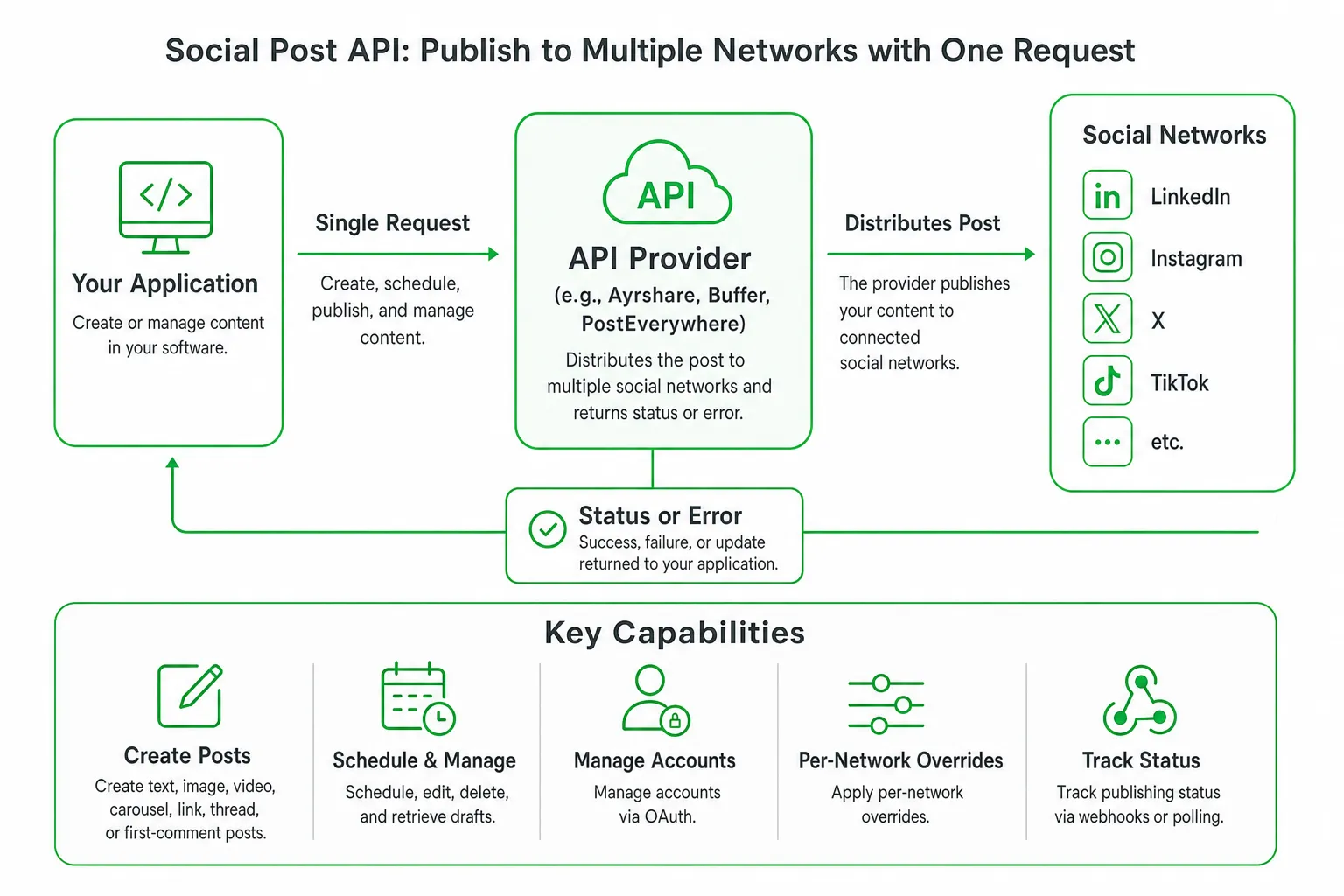
A social post API connects your application to social networks through programmable endpoints. Your software sends a request containing content, media, destination accounts, and timing. The provider then handles the network-specific publishing process and returns a status or error.
Depending on the provider, you may be able to:
- Create text, image, video, carousel, link, thread, or first-comment posts.
- Schedule, edit, delete, or retrieve drafts and published content.
- Connect and manage social accounts through OAuth.
- Apply different captions, media, hashtags, or calls to action to each network.
- Track publishing status through webhooks, polling, or dashboard updates.
That makes an API different from a social media management dashboard. A dashboard is the finished application your team uses. An API is the underlying infrastructure that powers your own product, workflow, automation, or internal tool.
A unified API can simplify multi-network publishing. It does not make every network identical. Permissions, media rules, review requirements, analytics access, and engagement features still vary by platform.
What to Look for in a Social Post API
Publishing capabilities
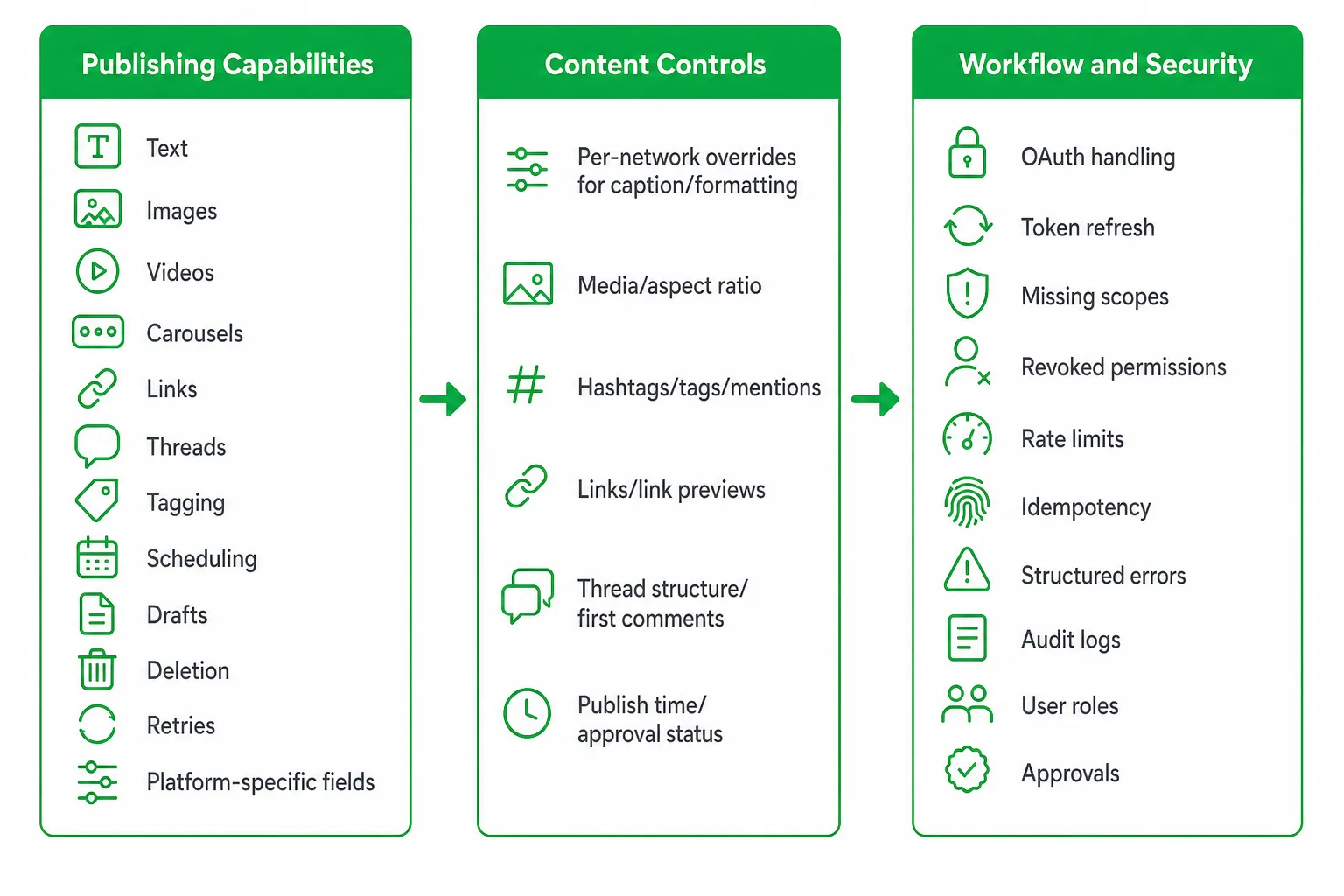
Start with the content your product actually needs to publish. Check support for text, images, videos, carousels, links, threads, tagging, scheduling, drafts, deletion, retries, and platform-specific fields.
Ask whether the provider supports native publishing or only link sharing. Check how it handles video processing, failed uploads, duplicate requests, and posts that a network rejects after submission.
Content controls
Look for per-network overrides. A single caption rarely works equally well on LinkedIn, Instagram, Reddit, X, TikTok, or a Google Business Profile.
Your normalized post model should allow a shared campaign concept with destination-specific values for:
- Caption and formatting.
- Media and aspect ratio.
- Hashtags, tags, and mentions.
- Links and link previews.
- Thread structure or first comments.
- Publish time and approval status.
Workflow and security
Review OAuth handling, token refresh, missing scopes, revoked permissions, rate limits, idempotency, structured errors, audit logs, user roles, approvals, and data retention.
A good API should help you answer a simple question after every publish: who approved this content, which account received it, what happened at the network, and what should the system do next?
Reporting and engagement
Separate publishing access from analytics and engagement. An API may create a post while offering little or no access to audience data, comments, replies, mentions, inbox messages, or full performance reporting.
Confirm these capabilities before you design your product around them. Adding them later may require direct integrations with individual networks.
The Practical Comparison Most API Guides Miss
Most social posting API comparisons focus on platform counts. That is a weak buying signal. Your implementation will feel the difference in approval workflows, content overrides, API architecture, and analytics limitations.
Approval workflows
Ayrshare documents a two-step approval workflow in its posting API. A post can remain in an “awaiting approval” state until an approval request is sent through the API. See the Ayrshare API Documentation.
That is useful when your application drafts content automatically but requires a person to approve every send. Without an explicit approval state, teams often build their own database flags, locking logic, and audit trail.
Per-network overrides
Ayrshare’s post endpoint supports platform-specific text or media customization within a single API request. That lets you adapt content for each destination without creating completely separate publishing jobs. See the Ayrshare API Documentation.
Look for this capability if your product publishes one campaign across several networks. It reduces duplicated logic and gives content teams more control over the final message.
API architecture
Buffer’s current API is GraphQL-based. Its API provides access to creating and scheduling posts, managing content ideas, retrieving connected channels, and retrieving scheduled, sent, and draft posts. See Buffer Developers.
Architecture affects implementation. GraphQL can give your application a flexible query layer, while REST endpoints may feel more familiar if your team already uses request-based services. Evaluate documentation, client libraries, error handling, pagination, and versioning alongside the architecture label.
Analytics and engagement limitations
Buffer states that its API does not currently provide full analytics and insights or comment reading and replying. See the Buffer Help Center.
That does not make the API unsuitable. It clarifies the boundary. Use it for publishing and scheduling if those are your needs. Choose direct network integrations or another provider if comment workflows and deep analytics are core product features.
How Social Post API Pricing Works
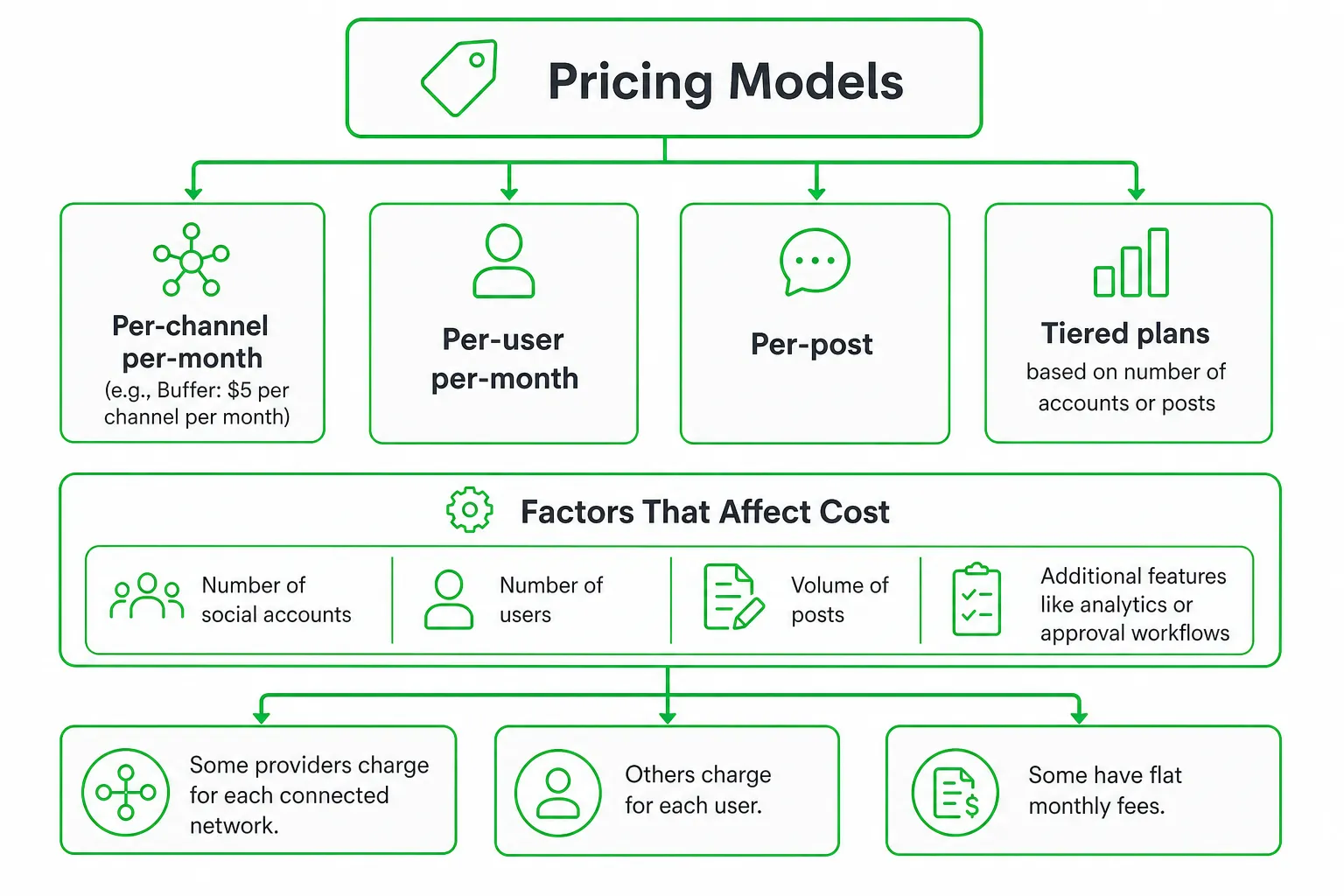
API pricing becomes easier to compare once you identify the billing unit. Providers may charge by:
- Active social profiles or connected accounts.
- API calls or published posts.
- Users, seats, or internal team members.
- Media storage or video processing.
- Premium support, environments, or usage limits.
Ayrshare provides a clear profile-based example. It charges by active social profile rather than API calls, posts, seats, or internal team members. Its listed plans start at $149 per month for one profile, $299 per month for up to 10 profiles, and $599 per month for 30 profiles. See Ayrshare pricing.
This model can be predictable when your publishing volume changes but your connected accounts stay stable. It can be expensive if you need many profiles for a small number of customers or campaigns, so map the pricing unit to your actual product model.
PostEverywhere advertises one API for publishing across its listed platforms, with plans starting at $9 per month. See the PostEverywhere SDK.
That lower entry point may suit a lightweight publishing experiment. Before using it in production, inspect authentication, support, rate limits, failure handling, documentation, and how the plan changes as your use grows.
Best Social Post API Options
| Option | Best fit | Check before choosing |
|---|---|---|
| Ayrshare | Teams needing broad network coverage, platform-specific customization, approval controls, and profile-based pricing. | Validate media support, permissions, and pricing for your intended channels. |
| Buffer | Products needing a documented GraphQL publishing and scheduling layer. | Its stated API limitations include full analytics and insights, plus comment reading and replying. See Buffer Developers and the Buffer Help Center. |
| PostEverywhere | Budget-conscious teams evaluating a lightweight multi-platform publishing layer. | Check production readiness, support, authentication, retries, and failure handling. See the PostEverywhere SDK. |
| OneUp Today | Founders and small teams that want publishing connected to AI content creation, Reddit lead generation, outreach, SEO, and human approval. | Choose it when you need a complete marketing workflow rather than developer infrastructure alone. |
How to Integrate a Social Post API
Define the workflow before writing the integration. Your API provider should fit the process, not dictate it.
- Map account onboarding. Decide how users connect accounts, reauthorize expired tokens, handle revoked access, and see missing permissions.
- Create a normalized post model. Store shared campaign content alongside optional per-network overrides for captions, media, links, tags, scheduling, threads, and first comments.
- Add approval before delivery. Keep drafts separate from approved posts. Record who approved the content and when.
- Queue publishing jobs. Avoid sending every network request directly from a user-facing page. Use queued jobs that can retry safely.
- Build idempotency. Prevent a timeout from creating duplicate posts. Store provider request identifiers and your own delivery key.
- Track status. Use webhooks when available, or poll carefully. Show pending, published, failed, rejected, and action-required states.
- Keep an audit trail. Log account, destination, content version, approval event, provider response, and final status.
Which Social Post API Should You Choose?
Choose a unified API when your product needs consistent publishing across multiple networks and you can accept the provider’s supported features, pricing model, and platform dependencies.
Choose direct network integrations when you need specialized analytics, engagement actions, data ownership, or capabilities the unified provider does not expose. Direct integrations take more engineering work, but they may give you better control over network-specific behavior.
Choose a managed marketing platform instead of an API when your real requirement is approved content creation, lead discovery, outreach, scheduling, SEO, and reporting. Building an API-driven publishing workflow does not solve the strategy and execution work around it.
For example, at OneUp Today, the publisher’s own data across 2,269 real Reddit cold DM conversations found that 29.7% received at least one human reply. See OneUp Today’s Reddit DM benchmarks. That illustrates the difference between distributing content and finding the right conversation before you publish or reach out.
Start with a proof of concept. Connect your priority accounts, test real content and media, run an approval cycle, simulate failures, and verify the resulting analytics. Then compare the total engineering and operating cost against a managed workflow.
Start With the Right Social Publishing Workflow
For developers, shortlist providers against a written matrix. Include network permissions, content overrides, approval states, API architecture, analytics, engagement, rate limits, support, documentation, and pricing units.
For SaaS founders and indie hackers, focus on the outcome. A social post API can automate distribution, but it does not remove the need for platform-specific content, permission management, review controls, monitoring, and follow-up.
Use an API when you want to build that infrastructure. Use a managed marketing platform when you want coordinated execution without assembling the entire system internally.
Next step: Test your priority publishing workflow with real accounts and an approval cycle. If your larger goal is AI marketing automation across publishing, Reddit lead generation, outreach, and SEO, evaluate OneUp Today alongside the API options.
Frequently asked questions
How much does a social post API cost per month?
Pricing varies widely, typically ranging from $50 to $500+ per month depending on features and volume. Ayrshare charges per post, Buffer has tiered plans, and PostEverywhere uses a flat monthly fee, so compare pricing units like per-post or per-account costs.
Can a social post API handle video uploads to TikTok?
Yes, but only if the provider supports TikTok's native video API and media rules. Not all APIs handle video processing or failed uploads well, so verify support for video formats, aspect ratios, and retry logic before choosing.
Does a social post API include analytics for post performance?
Not always, many APIs focus on publishing and offer limited or no analytics access. Check if the provider exposes engagement data like likes, shares, comments, or impressions through separate endpoints, as some require a premium plan.
What is the difference between a social post API and a social media management dashboard?
A social post API is programmable infrastructure for building your own publishing workflow, while a dashboard is a ready-made user interface. The API lets you automate, customize, and integrate with your app, whereas a dashboard is for manual use by teams.
Can I schedule posts for different time zones using a social post API?
Yes, most APIs support scheduling with timezone-aware timestamps. You can specify publish times in UTC or local time, and the API handles delivery timing, but confirm the provider's scheduling accuracy and retry behavior for failed posts.