
Open Source Social Media Tools for Small Teams
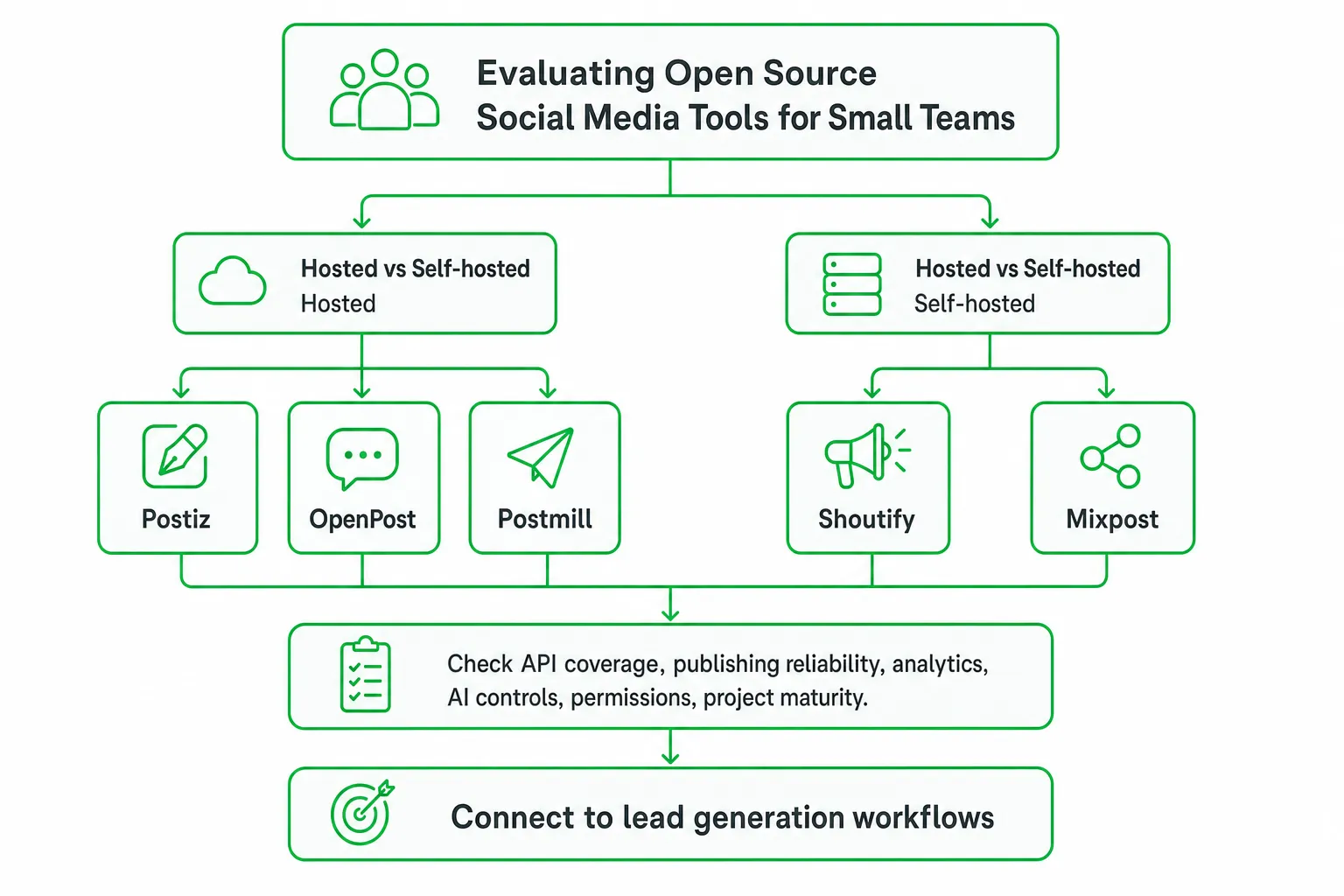
Open source social media tools can help your small team schedule content, manage multiple accounts, and keep more control over data than conventional cloud schedulers. The strongest options to investigate include Postiz, OpenPost, Postmill, Shoutify, and Mixpost.
Choose hosted open source software when you want speed and less maintenance. Choose self-hosting when customization, data control, and infrastructure ownership matter more. If your real goal is qualified pipeline, connect publishing with lead generation instead of treating social scheduling as the finish line.
Key takeaways
- Compare hosted and self-hosted tools by total cost, not subscription price alone.
- Evaluate API coverage, publishing reliability, analytics, AI controls, permissions, and project maturity.
- Use GitHub activity as a research signal, not proof that a project is production-ready.
- Pair social publishing with workflows that identify high-intent conversations and track leads.
The best open source social media tools for small teams
Open source social media tools give you more options than a standard content scheduler. You can publish across multiple networks, inspect the code, host the application yourself, and adapt the workflow to your team.
Start with this shortlist:
- Postiz: Broad platform coverage with a hosted and self-hosted path.
- OpenPost: A wide integration mix covering mainstream and decentralized networks.
- Postmill: An AI-focused option for teams testing content operations with their own provider keys.
- Shoutify and Mixpost: Projects worth reviewing when self-hosted publishing is the priority.
Do not choose based on a feature list alone. Check whether the tool supports your exact accounts, publishing formats, approval process, analytics requirements, and tolerance for maintenance.
Hosted open source software usually gives you a faster start. Self-hosting can give you more control over deployment, credentials, storage, and upgrades. The right choice depends on whether your team values convenience or operational ownership more.
What an open source social media manager should include
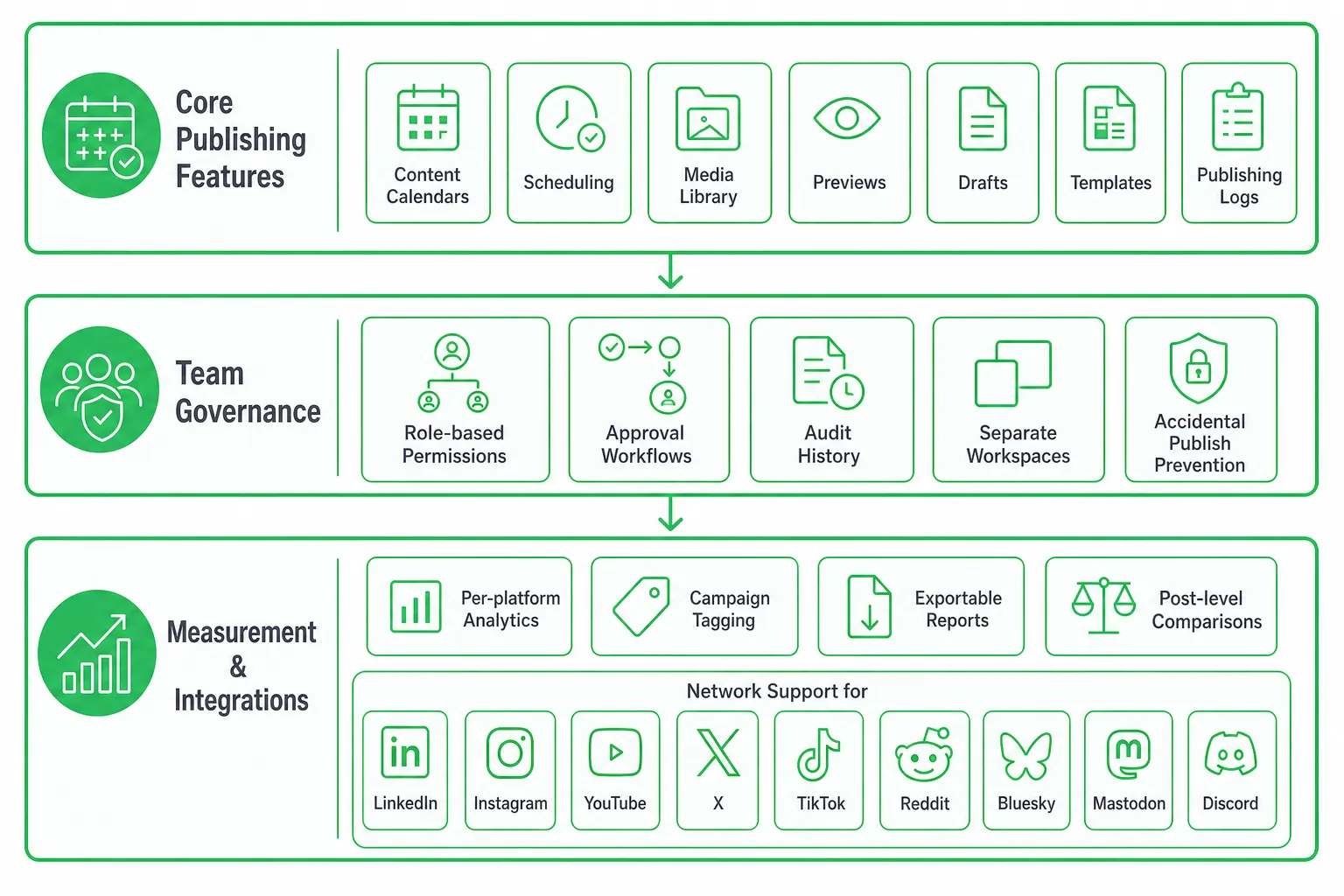
A useful open source social media manager needs more than a queue of scheduled posts. It should support the full publishing workflow, from draft to approval to reporting.
Core publishing features
- Content calendars and scheduling.
- Media libraries and reusable content.
- Platform-specific previews.
- Drafts, templates, and content variations.
- Publishing logs that show success, failure, and retry status.
Team governance
- Role-based permissions.
- Approval workflows before publishing.
- Audit history for edits and approvals.
- Separate workspaces for brands, clients, or products.
- A clear way to prevent accidental publishing.
Measurement and integrations
Look for per-platform analytics, campaign tagging, exportable reports, and post-level comparisons. You also need visibility into which content creates meaningful conversations, not just which post earns the most reactions.
Prioritize the networks your audience actually uses. That may include LinkedIn, Instagram, YouTube, X, or TikTok. It may also include Reddit, Bluesky, Mastodon, Discord, or another community where prospects ask questions before they buy.
Self-hosted versus hosted: compare the real cost
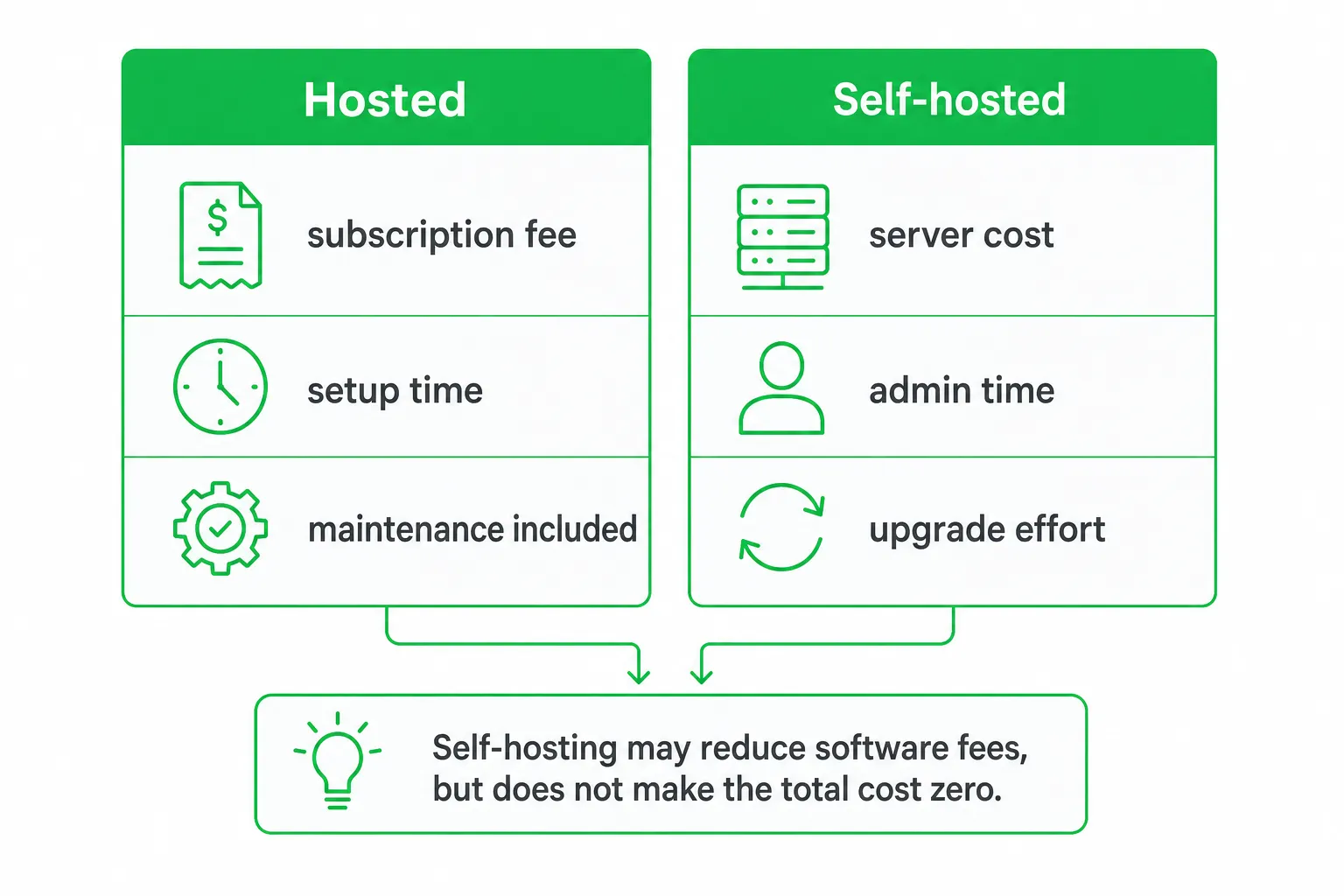
Self-hosting may reduce software fees, but it does not make the system free to operate. You still pay for infrastructure, setup, backups, monitoring, security reviews, troubleshooting, upgrades, and engineering time.
Hosted plans cost more directly, but they can reduce the work involved in updates, uptime, onboarding, support, and account access. That tradeoff often matters more to a small team than the license price.
| Consideration | Self-hosted | Hosted |
|---|---|---|
| Setup | Requires deployment and configuration | Usually faster to start |
| Data control | More control over storage and credentials | Depends on the provider's architecture and policies |
| Maintenance | Your team handles updates, backups, and failures | The provider handles most platform operations |
| Customization | More flexibility to modify the deployment | Limited to available settings and integrations |
| Best fit | Teams with technical capacity and specific control requirements | Teams prioritizing speed and predictable operations |
Use a total-cost worksheet. Include hosting, engineering time, security work, API changes, backup recovery, support, and the opportunity cost of maintaining the system.
For a familiar cloud benchmark, Buffer's Free plan supports 3 connected channels. Its Essentials plan starts at $6 per channel per month, and Team starts at $12 per channel per month for channels 1 through 10. Buffer also offers a 14-day free trial on paid plans, while its Free plan allows 10 scheduled posts per channel.
That comparison does not make a conventional cloud scheduler better or worse. It gives you a baseline for judging whether self-hosting actually saves money after your team's time is included.
Compare the leading open source options
Use the following tools as a research shortlist. Then test each one with your actual accounts and publishing workflow.
| Tool | Why consider it | Questions to verify |
|---|---|---|
| Postiz | Broad coverage with hosted and self-hosted options | Which platforms, analytics, permissions, and support options fit your workflow? |
| OpenPost | Mainstream and decentralized network coverage | Are your required post formats and account permissions supported? |
| Postmill | AI-native content operations and provider flexibility | How are keys, prompts, outputs, approvals, and usage costs managed? |
| Shoutify or Mixpost | Additional self-hosted publishing candidates | How active is the project, and how much setup does your team own? |
Postiz is a useful candidate when platform breadth and deployment choice matter. Buffer describes it as open source, with a free self-hosted option, a $29-per-month cloud plan, and support for more than 30 platforms.
OpenPost is worth evaluating if you need mainstream and decentralized networks in one workflow. Its repository lists 14 named integrations, including Instagram, Facebook, LinkedIn, X, TikTok, YouTube, Threads, Bluesky, Mastodon, Pinterest, Telegram, and Discord.
Postmill stands out if you are testing AI-assisted content operations. Its repository describes support for more than 45 channels, bring-your-own-key AI access across more than 30 providers, and 46 media tools.
These descriptions are starting points, not buying decisions. Verify current releases, supported APIs, documentation, issue response, permissions, analytics, and migration options before connecting important accounts.
The evaluation framework most lists leave out
Most tool lists stop at platform names. A commercial decision needs a broader framework that includes maintenance, governance, AI behavior, and the path from social activity to revenue.
Score each candidate across these areas:
- Coverage: Required networks, formats, media types, and account connections.
- Reliability: Publishing success, retries, logs, and handling of API changes.
- Deployment: Hosted availability, self-hosted documentation, backups, and recovery.
- Operations: Updates, monitoring, support, and technical ownership.
- Analytics: Post performance, campaign attribution, exports, and lead visibility.
- AI controls: Provider choice, key management, prompt controls, approvals, and retention.
- Governance: Roles, review steps, audit history, and workspace separation.
- Migration: Data export, account portability, and a credible exit plan.
Assess maturity through observable signals. Review recent commits, release cadence, open and closed issues, maintainer responsiveness, contributor diversity, deployment documentation, tests, backup guidance, and upgrade instructions.
Do not confuse GitHub popularity with production readiness. OpenPost showed 661 stars and 85 forks when accessed. That can inform your research, but it does not guarantee support, security, uptime, or long-term maintenance.
Ask governance questions before connecting accounts. Who can publish? Where are credentials stored? How are revoked permissions handled? Are AI prompts and outputs retained? Can an administrator export or delete workspace data?
Connect social publishing to lead generation
A scheduler distributes content. A growth system also finds people who are actively asking for a solution, scores the opportunity, drafts a relevant response, records context, and measures whether the conversation becomes pipeline.
This distinction matters on Reddit and other discussion-led channels. In OneUp Today's own data across 2,269 real Reddit cold DM conversations sent from March to September 2026, 29.7% received at least one human reply. That makes timing, relevance, and audience selection worth evaluating alongside publishing volume.
Build the workflow around audience signals:
- Monitor relevant discussions and communities.
- Identify people describing a problem your product can solve.
- Check community rules before replying or sending a message.
- Draft a useful response in your brand voice.
- Require human approval before every send.
- Track replies, qualified conversations, and movement toward a sale.
Use open source publishing for owned-channel distribution. Use OneUp Today when you need Reddit lead generation, AI outreach, multi-platform posting, SEO and blog automation, and approval-controlled messaging in the same growth workflow.
Avoid spammy automation. Contribute a genuinely useful answer first, personalize the outreach, respect platform rules, and keep a human responsible for every message.
How to choose and launch one safely
Start with a requirements brief. Write down your target networks, workspaces, content types, approval roles, analytics needs, deployment preference, AI policy, lead sources, and acceptable maintenance time.
Then run a small pilot with representative accounts. Connect the platforms, publish drafts, test failures and retries, review permissions, measure setup effort, and confirm that nontechnical teammates can use the workflow without developer help.
Create an operating checklist covering:
- Backups and restore testing.
- Application and dependency updates.
- API-token rotation.
- Moderation and approval ownership.
- Incident response.
- Data export and migration.
Start with hosted deployment when speed is the priority. Move to self-hosting after the workflow is proven, or choose self-hosting immediately when privacy, regulatory, or customization requirements justify the operational burden.
Final recommendation and next step
For most small teams, shortlist one hosted open source option and one self-hosted option. Compare both against the same requirements for publishing, governance, maintenance, analytics, AI control, and lead generation.
- Choose Postiz: When broad distribution and a hosted-versus-self-hosted path are central.
- Choose OpenPost: When its integration mix matches your audience.
- Choose Postmill: When controlled AI experimentation is the priority.
- Review Shoutify or Mixpost: When self-hosted publishing deserves a closer look.
If your business objective is qualified pipeline rather than publishing volume, connect social activity to active demand. The practical next step is to define one campaign, connect only the required accounts, approve every message during the pilot, and retain the tool that creates measurable conversations without becoming an unmanageable maintenance job.
Frequently asked questions
Can open source social media tools integrate with CRM systems?
Yes, some open source tools like Postiz and Mixpost offer API access that can be connected to CRMs. This enables automated lead capture from social interactions, but you may need custom development to sync data effectively.
How do I migrate from a paid social scheduler to an open source alternative?
Export your scheduled posts and analytics from the paid tool, then import them into the open source platform. Most open source tools support CSV or JSON imports, but verify format compatibility beforehand to avoid data loss.
What security risks come with self-hosting open source social media tools?
Self-hosting exposes you to risks like server misconfiguration, outdated dependencies, and credential leaks. Regular updates, strong authentication, and network isolation are essential to mitigate these threats.
Do open source social media tools support video publishing?
Yes, many open source tools like Postiz and OpenPost support video publishing on platforms like YouTube and Instagram. However, video format and size limits vary, so check platform-specific requirements before scheduling.