
How to Improve Google Ranking
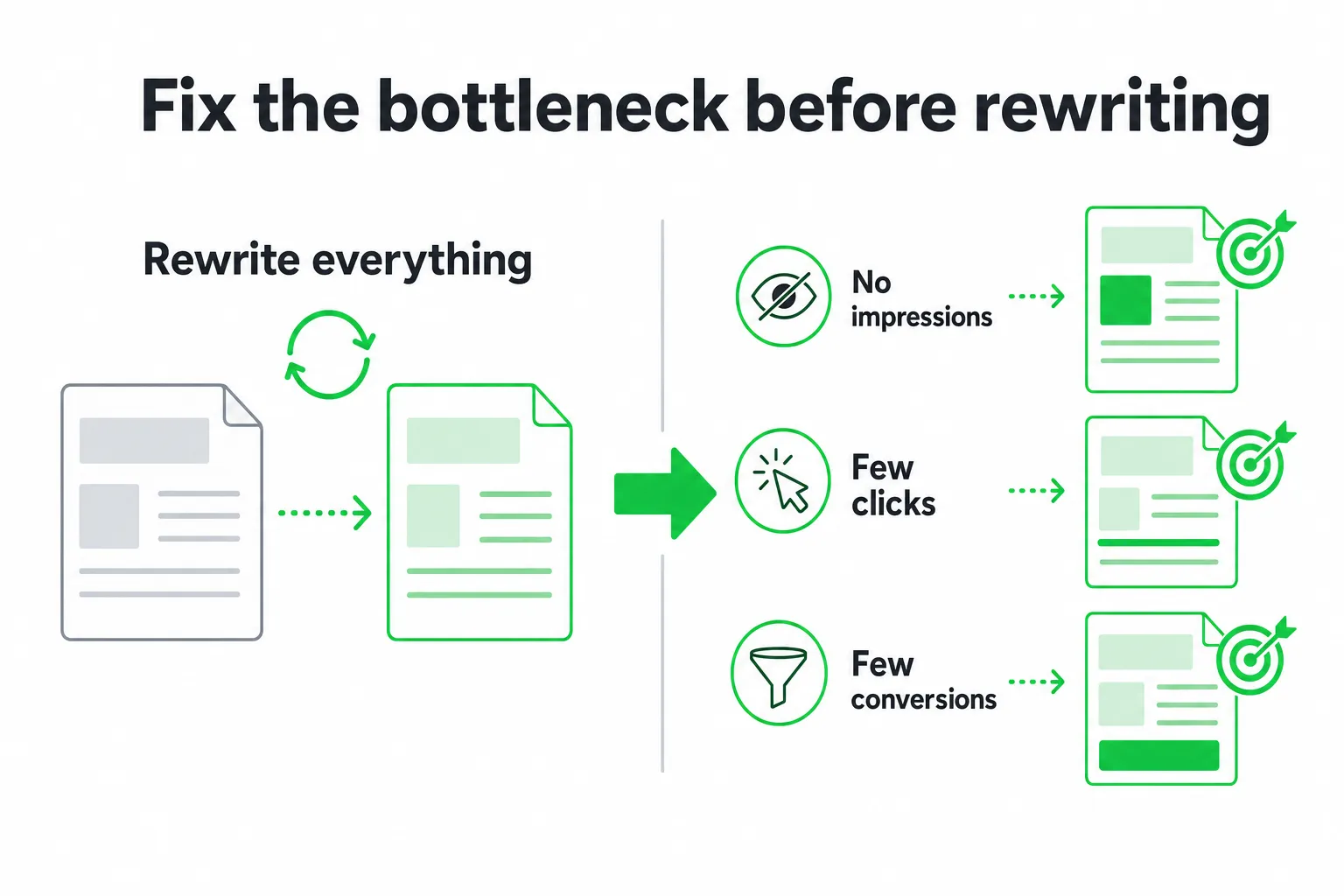
To improve Google ranking, choose a clear search query, create the most useful answer for that query, remove crawling and indexing barriers, strengthen internal links, and measure impressions, clicks, and conversions. Do not rely on publishing more pages alone. Google evaluates whether your content helps people and whether it can access, understand, and trust your site.
The fastest gains usually come from fixing the right problem first. A page with no impressions needs a different solution from a page that gets impressions but no clicks. Use the process below to find the bottleneck before you rewrite everything.
Key takeaways
- Diagnose crawling, indexing, relevance, and click-through problems separately.
- Match every page to one clear search intent and one primary purpose.
- Improve titles, headings, internal links, usability, and content depth together.
- Use structured data for eligibility, not as a shortcut to higher rankings.
- Measure search performance by impressions, clicks, qualified traffic, and conversions.
Start Here: The Fastest Way to Improve Google Ranking
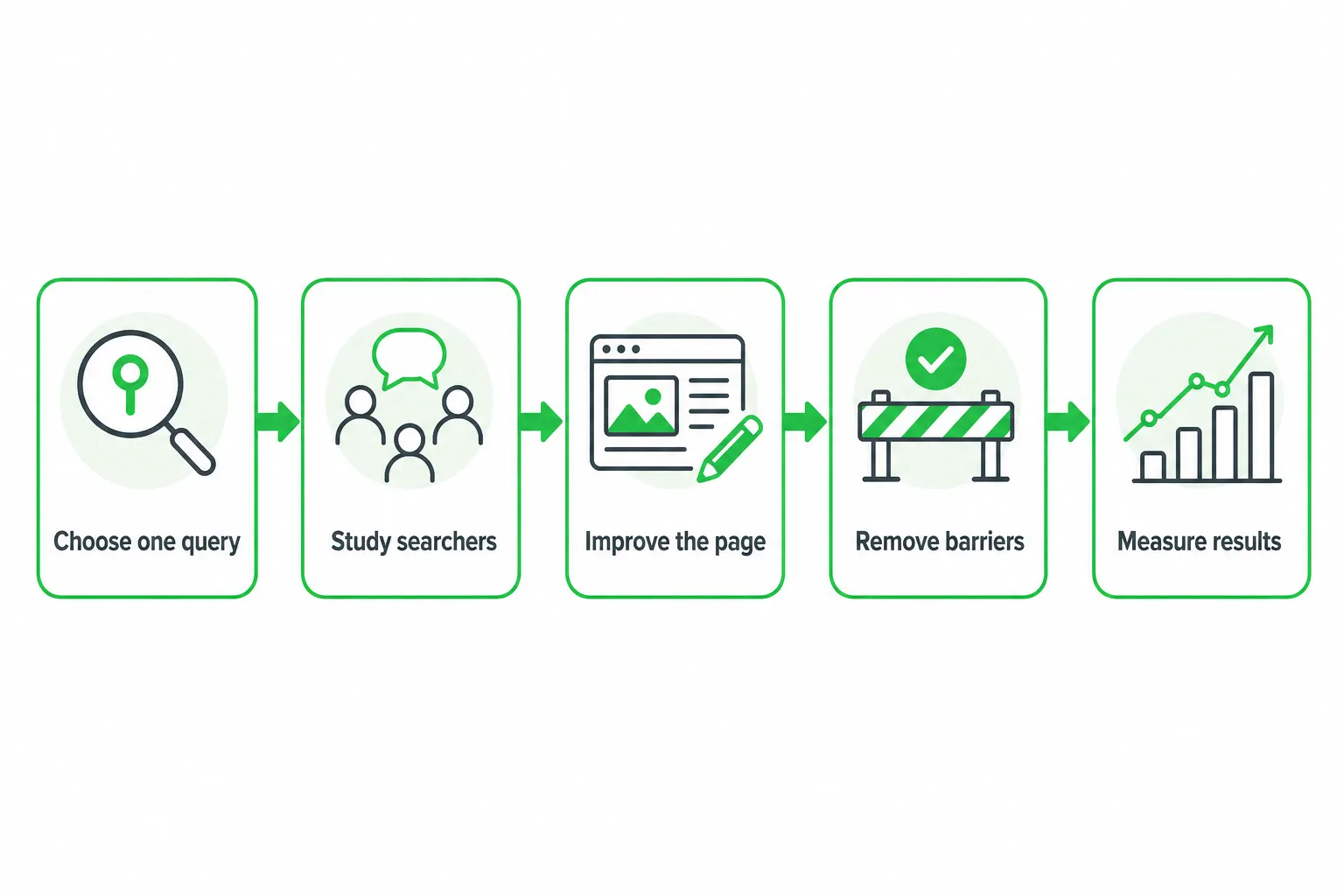
Start with one specific query. Study what searchers need, review the pages already appearing, and publish a more complete and useful answer. Then improve the page title, headings, internal links, technical experience, and conversion path.
Track impressions, clicks, indexed status, and conversions. Publishing another article will not solve a page that Google cannot index, a title that nobody wants to click, or an offer that does not match the visitor’s needs.
- Diagnose: Check indexing, impressions, clicks, and conversions.
- Improve relevance: Match the page to the searcher’s actual task.
- Remove barriers: Fix technical issues, poor navigation, and weak page experience.
- Build authority: Add useful internal links and earn relevant references.
- Measure: Document changes and compare performance after Google has had time to recrawl the page.
The Overlooked Difference Between Crawling, Indexing, and Ranking
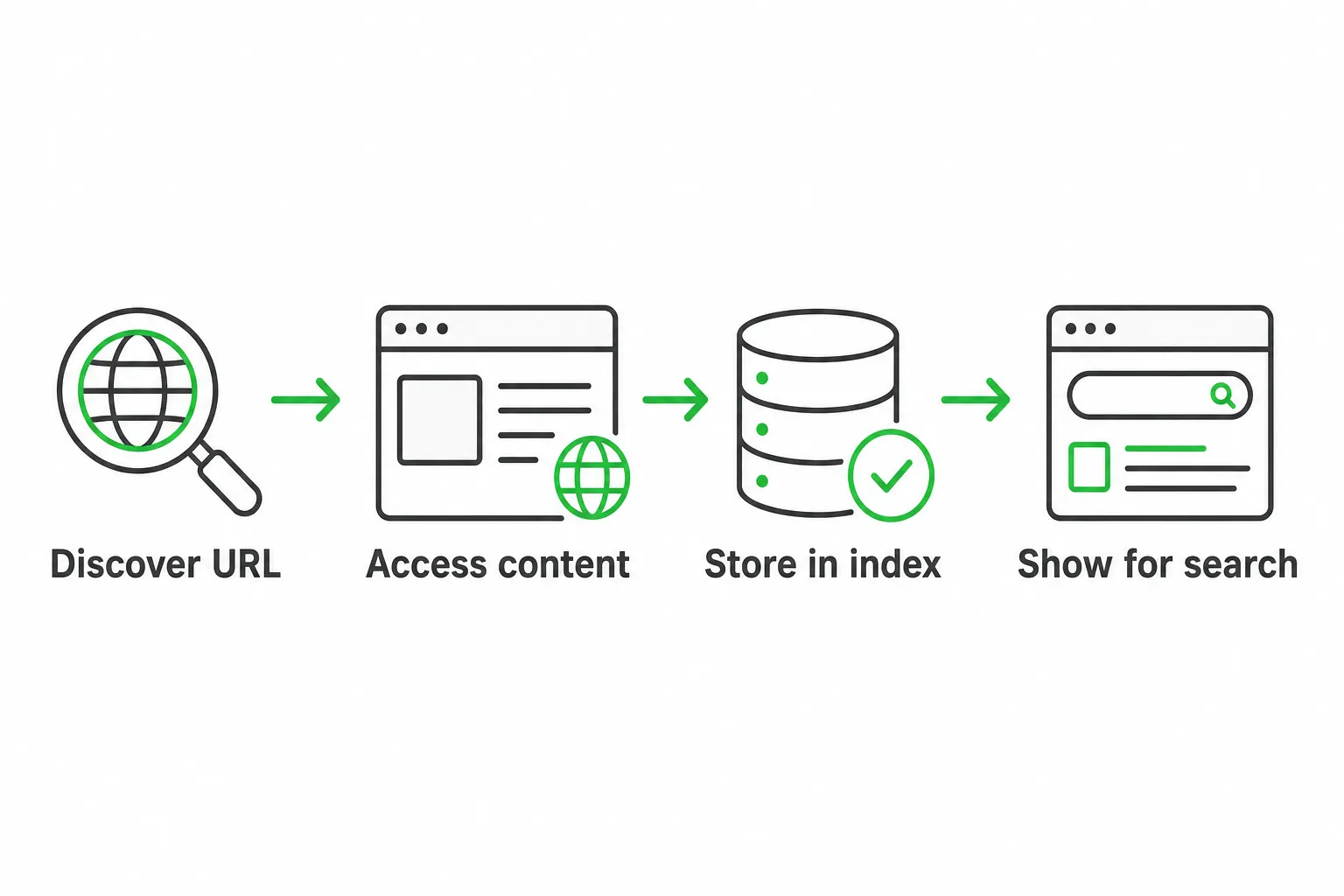
Crawling, indexing, and ranking are separate steps. Google must discover a URL, access its content, decide whether to store it in its index, and then determine when it should appear for a search. Following best practices does not guarantee that a page will be crawled, indexed, or shown in results, according to Google Search Central’s guide to how Google Search works.
| What you observe | Likely problem | What to check |
|---|---|---|
| No impressions | Discovery, indexing, relevance, or authority | URL inspection, robots rules, noindex directives, canonical settings, content quality, and internal links |
| Impressions but few clicks | Title, snippet, or intent mismatch | Search appearance, title wording, page promise, and whether the result answers the query |
| Clicks but few conversions | Landing page or offer problem | Message match, calls to action, trust signals, usability, and next steps |
Inspect important URLs in Search Console. Look for blocked crawling, noindex directives, redirect problems, canonical conflicts, server errors, and pages that Google has discovered but not indexed.
Create a clean XML sitemap to help Google discover important URLs, particularly on a new, large, or complex site. A sitemap is a discovery aid, not a guarantee that Google will crawl or index every submitted URL, as Google Search Central explains in its sitemap guidance.
When impressions remain steady but clicks fall, review the title and snippet before changing the entire article. Google recommends using impressions and clicks as primary measures of search success instead of focusing too heavily on average position, according to Google Search Central’s guide to debugging search traffic drops.
Use structured data when a page qualifies for a relevant search feature. It can make a page eligible for rich-result features, but it does not directly improve ordinary web-search ranking or guarantee that a rich result will appear, according to Google Search Central’s structured data guidelines.
Match Keywords to Search Intent and Page Purpose
Keyword research gives you language. Search intent tells you what the searcher expects to do with the answer.
Group target phrases by purpose:
- Learn: The searcher wants an explanation, definition, or guide.
- Compare: The searcher is evaluating tools, approaches, or providers.
- Solve: The searcher needs instructions for a specific problem.
- Choose: The searcher is close to selecting a product or service.
Give each page one primary purpose. Do not force a product pitch into an educational guide or combine unrelated topics simply because their keywords look similar.
Study the current results before you write. Notice whether Google favors guides, comparison pages, templates, product pages, local listings, or troubleshooting content. The dominant format provides a useful signal about the task searchers want completed.
Place the primary topic naturally in the title, introduction, relevant headings, URL, image context, and supporting copy. Then cover the related questions a reader will have, including definitions, examples, limitations, and next steps.
Improve On-Page Experience and Technical SEO
Write a distinct title and meta description that accurately explain the page’s value. Make the opening section deliver on that promise immediately.
Google may form a result’s title link from the HTML title element, visible page title, headings, anchor text, links pointing to the page, and other prominent text. Changes can take time to be recrawled and reprocessed, as described in Google Search Central’s title link guidance.
Organize the page so a visitor can find the answer quickly:
- Use descriptive headings that explain the section’s question.
- Keep paragraphs short and place key definitions near the top.
- Add useful visuals, with descriptive alt text that explains the image’s purpose.
- Make navigation predictable and links descriptive.
- Put the main answer above distracting elements and intrusive pop-ups.
Improve mobile usability, page performance, accessibility, HTTPS, and layout stability. These changes support both search engines and people, especially when visitors arrive on a small screen or with assistive technology.
Use canonical URLs for duplicate or near-duplicate versions. Apply logical redirects, keep important templates indexable, and connect related pages through consistent internal navigation.
Build Authority With Internal Links and Earned References
Internal links help visitors discover related answers and help search engines understand how your pages fit together. Link from established, relevant pages to newer or strategically important pages. Remove orphan pages that have no useful path from the rest of your site.
Google uses links to understand page relevance and discover new pages. It also recommends that every important page be linked from at least one other page on your site, as explained in Google Search Central’s link best practices.
Build assets that people would reasonably reference:
- Original research or clearly documented first-party findings.
- Practical templates, checklists, calculators, or tools.
- Detailed product comparisons with transparent evaluation criteria.
- Expert explanations that make a difficult topic easier to apply.
Earn relevant mentions through partnerships, digital PR, expert contributions, and genuinely helpful community participation. Avoid buying manipulative links or exchanging links at scale.
Audit broken internal links, irrelevant redirects, and low-value backlinks. Improve pages that already attract impressions before spending effort on a broad link campaign.
Publish Better Content Without Creating Scaled Content Abuse
Helpful content demonstrates first-hand knowledge, clear authorship, accurate claims, useful examples, and a meaningful benefit to the reader. Google identifies helpful, reliable, people-first content as its most impactful SEO practice and says there are no secret changes that automatically make a site rank first, according to its SEO Starter Guide.
Refresh pages when facts, screenshots, products, regulations, or search intent change. Combine overlapping pages when they compete for the same query, then redirect or update the weaker version where appropriate.
Use AI for research support, outlining, editing, diagrams, and workflow automation. Add human judgment, original insight, verification, and a clear editorial standard before publishing.
OneUp Today’s own DM generator blocks 23 corporate buzzwords with a hard validator because prompting a model to avoid them was not enough, according to OneUp Today’s published product data. The broader lesson applies to SEO content too: define quality rules in the workflow, then validate the output instead of trusting instructions alone.
Do not generate large volumes of near-duplicate pages primarily to manipulate rankings. Google classifies content produced at scale for that purpose as scaled content abuse, which can reduce visibility or remove pages from some Search features, as stated in Google Search Central’s spam policies.
Measure Progress and Turn Improvements Into a Repeatable System
Establish a baseline in Search Console and analytics. Record impressions, clicks, click-through rate, indexed pages, conversions, and the queries bringing qualified visitors.
Diagnose the pattern before changing the page:
- Low impressions: Investigate indexing, relevance, internal links, competition, and authority.
- Impressions without clicks: Review the title, snippet, search intent, and result appeal.
- Clicks without conversions: Improve the landing page, offer, message match, and calls to action.
Make one meaningful change at a time where practical. Document what changed, the reason for the change, and the metrics you expect to move. Give Google time to recrawl and reassess the page before judging the outcome.
For a repeatable workflow, OneUp Today can support SEO article planning, on-brand publishing, and Google and Bing rank tracking. Its blog autopilot can maintain a regular editorial schedule, but your review and quality control should remain part of the process.
Takeaway: Improving Google ranking is not one trick. Diagnose the stage that is failing, make the page more useful for its search intent, remove technical barriers, and measure the result.
Next step: Open Search Console, choose one important URL, and check whether its main problem is discovery, indexing, impressions, clicks, or conversions. Fix that problem first.
Frequently asked questions
How long does it take to improve Google rankings?
There is no fixed timeline; ranking changes can take days to months. Google needs to recrawl and reassess updated pages, and results also depend on competition, site authority, and the quality of the changes. Track impressions and clicks over time rather than expecting an immediate position increase.
Do backlinks help improve Google rankings?
Yes, relevant backlinks can help Google understand that other sites value your content. Focus on earning genuine references by publishing useful material and building relationships; buying links or pursuing irrelevant links can create risks and is not a reliable shortcut to better rankings.
Does publishing more content improve Google rankings?
No, publishing more pages alone does not guarantee better rankings. Each page should serve a distinct search need and provide useful information; adding repetitive or thin pages can waste effort. Improve existing pages when they already attract relevant impressions or meet a clear user need.
Can I improve Google rankings without hiring an SEO expert?
Yes, many basic improvements can be handled without an SEO expert. Use Search Console to check indexing and performance, make pages useful for a clear query, improve internal links, and review results after changes. Consider professional help if technical issues are complex or progress remains unclear.