
Cross Platform Posting Free: Best Options
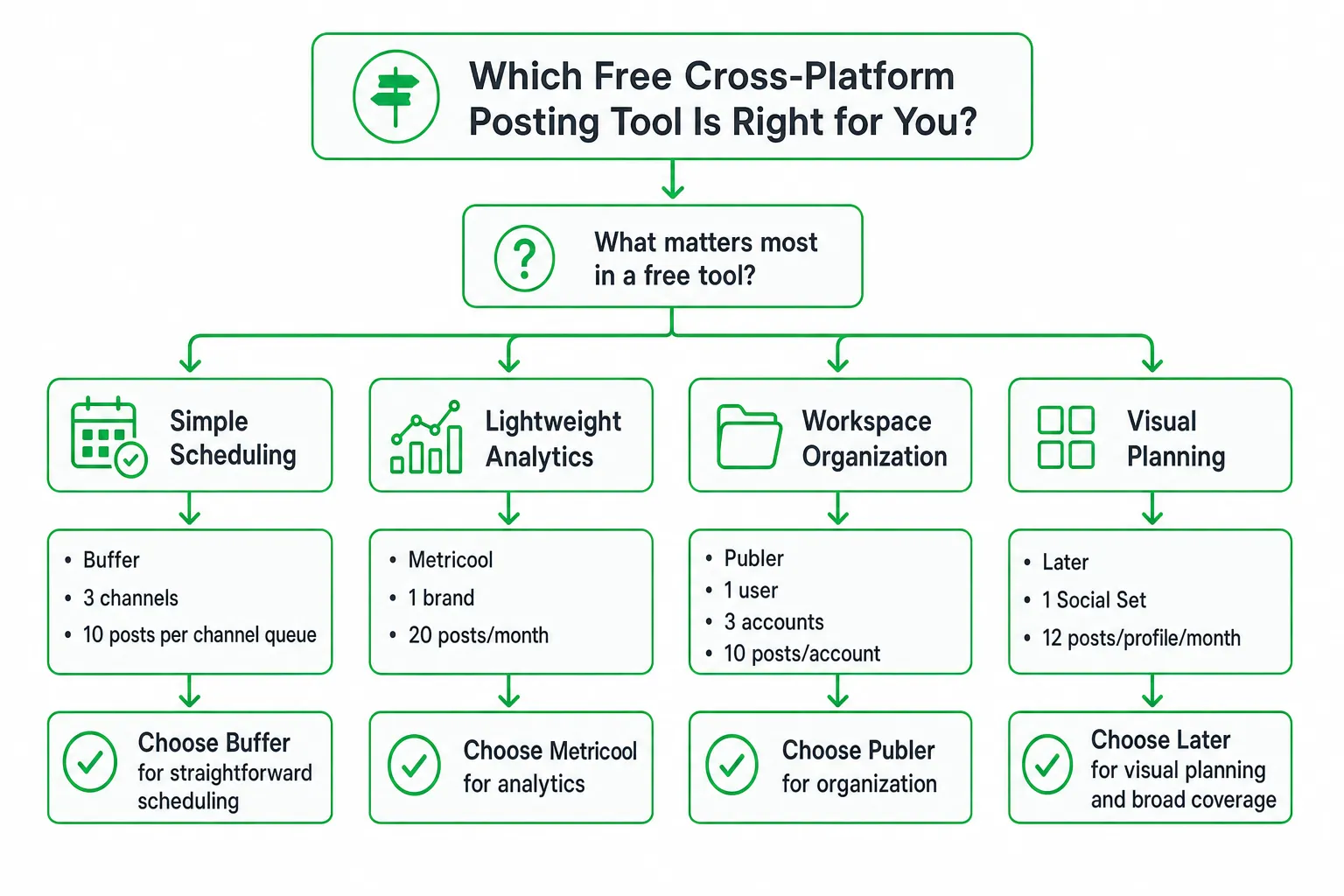
For free cross-platform posting, Buffer is a strong all-purpose starting point if you want simple scheduling and a queue that refills as posts publish. Metricool, Publer, and Later may suit you better if you prioritize analytics, workspace organization, or broad profile coverage.
The catch? A free social media scheduler may automatically publish, send a reminder, limit you by month, or limit how many posts sit in your queue. Those differences shape your daily workflow more than the headline “free” label.
Key takeaways
- Choose Buffer for a straightforward scheduling workflow and a queue-based limit.
- Choose Metricool for lightweight analytics, Publer for account organization, and Later for visual planning and broad profile coverage.
- Check automatic publishing, account eligibility, monthly quotas, queue capacity, and platform-specific editing before committing.
- Adapt each post for its destination instead of publishing the same caption everywhere.
What is the best free cross-platform posting option?
Buffer is the best general starting point for many people searching for cross platform posting free. It supports a practical scheduling workflow, connects several major account types, and uses a queue model that can work well for consistent publishing.
Still, the right choice depends on what you need to manage:
- Buffer: Choose it for simple scheduling, queue management, and broad everyday use.
- Metricool: Choose it when lightweight analytics matter more than wide platform coverage.
- Publer: Choose it when you want a free-forever plan with clear workspace and account organization.
- Later: Choose it when visual planning and profile coverage across several networks matter most.
Native platform cross-posting can also be free. However, it usually gives you less central scheduling, repurposing, approval control, and reporting than a dedicated social media management tool.
Use a free plan to test your workflow. Expect trade-offs if you publish frequently, manage several brands, need team approvals, or want detailed platform-by-platform customization.
Best free cross-posting tools compared
| Tool | Best fit | Free-plan detail | Watch for |
|---|---|---|---|
| Buffer | Simple scheduling | Up to 3 channels and 10 scheduled posts per channel at a time | Some account types use notification publishing |
| Metricool | Lightweight analytics | 1 brand, 20 scheduled posts per month, 30 days of analytics | LinkedIn and X/Twitter are excluded |
| Publer | Workspace organization | 1 user, 1 workspace, 3 social accounts, and 10 scheduled posts per account | X/Twitter is excluded |
| Later | Visual planning and broad profile coverage | 1 Social Set with up to 1 profile on supported platforms and 12 posts per profile per month | Drafts count toward the monthly allowance |
Buffer: Simple queue-based scheduling
Buffer gives you a clean starting point for scheduling across social channels. Its free plan connects up to 3 channels and allows 10 scheduled posts per channel at a time, according to Buffer Pricing.
That “at a time” wording matters. Buffer does not impose a monthly posting cap in the same way a monthly quota does. As scheduled posts publish, space becomes available in the queue.
Buffer supports automatic publishing for several major account types. Instagram personal accounts use notification publishing instead, according to the Buffer Help Center. You may prepare the post in advance, but still need to complete the final publishing step yourself.
Metricool: Lightweight analytics with a monthly quota
Metricool’s free plan supports 1 brand and schedules up to 20 posts per month. It excludes LinkedIn and X/Twitter, while its analytics window covers 30 days, according to Metricool Pricing.
That makes Metricool a sensible fit for a creator or small team that wants basic reporting and occasional campaigns. It is less suitable when LinkedIn or X/Twitter forms a central part of your publishing plan.
Publer: Free-forever account organization
Publer’s free plan is free forever. It includes 1 user, 1 workspace, 3 social accounts, and 10 scheduled posts per account. X/Twitter is excluded from the free version, according to Publer Plans.
Pick Publer when organizing accounts and workspaces matters more than connecting every network. Before you build a publishing routine around it, confirm that your required channels are supported on the free plan.
Later: Visual planning and profile coverage
Later’s free plan includes 1 Social Set. Later defines a Social Set as 1 profile from each supported platform, covering up to 1 profile on Instagram, Facebook, Threads, Pinterest, TikTok, LinkedIn, YouTube, and Snapchat, according to the Later Help Center.
The free plan allows 12 posts per social profile per month, and drafts count toward that allowance, according to the Later Help Center.
Later fits visual content teams that plan feeds, short-form video, and profile layouts. Its broad profile coverage does not remove the need to check media formats, publishing modes, and the effect of drafts on your quota.
Free-plan limits that actually matter
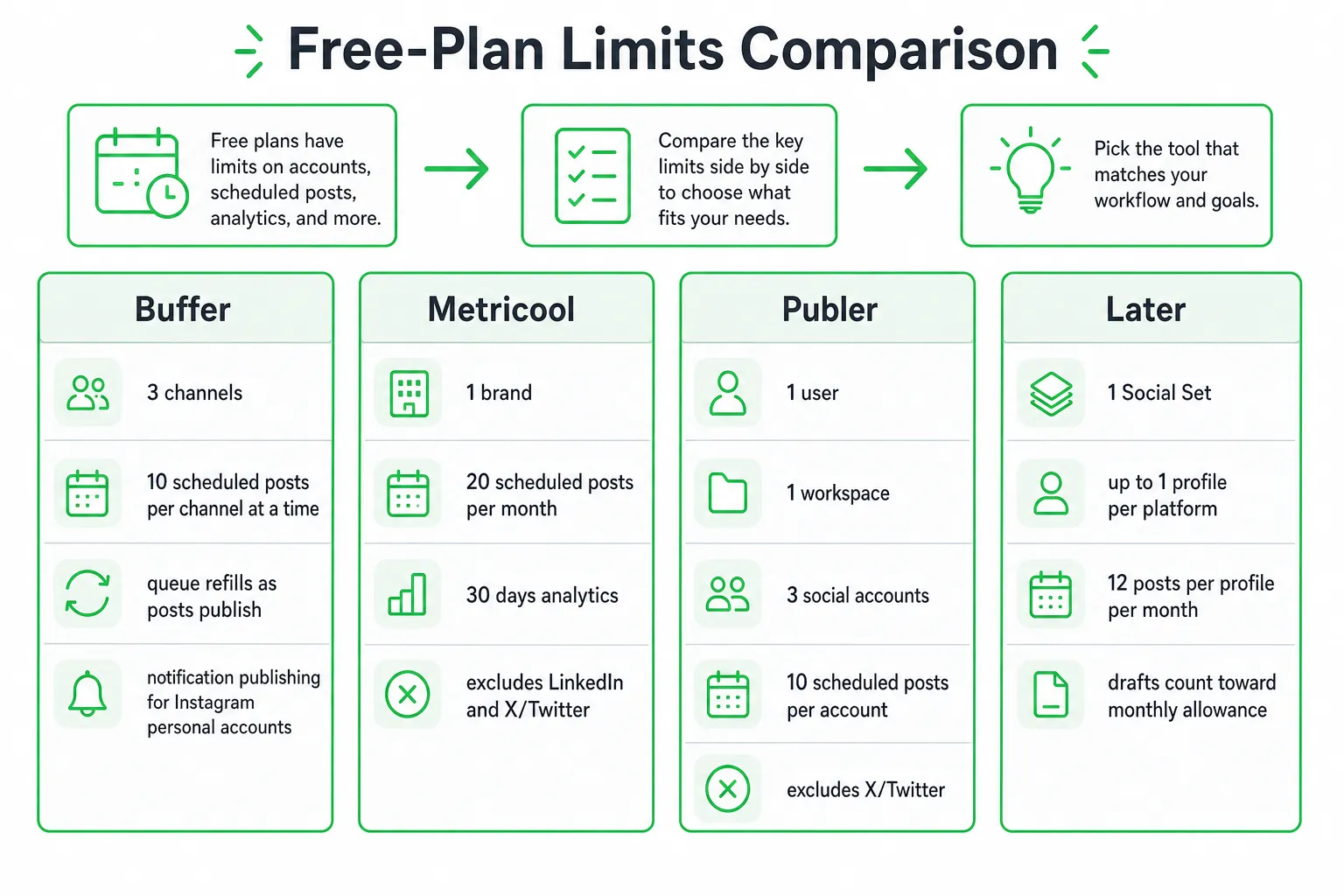
Free social media tools use different kinds of limits. Compare the mechanism, not only the number displayed on the pricing page.
- Queue capacity: Limits how many future posts can sit in the scheduler at once.
- Monthly allowance: Limits how many posts you can schedule during the billing period.
- Account limit: Restricts channels, brands, profiles, users, or workspaces.
- Feature limit: Removes analytics, approvals, platform support, or automatic publishing.
Buffer’s free plan illustrates the queue model. You can schedule up to 10 posts per channel at a time, and the capacity refills as posts publish, rather than imposing a monthly posting cap. Check the details in Buffer Pricing.
Metricool uses a monthly model. Its free plan schedules up to 20 posts per month for 1 brand, excludes LinkedIn and X/Twitter, and includes 30 days of analytics. See Metricool Pricing.
Publer’s allowance is measured per account. Its free plan includes 10 scheduled posts per account and excludes X/Twitter. See Publer Plans.
Later adds another detail: drafts count toward its 12 posts per social profile per month. A visual planning workflow can therefore use your allowance before anything goes live. Confirm how drafts, failed posts, duplicates, and rescheduled content are treated before you plan a campaign.
The operational differences free comparisons miss
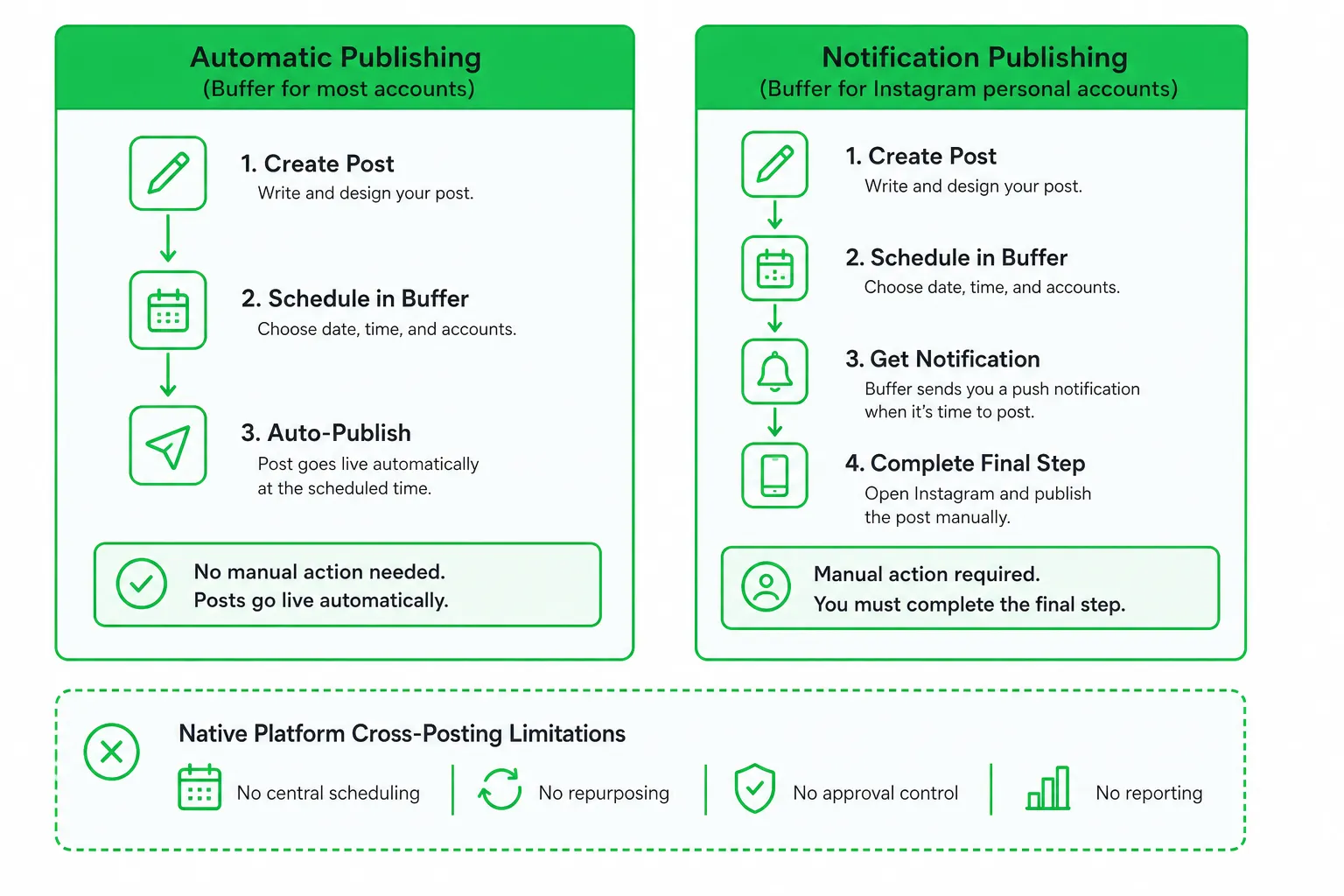
Free-plan roundups often compare quotas and platform lists. That helps, but it does not answer the question that affects your workday: will the tool publish the post, or will it remind you to publish it?
Automatic publishing versus reminders
Automatic publishing sends an eligible post to the platform without another manual publishing action. Notification publishing prepares the content, then asks you to finish the process from a notification or mobile workflow.
Buffer supports automatic publishing for several major account types, while Instagram personal accounts use notification publishing. Check the account-specific rules in the Buffer Help Center.
Account type changes eligibility
A platform may support a network but not every kind of account on that network. Personal, creator, business, and professional profiles can have different permissions and publishing methods.
Connect the exact account you intend to use. Do not assume that a tool’s platform logo guarantees automatic publishing for your profile.
One caption rarely fits every platform
Cross-posting works best when you reuse the idea, not every detail. You should be able to adjust:
- Hook and caption length.
- Hashtags, mentions, and tags.
- Links and calls to action.
- Image crops and video formats.
- Line breaks and formatting.
- Publishing time and approval status.
Run this practical test before choosing a tool:
- Connect the specific accounts you plan to use.
- Create a platform-specific variation from one core post.
- Schedule it and check whether the tool publishes automatically or sends a reminder.
- Review the preview on every destination.
- Delete or reschedule the test and confirm what counts against the free allowance.
How to choose the right free tool
Start with the platforms that matter to your audience. Then check account eligibility, media formats, publishing mode, and editing controls.
- Choose Buffer for a straightforward queue-based scheduling workflow.
- Choose Metricool for lightweight analytics and occasional publishing, if its platform exclusions do not affect you.
- Choose Publer for clear account and workspace organization.
- Choose Later for visual planning and broad profile coverage across supported networks.
Choose a queue-based plan when maintaining a steady cadence matters more than a fixed monthly quota. Choose a monthly plan when you publish occasional campaigns and want a clearly defined allowance.
Also check whether the free tier includes approvals, collaboration, saved templates, platform previews, and useful analytics. A free scheduler that forces manual editing for every channel may cost more time than a paid or automated alternative.
How to cross-post for free without looking repetitive
Build one core idea first. Then adapt it for each platform before scheduling.
- Rewrite the hook for the audience and format.
- Change the length and call to action.
- Adjust hashtags, tags, and link treatment.
- Crop or replace media when the original format does not fit.
- Schedule adapted versions separately rather than duplicating one caption.
- Review every preview for broken formatting and missing features.
Track replies, saves, clicks, and qualified conversations. Identical reach figures do not tell you whether a post produced useful engagement or a sales opportunity.
When an AI publishing workflow is worth considering
A basic scheduler solves the calendar problem. It does not always solve the content adaptation problem.
OneUp Today’s multi-platform publishing workflow turns one draft into platform-specific posts, applies templates based on your writing style, schedules the content, and tracks post performance. Its SEO autopilot can also connect social publishing with ongoing blog production and search visibility.
Consider that workflow when your bottleneck is creating and adapting content rather than placing posts on a calendar. Keep human approval in the process, especially when posts involve customers, claims, regulated topics, or sensitive links.
At OneUp Today, scheduling is listed as free, with costs of $0.02 per post, $0.10 per image, $0.50 per video, and $0.02 per X post. Review the current details at OneUp Today before planning a batch.
Start with a small content batch. Compare the time you spend adapting posts, checking previews, and publishing reminders. Then choose the free scheduler or automated workflow that fits how you actually work.
Final takeaway
Buffer is the strongest general starting point for free cross-platform posting, but Metricool, Publer, and Later each solve a different planning problem. Your next step is simple: connect your real accounts, test one adapted post on every target platform, and verify the publishing mode and allowance before building your calendar.
Frequently asked questions
Can I schedule Instagram posts automatically with a free cross-platform tool?
No, not fully. Free tools like Buffer schedule posts for Instagram personal accounts but require manual notification publishing, meaning you must confirm the post in the Instagram app. Business accounts may allow automatic publishing, but check your tool's specific support.
How many posts can I schedule per month on a free plan?
It varies by tool. Buffer limits your queue to 10 scheduled posts per channel at a time, with no monthly cap. Metricool allows 20 posts per month, while Later caps at 12 posts per profile per month. Always check the specific tool's quota.
Does any free cross-platform posting tool support LinkedIn?
Yes, some do. Buffer and Later support LinkedIn on their free plans, but Metricool excludes it. Publer also supports LinkedIn, but check each tool's account eligibility, as free plans may limit the number of LinkedIn profiles you can connect.
Is there a free tool that lets me schedule posts for X/Twitter?
Yes, Buffer supports X/Twitter on its free plan. However, Metricool and Publer exclude X/Twitter from their free tiers. Later also supports X/Twitter, but with a low monthly post limit. Always verify platform availability before committing.
Can I use a free cross-platform tool for team collaboration?
No, free plans typically limit you to one user. Publer offers one workspace with one user, while Buffer and Later also restrict team access. For team approvals or multiple users, you would need to upgrade to a paid plan.