
How to Choose an Auto Social Bookmarking Tool
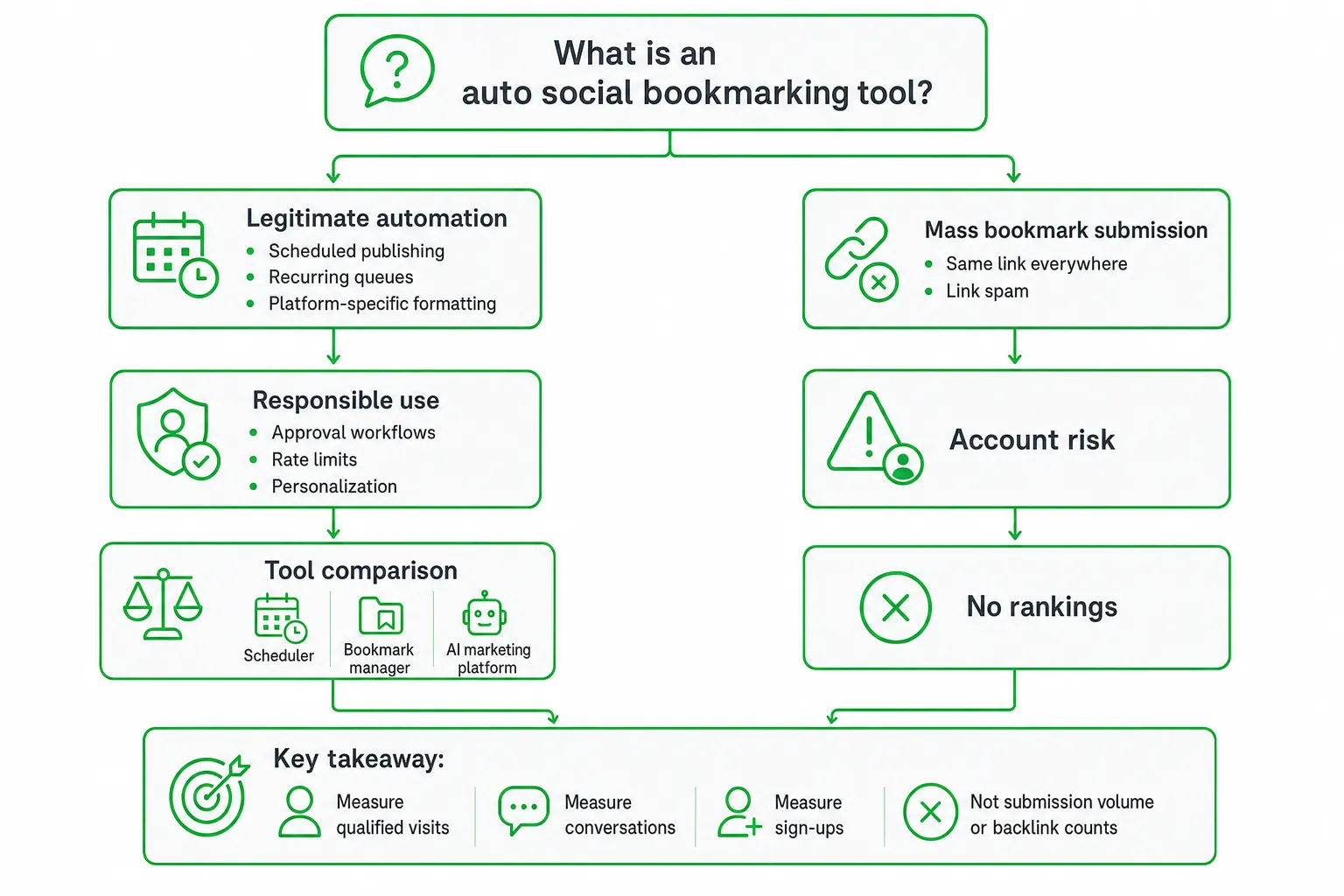
An auto social bookmarking tool helps you save, organize, schedule, and distribute links across bookmarking sites and social platforms without repeating the same manual workflow. The right tool improves content distribution and audience discovery. It does not manufacture backlinks or guarantee Google rankings.
Choose based on control, platform fit, personalization, and account safety. A useful tool helps you publish better content to the right audience. A risky one simply submits the same URL everywhere.
Key takeaways
- Separate legitimate scheduling from mass bookmark submission designed only to create links.
- Look for approval workflows, editable drafts, rate limits, personalization, duplicate detection, and pause controls.
- Measure qualified visits, conversations, and sign-ups instead of submission volume or backlink counts.
- Choose a scheduler, bookmark manager, or broader AI marketing platform based on the workflow you actually need.
What Is an Auto Social Bookmarking Tool?
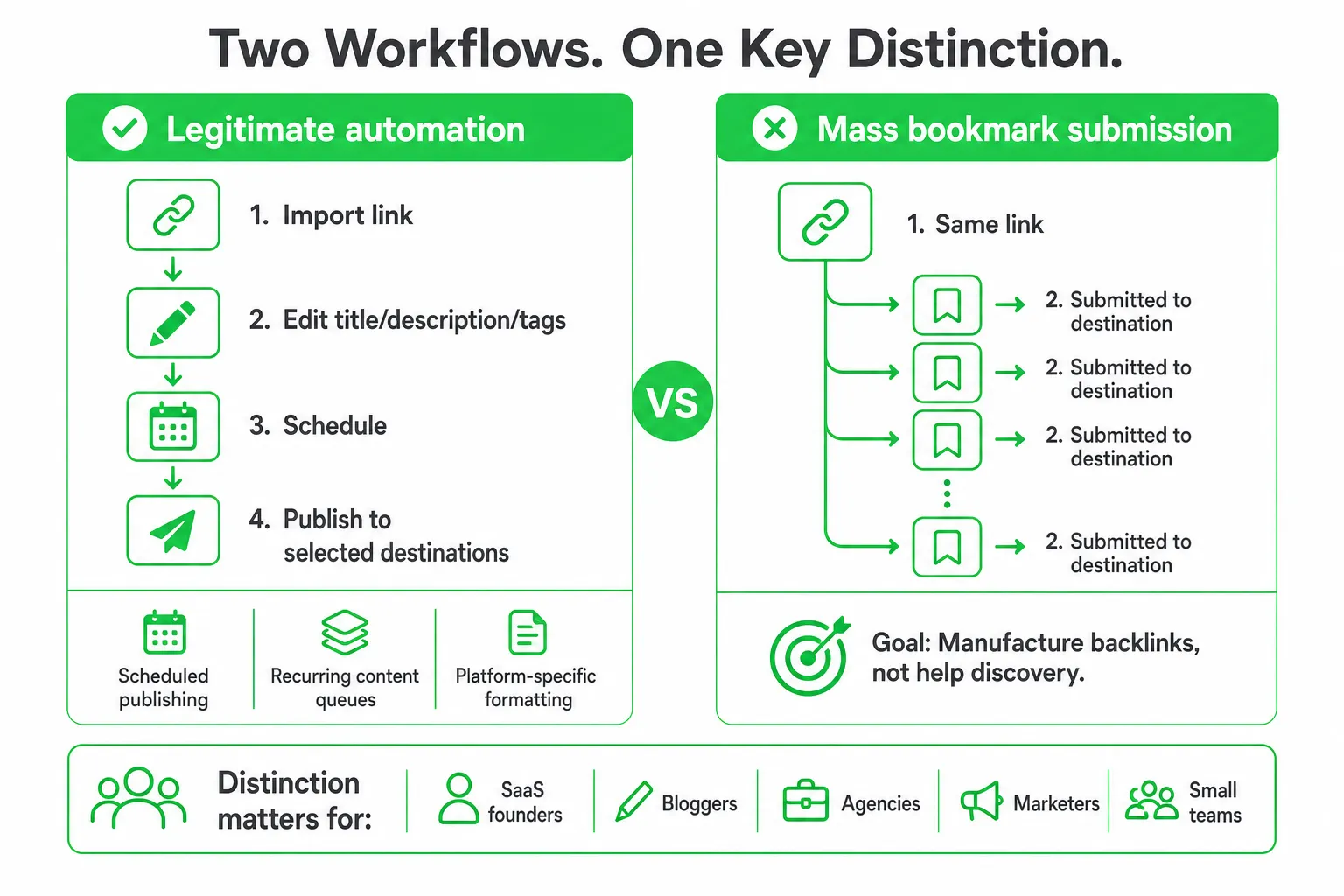
An auto social bookmarking tool automates the process of importing links, editing descriptions, adding tags, scheduling posts, and distributing content to selected destinations. Instead of opening every platform manually, you create or queue content in one workspace.
Legitimate automation looks like scheduled publishing, recurring content queues, and platform-specific formatting. You still decide what to share, where it belongs, and when it should appear.
Mass bookmark submission is different. It repeats the same link across many destinations with little regard for relevance or community context. The goal is often to manufacture backlinks rather than help people discover useful content.
That distinction matters for SaaS founders, bloggers, agencies, marketers, and small teams. You may want to:
- Distribute a new product guide across several social networks.
- Save research links for a content or sales workflow.
- Repackage one article into platform-native posts.
- Send useful resources to a community that already discusses the problem.
- Keep a small marketing team consistent without adding repetitive administrative work.
The best tool supports discovery, referral traffic, content distribution, and workflow efficiency. It should not promise rankings from bookmarks alone.
What Social Bookmarking Tools Can Automate
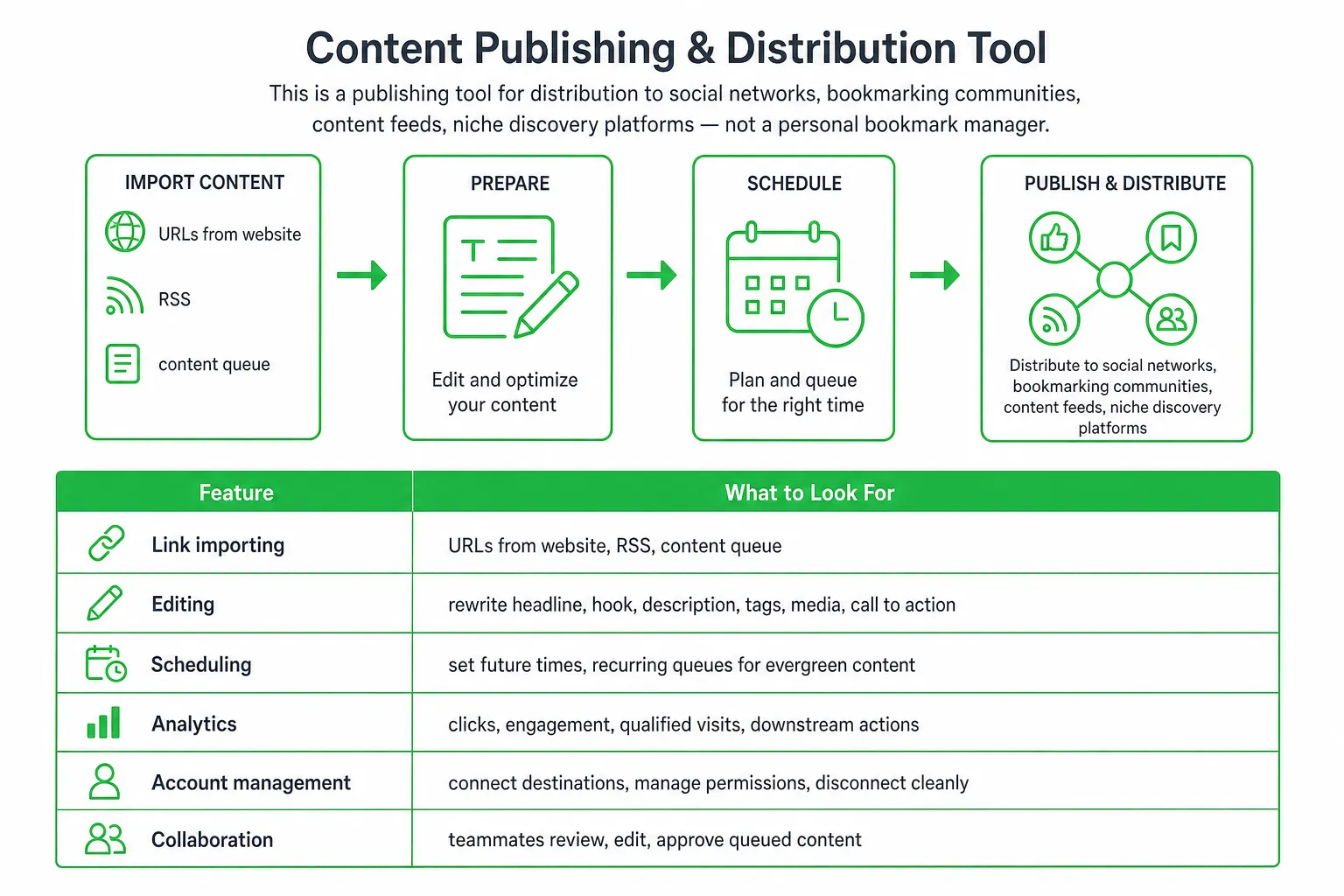
Start with the basic workflow. A capable tool should let you import or paste a link, edit the title and description, choose tags, select destinations, and schedule publication.
Look for these core features:
- Link importing: Bring in URLs from your website, RSS feeds, or a content queue.
- Editing: Rewrite the headline, hook, description, tags, media, and call to action.
- Scheduling: Set future publishing times instead of posting everything immediately.
- Recurring queues: Reuse evergreen content at sensible intervals.
- Analytics: Track clicks, engagement, qualified visits, and downstream actions.
- Account management: Connect destinations, manage permissions, and disconnect accounts cleanly.
- Collaboration: Let teammates review, edit, and approve queued content.
Do not confuse social bookmarking with a personal bookmark manager. A personal tool mainly helps you save articles for later reading. A publishing tool helps you distribute content to social networks, bookmarking communities, content feeds, and niche discovery platforms.
SEO expectations also need discipline. A bookmark can help people discover a page and may generate referral traffic. It is not a standalone link-building strategy. Your content still needs to answer a real question, earn attention, and satisfy the reader.
The Safety Test: Scheduling Versus Link Spam
This is the key test when you compare an auto social bookmarking tool. Legitimate automation preserves relevance, platform-native formatting, human review, and reasonable publishing patterns. Spam automation repeats links, ignores community context, and tries to manufacture backlinks at scale.
Google classifies using automated programs or services to create links to a site as link spam. That means a tool should never promise rankings from mass-submitted bookmarks alone. See Google Search Central for the policy.
Platform rules matter too. Reddit prohibits repeated or unsolicited mass engagement, including repetitive mass posts, large volumes of unsolicited messages, and bots or generative-AI tools that facilitate spam. Review Reddit Help before connecting any automation to Reddit.
Use this risk checklist before subscribing:
- Per-platform limits: Can you control activity separately for each destination?
- Community controls: Can you exclude a subreddit, group, or topic when its rules do not fit your content?
- Duplicate detection: Does the tool flag repeated copy or repeated links?
- Approval: Can you review every post, message, and reply before sending?
- Personalization: Can you adapt the hook to the platform and audience?
- Pause controls: Can you stop scheduled activity immediately?
- Audit logs: Can you see what was created, edited, approved, published, or rejected?
- Account control: Can you disconnect an account without contacting support?
How to Use an Auto Social Bookmarking Tool Responsibly
Automation should remove repetitive work, not remove judgment. Use this process to keep quality high.
- Build a focused queue. Start with useful guides, product updates, research, and answers that genuinely match your audience. Do not begin with every URL on your website.
- Map content to destinations. Decide whether each item belongs on a social network, bookmarking community, content feed, or niche discussion space.
- Rewrite the hook. Change the title, description, tags, media, and call to action for each platform. A product announcement may need a practical lesson on one network and a short question on another.
- Review the queue. Check the destination, wording, link, audience fit, and publishing time before approval.
- Schedule sustainably. Use a consistent cadence that you can monitor. Pause activity when a community changes its rules or audience expectations.
- Measure business outcomes. Track qualified visits, conversations, sign-ups, and assisted conversions instead of counting submissions or backlinks.
Personalization matters most when you are engaging with people rather than simply distributing an article. In OneUp Today’s own data, Reddit DMs sent within 12 hours of the post replied about 43% of the time, against about 21% for DMs sent a week or more later. Read the publisher’s Reddit DM benchmarks for the methodology and context.
How to Compare Auto Social Bookmarking Tools
Compare tools by workflow, not by the number of destinations shown on a pricing page. More integrations do not help if you cannot customize the post or control what gets published.
| Tool type | Best for | What to prioritize | Watch for |
|---|---|---|---|
| Scheduler | Predictable content distribution | Native formatting, queues, recurring slots, and analytics | Copying one post everywhere |
| Bookmark manager | Saving and organizing research | Tags, folders, search, and sharing | Expecting publishing or lead generation features |
| AI marketing platform | Publishing connected to audience engagement | Editable drafts, approval, personalization, lead discovery, and SEO workflows | Unreviewed outreach or vague usage pricing |
Use this evaluation list during a trial:
- Coverage: Does it support the platforms your audience actually uses?
- Native formatting: Can you adapt copy, media, links, and calls to action per destination?
- Content sources: Does it support RSS, feeds, imports, and content recycling?
- Quality controls: Are AI drafts editable? Can you set per-platform rules and detect duplicates?
- Review: Can you approve every post, message, and reply?
- Safety: Does it offer rate limits, community exclusions, pause controls, and activity history?
- Collaboration: Can teammates review content without sharing unnecessary account access?
- Pricing: Are you charged by generated post, connected destination, user, campaign, or usage tier?
Check the pricing details carefully. Scheduling, recurring slots, image generation, video creation, and cross-platform distribution may be included, separately charged, or restricted by plan.
Where OneUp Today Fits
OneUp Today fits teams that want social publishing connected to Reddit lead generation, AI content creation, SEO workflows, and approval-based outreach. It is better understood as a broader growth workflow than as a mass-submission backlink tool.
The publishing model charges $0.02 per generated or shaped social post. Scheduling and recurring slots are included at no additional charge, and one charge covers every platform receiving the post, according to the OneUp Today Content Agent.
The platform publishes across 9 platforms, including X, LinkedIn, Reddit, Instagram, Threads, Facebook, TikTok, YouTube, and Pinterest, according to OneUp Today’s free-tools page. That reach is useful when you want one content idea adapted across several destinations rather than manually recreated each time.
For a broader workflow, campaigns cost $0.25 and scan up to 250 Reddit posts, with lead scoring plus DM and reply drafts included, according to OneUp Today Pricing. Approval is required before messages or replies are sent, and the FAQ says outreach is rate-limited per subreddit and personalized for each recipient. See the OneUp Today FAQ for those controls.
That combination suits a founder who wants to publish useful content, find people actively discussing a problem, and review outreach before anything goes out. If you only need a basic queue for scheduled posts, a simpler scheduler may be the better fit.
How to Choose and Start Without Over-Automating
Match the tool to the job:
- Choose basic scheduling when your main need is predictable content distribution.
- Choose a bookmarking system when you mainly save and organize research.
- Choose an approval-first marketing platform when publishing, personalized audience engagement, lead discovery, and SEO need to work together.
Before subscribing, run a small test. Use one content type and a focused set of relevant platforms. Review the approval flow, editing controls, reporting, cancellation process, and quality of generated copy.
Then define your audience and content queue, connect only the platforms you actively maintain, approve each draft, and measure qualified traffic and conversations before expanding.
The best auto social bookmarking tool does not maximize submissions. It helps you publish relevant content safely, adapt it to each audience, and connect distribution with measurable growth.
Start with one audience, one useful content queue, and a small group of platforms. Approve every item, watch the response, and expand only when the workflow proves useful.
Frequently asked questions
Does an auto social bookmarking tool actually help with SEO?
Yes, but indirectly. It can generate referral traffic and content discovery, which may signal relevance to search engines. However, it does not create backlinks that directly boost Google rankings, so focus on audience engagement rather than link building.
How many social bookmarking sites should I submit my content to with an auto tool?
Limit submissions to 3-5 relevant platforms per piece. Submitting to too many sites at once can trigger spam filters and harm account safety. Prioritize platforms where your target audience is active for better engagement.
Can an auto social bookmarking tool schedule posts across different time zones?
Yes, most tools allow you to set specific publishing times per destination. You can schedule posts to go live during peak activity hours in each platform's primary time zone, maximizing visibility without manual adjustments.
What is the main difference between a social bookmarking tool and a content scheduler?
A social bookmarking tool focuses on distributing links to bookmarking sites and communities, while a content scheduler handles posts across social networks like Twitter or LinkedIn. Choose based on whether your goal is link discovery or social media engagement.
Is it safe to use an auto social bookmarking tool for multiple accounts?
Yes, if the tool supports account management with rate limits and approval workflows. Avoid tools that submit identical content to many accounts simultaneously, as this mimics spam behavior and risks account suspension.