
Best Backlink Monitoring Tool for Small Teams
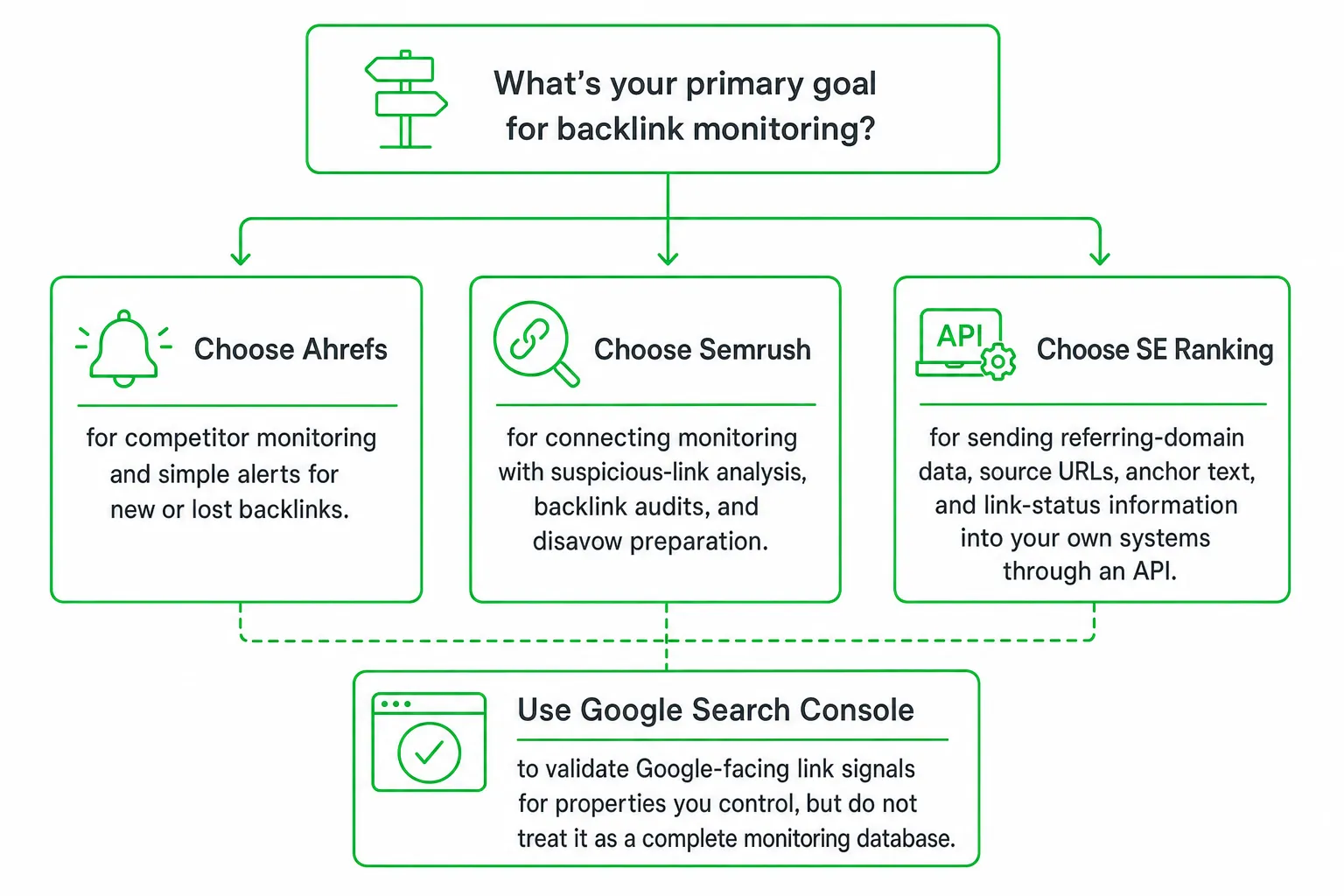
For most small teams, the best backlink monitoring tool is a dedicated monitor that detects new and lost links, keeps link history, checks placement status, and sends actionable alerts. Choose Ahrefs for straightforward backlink and competitor alerts, Semrush for auditing and disavow workflows, or SE Ranking when backlink data needs to flow through an API.
The right tool does more than show which links exist. It tells you what changed, when it changed, whether the change is real, and what you should do next.
Key takeaways
- Use Google Search Console as a free Google-facing reference, not as your complete backlink database.
- Compare alert timing, crawl freshness, historical retention, coverage limits, and temporary error handling before you buy.
- Choose Ahrefs for competitor monitoring, Semrush for backlink auditing, or SE Ranking for API-driven workflows.
- Start with your highest-value pages and competitors, then expand only when manual work becomes a proven bottleneck.
The Best Backlink Monitoring Tool for Small Teams
Best overall approach: Pick a focused backlink monitoring tool that tracks both link acquisition and link loss. You need more than a current snapshot. You need a dependable record of link events and a practical way to investigate them.
Choose Ahrefs: Prioritize competitor monitoring and simple alerts for new or lost backlinks.
Choose Semrush: Connect monitoring with suspicious-link analysis, backlink audits, and disavow preparation.
Choose SE Ranking: Send referring-domain data, source URLs, anchor text, and link-status information into your own systems through an API.
Use Google Search Console: Validate Google-facing link signals for properties you control, but do not treat it as a complete monitoring database.
Small teams rarely need another complicated dashboard. They need a short list of meaningful changes, clear ownership, and enough history to recover valuable placements before the loss affects a campaign.
What a Backlink Monitoring Tool Should Track
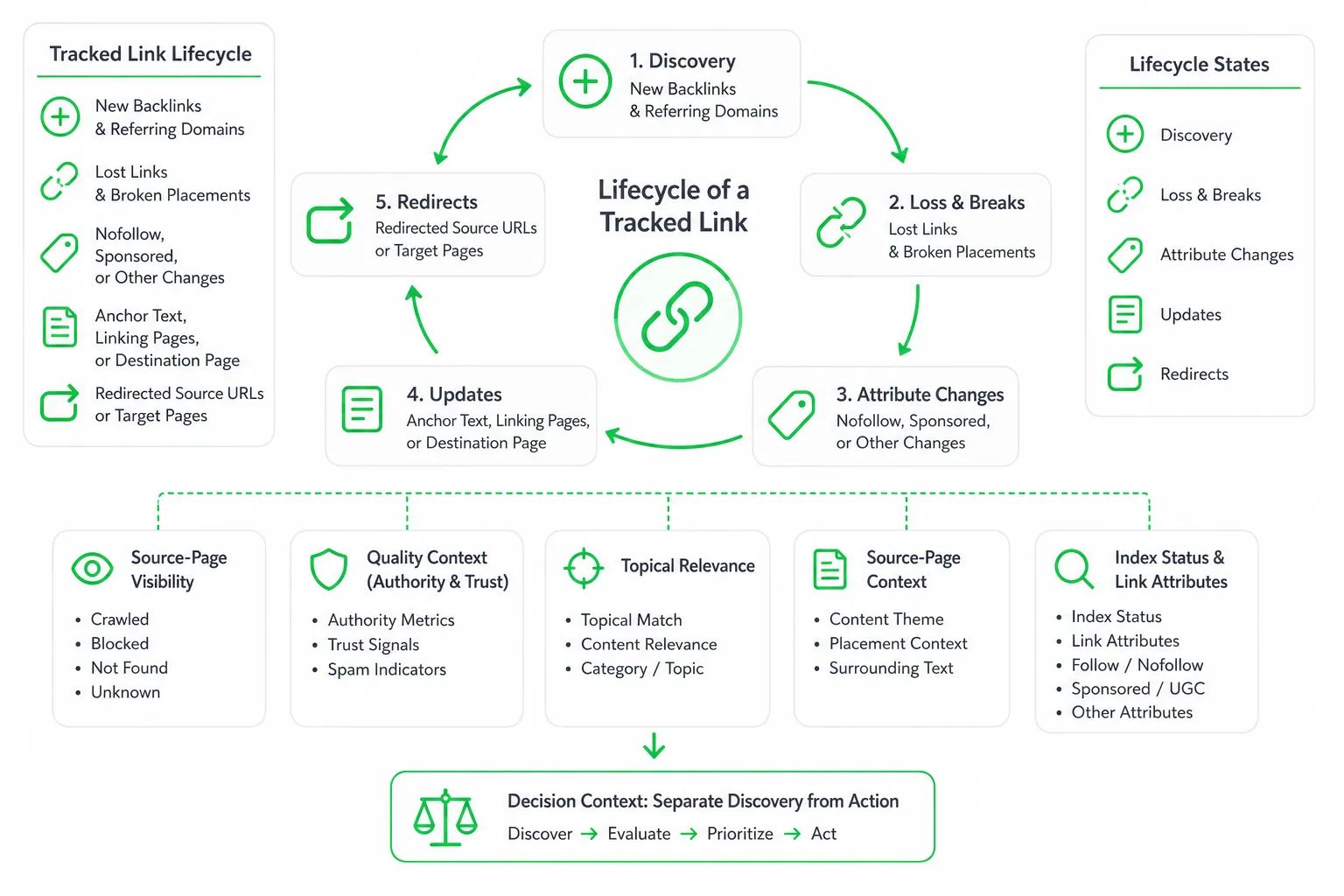
A useful monitor tracks the entire lifecycle of a link. That includes:
- New backlinks and referring domains.
- Lost links and broken placements.
- Redirected source URLs and target pages.
- Nofollow, sponsored, or other attribute changes.
- Anchor text, linking pages, and the destination page receiving the link.
- Source-page visibility and whether visitors can still see the placement.
Quality context: Look for authority or trust metrics, topical relevance, source-page context, index status, and link attributes. Metrics help you prioritize, but they do not replace checking the actual page.
Decision context: The best tools separate discovery from action. They show what changed, why it may matter, and whether you should contact the publisher, investigate a technical issue, or ignore the event.
The Monitoring Mechanics Most Comparisons Skip
Most backlink tool comparisons focus on database size and authority metrics. Those details matter, but monitoring quality depends on what happens after the first crawl.
Alert frequency
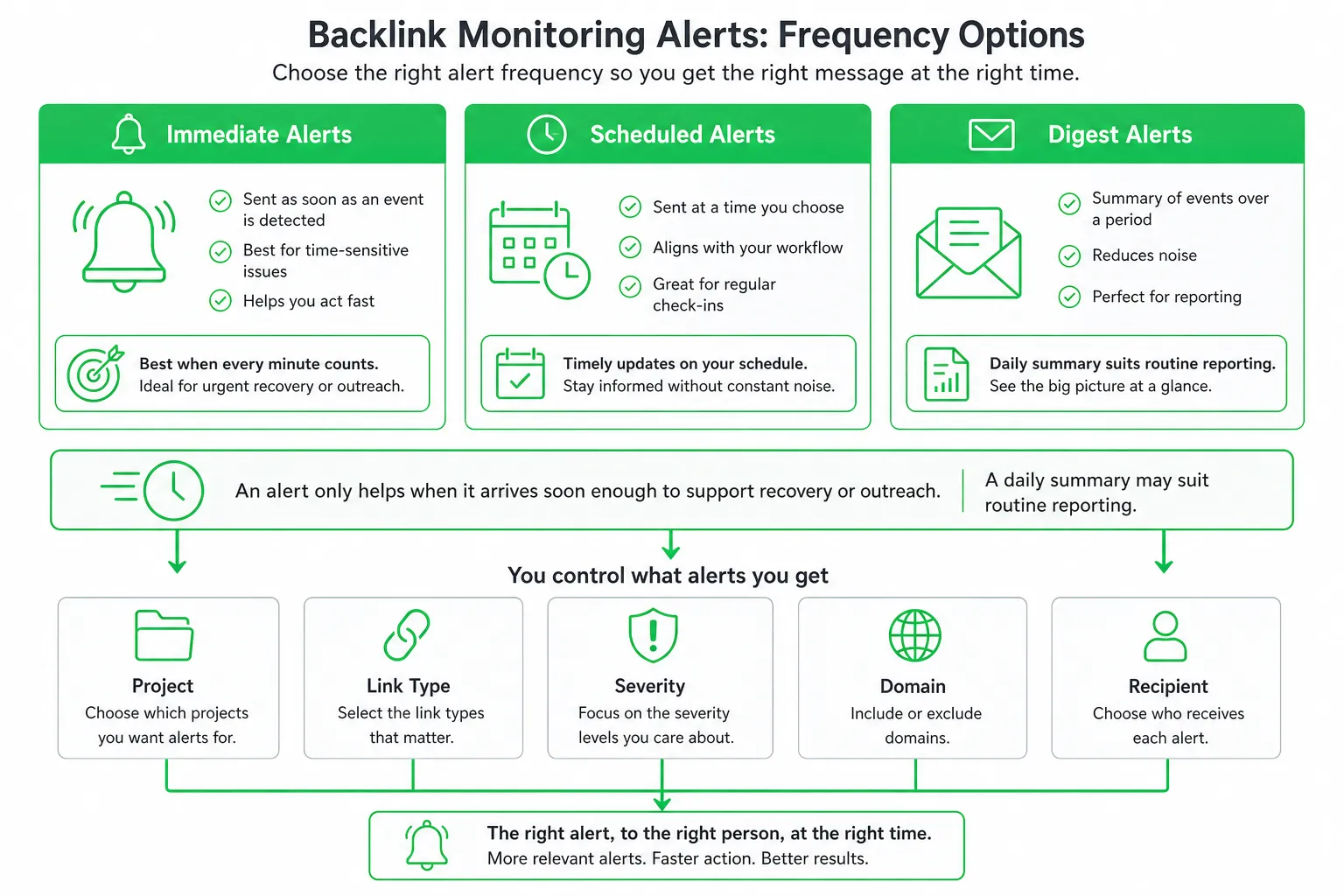
Check whether alerts arrive immediately, on a schedule, or in a digest. Then check whether you can control alerts by project, link type, severity, domain, and recipient.
An alert only helps when it arrives soon enough to support recovery or outreach. A daily summary may suit routine reporting. A high-value partnership may require faster notification.
Index freshness and coverage
Ask how often the provider recrawls known links and how quickly it discovers new placements. Check whether the crawler can access the pages and domains that matter to you.
Coverage can vary by crawl accessibility, language, country, page type, and technical restrictions. A tool may miss a link because the page is blocked, slow, temporarily unavailable, or not yet in its index.
History and status handling
Confirm how long link events remain available. The tool should preserve the original source URL, anchor text, target page, and relevant attributes so you can compare the old placement with the current result.
Look for status distinctions. A permanent removal is different from a temporary timeout, robots restriction, server error, crawler miss, or redirected page. If the tool collapses every situation into “lost,” your team may waste time contacting publishers unnecessarily.
Competitor monitoring and limits
Check whether you can monitor competing domains as well as your own. Review the limits for projects, links, domains, historical data, users, exports, and API requests.
Also ask what happens when you reach a limit. Does the tool stop discovering links, remove older history, restrict alerts, or require an upgrade? That answer can matter more than the headline feature list.
Google Search Console vs Dedicated Backlink Monitoring
Google Search Console is useful for checking Google’s view of links to your verified properties. It is not a full backlink-monitoring system.
Its Links report is a sample of a site’s backlinks and can display a maximum of 1,000 table rows, so it should not be treated as a complete backlink database. See Google Search Console Help for the current documentation.
Search Console gives you:
- A first-party view connected to your verified property.
- A useful reference for linking pages and top linked content.
- A way to compare your monitoring data with Google-facing signals.
A dedicated monitor adds:
- Recurring checks and change alerts.
- New, lost, and historical link events.
- Competitor tracking.
- Richer source-page and link metadata.
- Workflows for suspicious placements and recovery.
Use Search Console to validate Google-facing signals. Use a dedicated tool to manage link acquisition, preservation, recovery, and reporting.
Backlink Monitoring Tools Compared
| Tool | Best fit | Monitoring strengths | Watch before buying |
|---|---|---|---|
| Ahrefs | Competitor and first-party monitoring | Alerts for new and lost backlinks | Free verified-site access shows up to 1,000 backlinks and keywords at once |
| Semrush | Audits and suspicious-link workflows | Lost & Found reporting, backlink investigation, disavow preparation | SEO plan is listed at $117.33 per month when billed annually and includes monitoring for 5 websites |
| SE Ranking | API-driven workflows | Referring domains, authority and trust metrics, source URLs, anchor text, new and lost links | Core starts at $103.20 per month and Growth at $223.20 per month, with API access on Growth |
Ahrefs: Best for straightforward alerts and competitor research
Ahrefs is a strong fit when you want to monitor your own site and competitors from the same workflow. Ahrefs Alerts can notify you when a monitored website or URL gains or loses backlinks.
Its free verified-site access shows up to 1,000 backlinks and keywords at once, according to the Ahrefs Help Center. Treat that access as a useful starting point, then verify the monitoring limits and alert controls for your chosen plan.
Semrush: Best for backlink auditing
Semrush suits teams that want monitoring connected to risk analysis. Its Backlink Audit includes a Lost & Found report for tracking new and lost backlinks over time, along with workflows for suspicious links and disavow-file preparation.
The SEO plan is listed at $117.33 per month when billed annually and includes monitoring for 5 websites, according to Semrush Knowledge Base and Semrush Pricing. Check whether its audit workflow matches the way your team classifies and reviews links.
SE Ranking: Best for API access
SE Ranking is worth considering when backlink information needs to feed a reporting system, internal dashboard, or custom workflow. Its backlink API can provide referring domains, authority and trust metrics, new and lost links, source URLs, and anchor text.
Its listed Core plan starts at $103.20 per month and its Growth plan at $223.20 per month, with API access on Growth, according to SE Ranking. Confirm the available credits, fields, retention, and request limits before designing an automated workflow around it.
Free checkers and lightweight monitors can help with a quick snapshot. Before relying on one, test crawl frequency, historical retention, competitor support, and how it handles temporarily unavailable links.
How to Set Up Backlink Monitoring Properly
- Verify your domain. Connect relevant analytics or search data where available. Import important existing backlinks so the tool starts with a useful baseline.
- Create focused views. Separate owned domains, priority pages, active link-building campaigns, valuable referring domains, and key competitors.
- Set meaningful alerts. Track new links, confirmed losses, broken target pages, attribute changes, suspicious placements, and repeated availability failures.
- Verify every important alert. Open the source page manually. Check whether the link is visible, redirected, blocked, or genuinely removed.
- Classify the event. Mark it as temporary, technical, or permanent. Then contact the publisher when recovery is worthwhile and record the outcome.
Choosing the Right Tool for Your Team
Prioritize recovery workflows: Choose stronger alert controls when links support partnerships, digital PR, affiliate campaigns, or product launches.
Prioritize competitor monitoring: Choose broad competitor coverage when your growth strategy depends on finding where similar companies earn mentions and links.
Prioritize integrations: Choose API access when backlink events must enter a CRM, reporting system, or internal marketing workflow.
Check the practical limits: Review monitored domains, backlink rows, crawl frequency, historical retention, exports, user access, integrations, and whether pricing scales with links or projects.
Do not confuse a backlink checker with a monitoring system. A checker answers what links are visible now. A monitor explains what changed, when it changed, and whether the change is real.
Backlink monitoring also works best when it connects to a wider acquisition process. At OneUp Today, the company measured a 29.7% human reply rate across 2,269 real Reddit cold DM conversations sent March to September 2026, documented in its Reddit DM benchmarks. That kind of outreach can create conversations and content opportunities, while backlink monitoring helps you preserve the coverage that follows.
Start With a Small, Actionable Monitoring Workflow
Begin with your highest-value domain, priority landing pages, and the competitors most relevant to your current growth motion. Avoid tracking every possible URL before you know which alerts your team will act on.
- Run a baseline review.
- Define which link losses require recovery.
- Assign an owner for each alert.
- Review the report on a consistent operating rhythm.
- Test a known new link and a confirmed loss.
- Check whether the tool distinguishes temporary unavailability from removal.
If budget or complexity is the objection, start with the narrowest plan that supports your recovery and reporting needs. Expand only when missed coverage or manual work becomes a proven bottleneck.
Next step: Pick one tool, connect your main domain, and test its handling of a known link change before you commit. If you also need lead discovery, SEO content, outreach, and publishing, OneUp Today can complement that monitoring workflow while keeping every send under human approval.
Frequently asked questions
Can a free backlink monitoring tool replace a paid one?
No. Free tools like Google Search Console offer basic link data, but they lack real-time alerts, historical retention, and detailed link attribute tracking. Paid tools provide actionable insights for recovery and outreach, making them essential for competitive monitoring.
How often should I check my backlink monitoring tool for new links?
At least weekly. For high-value pages or competitive niches, daily checks are better. Tools like Ahrefs and Semrush offer customizable alerts, so you can set frequency based on link importance and campaign urgency.
What is the best backlink monitoring tool for API integration?
SE Ranking is the best choice. It provides a robust API that allows you to pull referring domains, source URLs, anchor text, and link status into your own systems. This is ideal for custom workflows or data analysis.
Does a backlink monitoring tool track nofollow links?
Yes. Most dedicated tools, including Ahrefs and Semrush, track nofollow, sponsored, and UGC attributes. This helps you understand link profile diversity and identify potential partnership opportunities, even if they don't pass link equity.