
SEO WP Plugins: Best Options for SaaS Teams
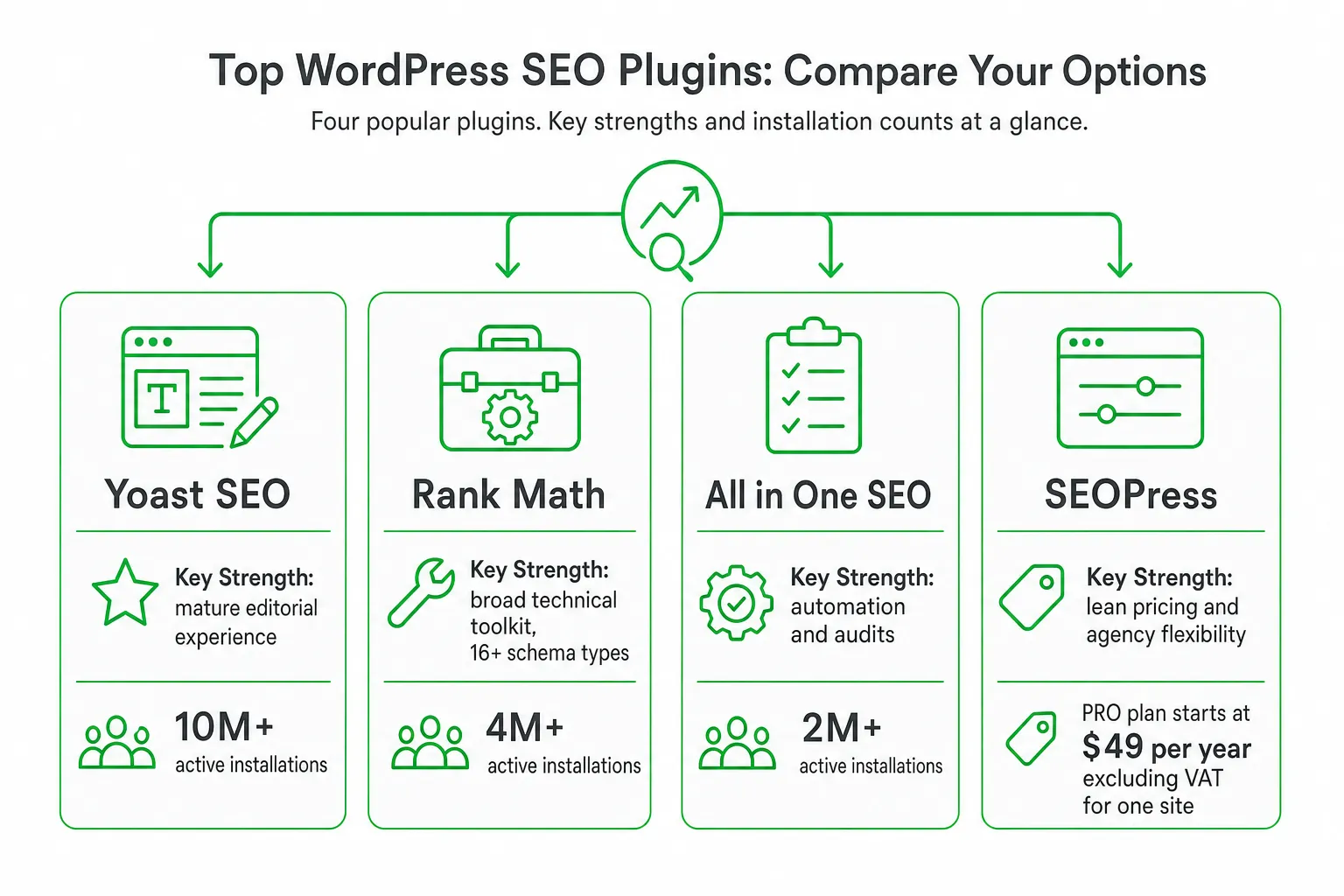
For most SaaS teams, the best seo wp plugins shortlist is Yoast SEO, Rank Math, All in One SEO, and SEOPress. Choose between them based on migration safety, technical controls, editorial workflow, support, and site performance, not the length of the feature list.
Start with the plugin that passes a staging test on your own site. A plugin can manage metadata, sitemaps, redirects, and schema. It cannot create useful product expertise, earn authoritative links, or fix content that misses search intent.
Key takeaways
- Best editorial fit: Yoast SEO for teams that want mature writing guidance and broad ecosystem adoption.
- Best technical breadth: Rank Math for teams that want many controls in one interface.
- Best lean alternative: SEOPress for predictable pricing and a focused workflow.
- Best buyer test: Compare metadata, redirects, sitemaps, database changes, page speed, updates, and support on staging before switching.
- Core limitation: No plugin replaces strong content, internal links, digital PR, or relevant backlinks.
The best SEO WP plugins for SaaS teams
Yoast SEO: Mature editorial experience. Yoast is a strong choice when writers, editors, and marketers need clear on-page guidance inside WordPress. It has more than 10 million active installations on WordPress.org, making it the most widely installed major option in this comparison, according to WordPress.org, Yoast SEO.
Rank Math: Broad technical toolkit. Rank Math suits technical SEO-led SaaS teams that want schema, redirects, a 404 monitor, XML sitemaps, and Google Search Console integration in one interface. Its WordPress.org listing reports more than 4 million active installations and includes 16+ schema types, as documented by WordPress.org, Rank Math SEO.
All in One SEO: Automation and audits. AIOSEO is worth considering when you need SEO audits, automatic redirects, local SEO, WooCommerce support, internal-link automation, and keyword rank tracking. Its WordPress.org listing reports more than 2 million active installations, according to WordPress.org, All in One SEO.
SEOPress: Lean pricing and agency flexibility. SEOPress is a compelling alternative when you want schema, redirects, 404 monitoring, local SEO, WooCommerce SEO, and AI integrations without choosing the largest ecosystem. Its PRO plan starts at $49 per year excluding VAT for one site and renews at the same price, according to SEOPress Pricing.
Your final choice should follow the site, not the brand. Check page builders, custom post types, multilingual plugins, WooCommerce, caching, managed hosting, analytics, and your publishing workflow before you migrate.
What a WordPress SEO plugin actually handles
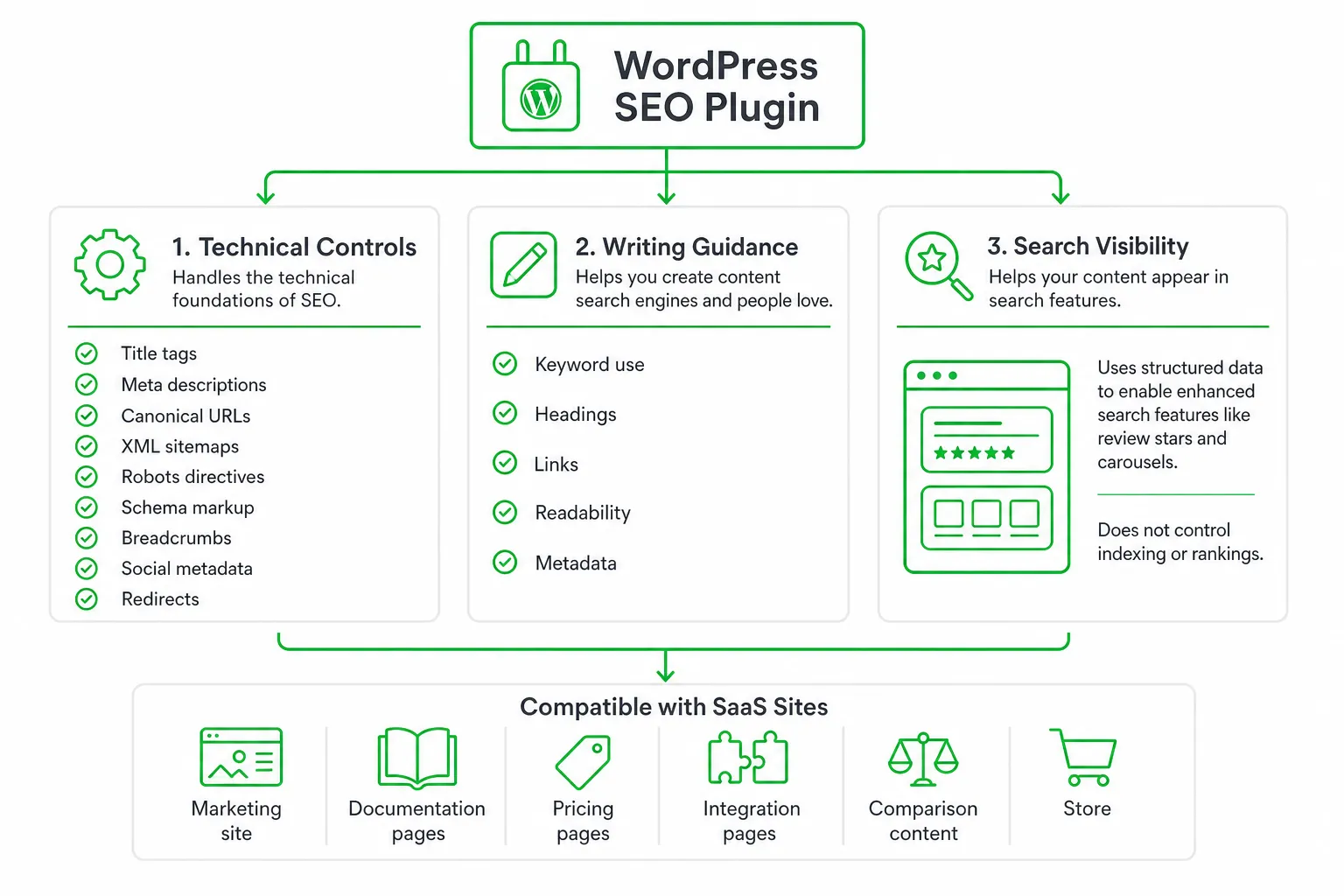
Technical controls: Most established plugins help you manage title tags, meta descriptions, canonical URLs, XML sitemaps, robots directives, schema markup, breadcrumbs, social metadata, and redirects.
Writing guidance: Many also score or review a page for keyword use, headings, links, readability, and metadata. Treat those checks as workflow prompts. They are not a substitute for understanding what a searcher needs.
Search visibility: Structured data can make a page eligible for enhanced search features such as review stars and carousels. Google also makes clear that valid structured data does not guarantee indexing or first-place rankings in its SEO Starter Guide.
Compatibility: SaaS sites often combine a marketing site, documentation, pricing pages, integration pages, comparison content, and sometimes a store. Test how your plugin handles each content type. A setting that works for a blog post may create poor defaults for a product template or documentation archive.
- Page builders: Check whether the plugin can read and edit metadata on builder-created pages.
- Custom post types: Confirm that product, integration, resource, and documentation templates receive the correct schema and sitemap treatment.
- Multilingual tools: Review language canonicals, hreflang output, translated metadata, and localized sitemaps.
- Commerce: Test product schema, category pages, checkout exclusions, and WooCommerce SEO settings.
- Hosting and caching: Check page output after cache purges and confirm that generated files remain current.
Head-to-head comparison for SaaS buyers
Use this table as a shortlist, not a final verdict. The right plugin is the one your team can configure correctly, maintain safely, and use consistently.
| Plugin | Best fit | Strengths to evaluate | Watch for |
|---|---|---|---|
| Yoast SEO | Content-led SaaS | Editorial guidance, ecosystem maturity, metadata, schema, redirects | Premium cost and whether its recommendations fit your workflow |
| Rank Math | Technical SEO-led SaaS | Broad controls, schema, sitemaps, redirects, 404 monitoring, Search Console integration | Overlapping modules and settings you do not need |
| All in One SEO | Teams wanting audits and automation | Audits, redirects, local SEO, WooCommerce, internal links, rank tracking | Which automation features your site will actually use |
| SEOPress | Lean teams and agencies | Focused interface, schema, redirects, local SEO, WooCommerce, AI integrations | Whether documentation and support meet your team’s needs |
| The SEO Framework | Minimal-configuration sites | Lightweight approach and fewer editorial distractions | Whether you need the broader audit and automation features above |
Price anchor: Yoast SEO Premium is listed at $118.80 per year excluding VAT for one site. It includes redirect automation, internal-link suggestions, optimization for up to five keyphrases per page, and 24/7 support, according to Yoast SEO Premium.
Alternative price anchor: SEOPress PRO starts at $49 per year excluding VAT for one site. AIOSEO Basic is listed at $49.50 per year for one site and includes TruSEO analysis, smart schema markup, XML sitemaps, WooCommerce SEO, automatic redirects, AI writing tools, and unlimited SEO audits, according to AIOSEO Pricing.
Do not treat the cheapest plan as the best value. Ask which features matter for one SaaS site, several client sites, product documentation, localization, or a WooCommerce operation. Agency-managed WordPress sites may prioritize white-label workflows. A founder-led site may prioritize minimal configuration. A content team may care more about editorial adoption than advanced technical modules.
The buyer test most plugin roundups skip
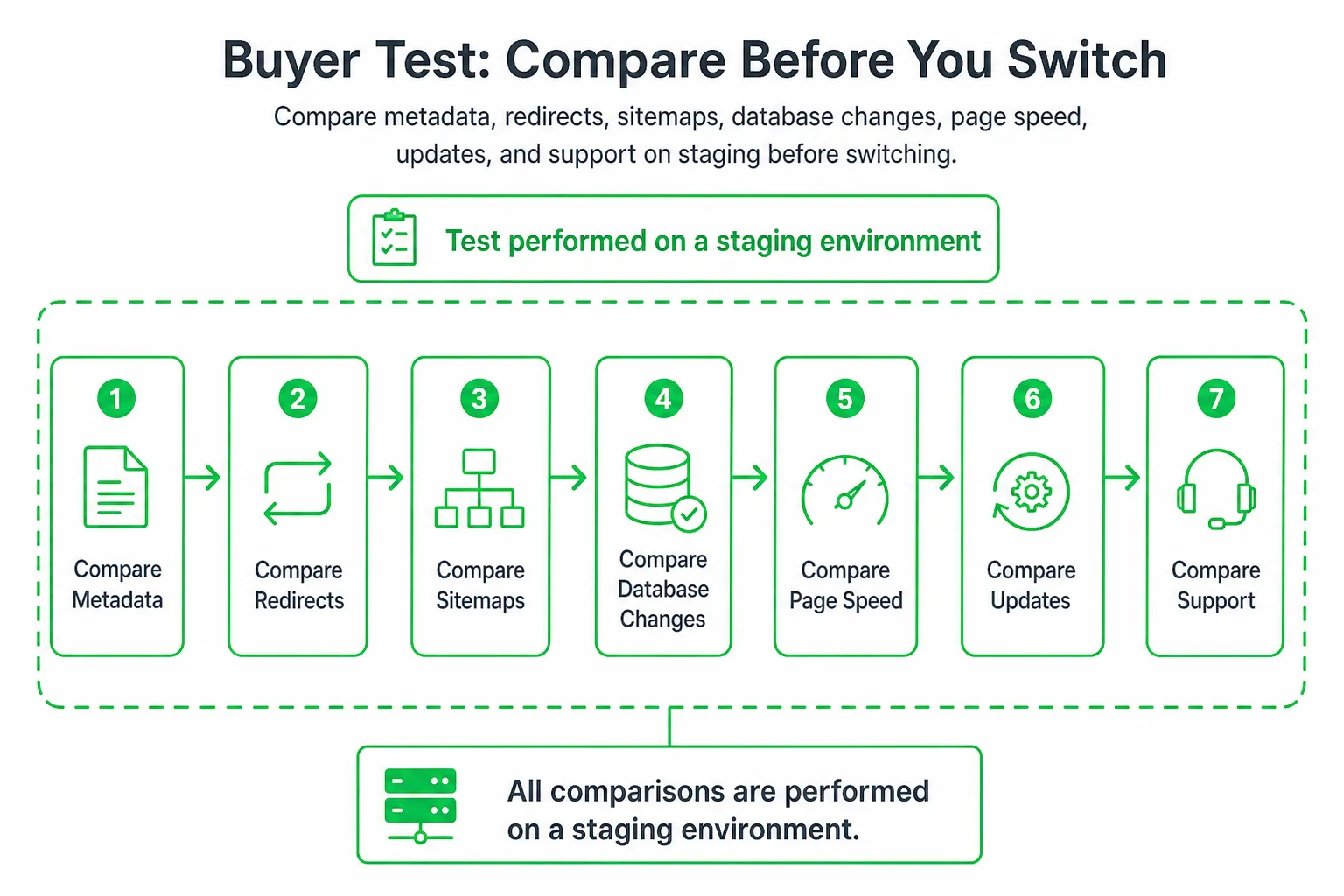
Feature checklists miss the risks that can damage an established SaaS site. Run a reproducible test before you replace or add an SEO plugin.
- Clone production to staging. Create a private staging copy with the same themes, plugins, templates, redirects, cache configuration, and content types.
- Record the baseline. Export existing titles, descriptions, canonicals, robots directives, redirects, schema, sitemap URLs, crawl results, database size, and page-speed results. Save representative HTML from key templates.
- Test migration safety. Import settings from the current plugin where possible. Check whether page-level metadata, canonicals, redirects, robots rules, schema, and social images remain intact.
- Check for duplicate output. Confirm that only one plugin generates each sitemap, canonical, major metadata field, breadcrumb trail, and schema block. Pause overlapping features in other plugins.
- Measure performance and database impact. Activate one plugin at a time. Crawl representative templates, inspect frontend output, review admin behavior, check database changes, and test cache compatibility.
- Test operational reliability. Read update notes, apply updates on staging, open a support request, review the documentation, and record rollback steps if a template, redirect, schema block, or publishing workflow breaks.
Repeat the crawl after enabling the selected plugin. Compare the new output with the baseline. A clean dashboard does not prove that search engines receive clean HTML, valid canonicals, or the sitemap you intended.
What each plugin cannot improve by itself
No plugin creates product-led expertise. It cannot solve weak search intent, earn relevant backlinks, improve retention, or turn a thin comparison page into a useful resource.
Content system: Pair your plugin with topic research, original product evidence, comparison pages, integration documentation, customer questions, internal-link architecture, and a consistent refresh process.
Editorial judgment: Keyword scores and AI suggestions can help a writer spot omissions. They cannot decide whether your explanation is accurate, differentiated, or genuinely useful to a SaaS buyer.
Technical restraint: Schema toggles do not make unsupported claims valid. Automatic pages can create duplication. Redirects created without a documented URL plan can hide broken information architecture rather than fix it.
- Warning sign: Your team spends more time chasing a page score than improving the answer.
- Warning sign: Several tools output the same metadata or sitemap.
- Warning sign: AI-generated pages have no original screenshots, product evidence, examples, or expert review.
- Warning sign: Redirects are added without recording the old URL, new URL, reason, and owner.
A practical setup and migration workflow
Step one: Choose one canonical plugin. Back up the site, create staging, document existing settings, and pause other SEO plugins before enabling overlapping features.
Step two: Configure sitewide defaults. Set title templates, description fallbacks, canonical behavior, XML sitemaps, robots rules, breadcrumbs, social previews, organization identity, and noindex rules for low-value archives.
Step three: Migrate page-level data. Move titles, descriptions, focus terms where relevant, redirects, social images, and custom schema. Then manually review your homepage, pricing page, product pages, feature pages, integration pages, comparison pages, documentation, categories, authors, and templates.
Step four: Validate the output. Run a crawl, inspect sitemap contents, check representative page source, review Search Console signals, test broken links, and verify cache behavior. Keep a rollback plan before publishing the change.
Step five: Make adoption easy. Write a short internal guide explaining which fields writers must complete, which fields editors review, and which settings only administrators can change. A technically capable plugin still fails when your team avoids it.
Recommendation and next steps for SaaS teams
Choose Yoast SEO when editorial guidance and ecosystem maturity matter most. Choose Rank Math when centralized technical breadth matters most. Choose SEOPress when predictable pricing and a lean interface matter most. Choose All in One SEO when audits, redirects, local or WooCommerce features, and broader automation are priorities.
Start with the plugin that passes your migration and conflict test, not the one with the longest feature list. Include support quality, update confidence, database impact, page speed, and editorial adoption in the buying decision.
If you want publishing help beyond plugin configuration, OneUp Today’s SEO autopilot and blog autopilot can research topics, draft on-brand articles with diagrams and schema, publish to WordPress or another stack, and track rankings. That complements an SEO plugin. It does not replace your content and link strategy.
Next step: Shortlist two plugins, run the staging test above, compare the results against your content plan, then install one canonical solution and schedule a post-migration crawl.
Frequently asked questions
Is Yoast SEO still the best free SEO plugin for WordPress in 2024?
Yes, Yoast SEO remains a top free option due to its mature writing guidance and broad ecosystem adoption. However, Rank Math offers more built-in technical controls like schema and redirects at no cost, making the choice depend on whether you prioritize editorial features or technical breadth.
Can Rank Math replace a dedicated redirect plugin for WordPress?
Yes, Rank Math includes a built-in redirect manager that handles 301, 302, and 307 redirects, along with a 404 monitor. This eliminates the need for a separate redirect plugin, but you should verify its behavior with your specific caching setup and custom post types before migrating.
How many schema types does SEOPress support compared to Rank Math?
SEOPress supports over 15 schema types, while Rank Math offers 16+ schema types. Both cover common types like Article, Product, and FAQ, but Rank Math provides more granular control for technical SEO tasks. Your choice should depend on whether you need advanced schema customization or a simpler, leaner interface.
Does All in One SEO slow down WordPress site performance?
All in One SEO can impact site performance if you enable all its features, such as automatic audits and rank tracking. However, its impact is generally minimal for most sites. You should test it on a staging environment with your specific hosting and caching setup to measure actual page speed changes.
What is the best free SEO plugin for a WordPress multisite network?
Rank Math is the best free option for multisite networks because it offers centralized settings and per-site controls without requiring a separate license per site. Yoast SEO requires a premium license for multisite support, while SEOPress and All in One SEO also work but may need additional configuration for consistent schema and redirects across sites.