
SEO Add Ons That Save Small Teams Time
SEO add ons help you inspect pages, research search results, check technical signals, and improve content without opening another SEO platform for every question. For most small teams, the best setup is simple: start with a lightweight on-page checker, add SERP research when you validate topics, and pay for broader data only when you need backlinks, rank tracking, exports, or team reporting.
The right tool is not the one with the longest feature list. It is the one that fits the SEO task you repeat most often and turns each browser check into a clear next action.
Key takeaways
- Choose an add on based on your workflow: page audits, SERP research, technical checks, backlinks, rank tracking, or content optimization.
- Free extensions work well for manual inspection, but paid accounts often unlock keyword metrics, historical data, exports, and ongoing monitoring.
- Review browser permissions, privacy policies, account requirements, and performance impact before installing.
- Use a repeatable review template so every audit leads to a content, technical, or internal-linking action.
The Best SEO Add Ons Depend on Your Workflow
SEO add ons are browser extensions and lightweight tools that place useful search data beside the page you are already viewing. You can inspect a competitor's title, review headings on your draft, check redirects, examine a SERP, or spot missing metadata without copying everything into a separate spreadsheet.
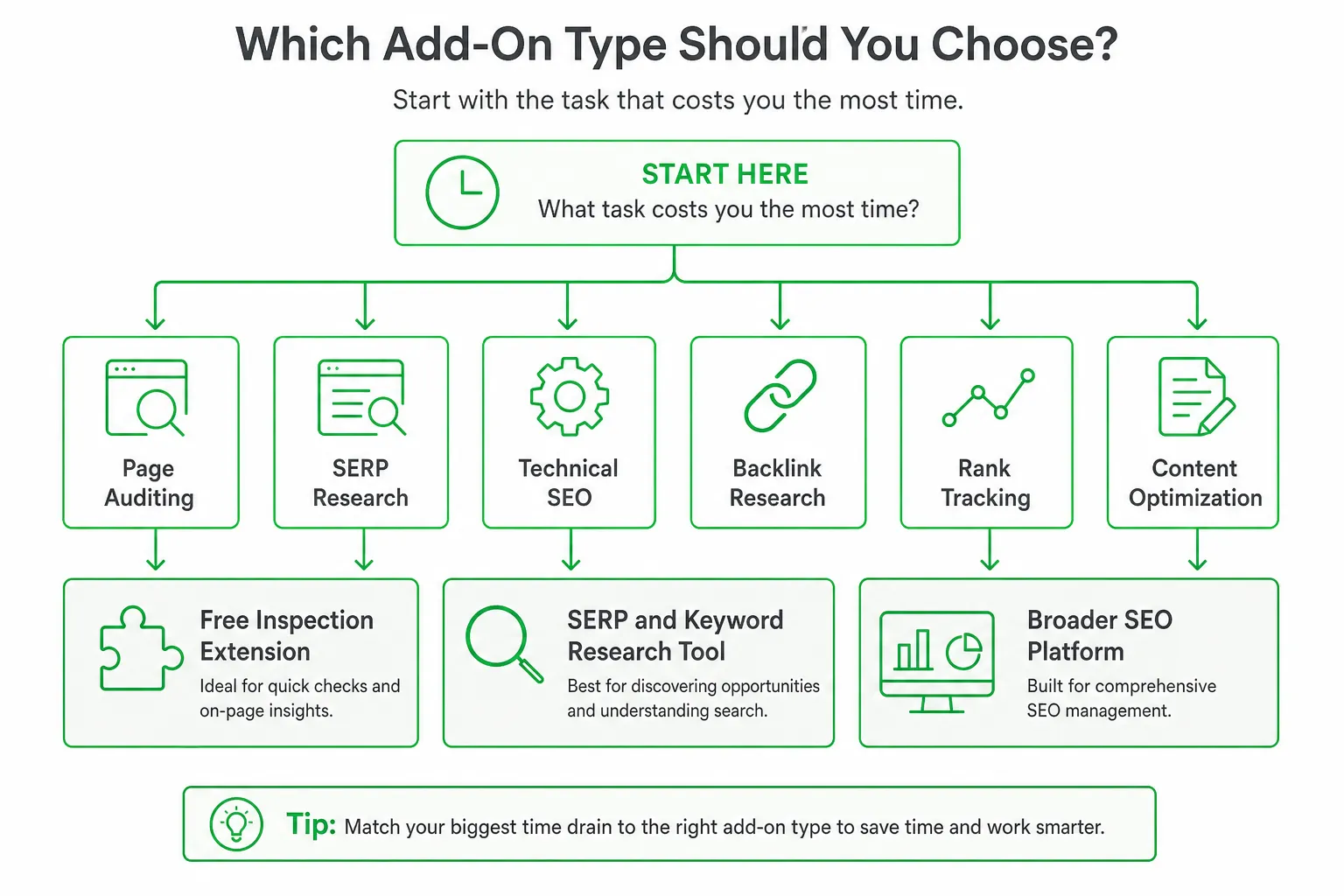
Start with the task that costs you the most time:
- Page auditing: Check titles, descriptions, headings, canonicals, robots directives, links, images, and structured data.
- SERP research: Review competing pages, search intent, related queries, People Also Ask results, and keyword ideas.
- Technical SEO: Inspect redirects, indexation signals, sitemaps, mobile issues, and performance indicators.
- Backlink research: Find links pointing to competitor pages or your own content.
- Rank tracking: Monitor visibility over time instead of checking a result manually.
- Content optimization: Compare coverage, structure, internal links, and on-page recommendations.
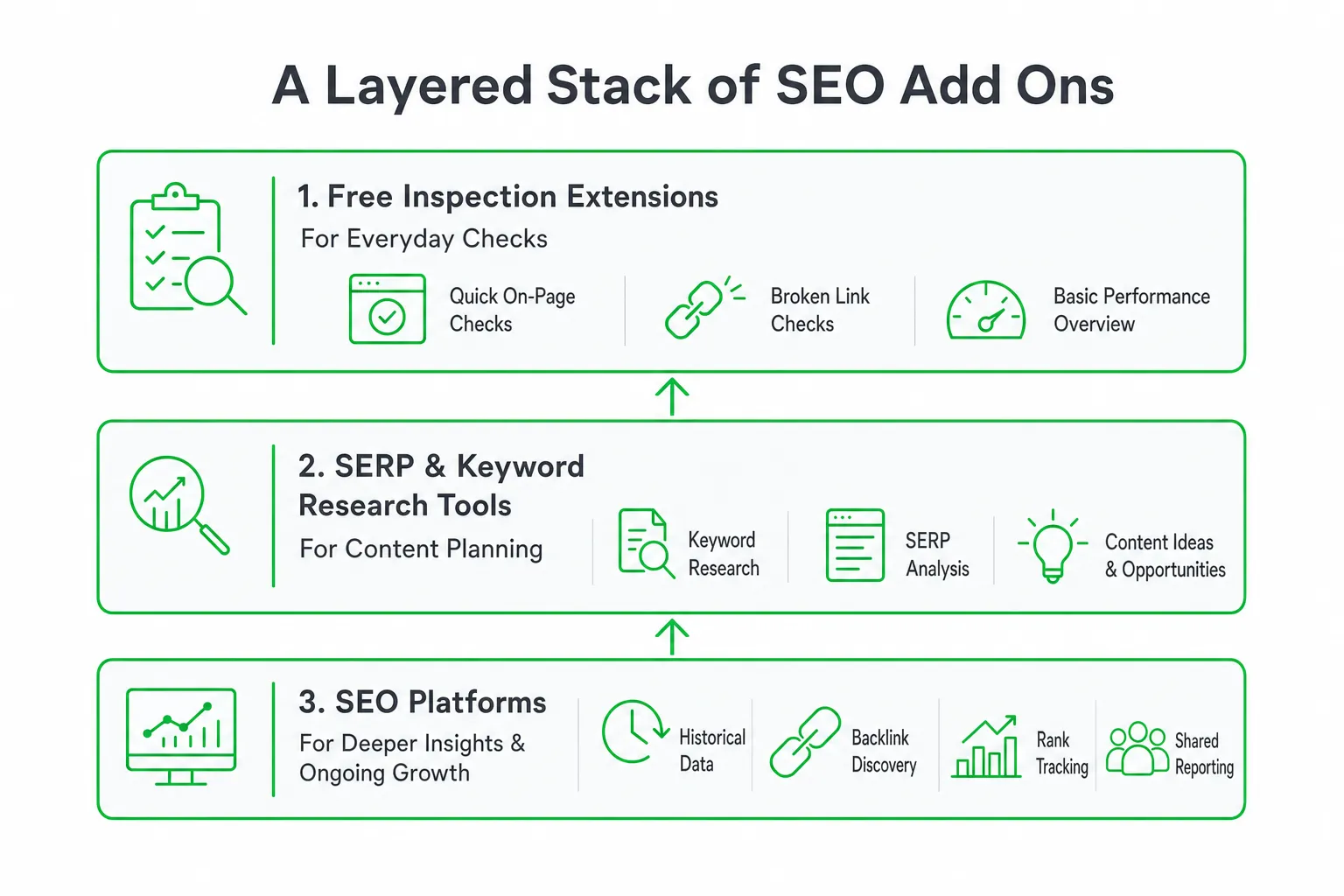
For most solo founders and small teams, a practical stack has three layers. Use a free inspection extension for everyday checks. Add SERP and keyword research when planning content. Choose a broader SEO platform when you need historical data, backlink discovery, rank tracking, or shared reporting.
What to Look For in an SEO Add On
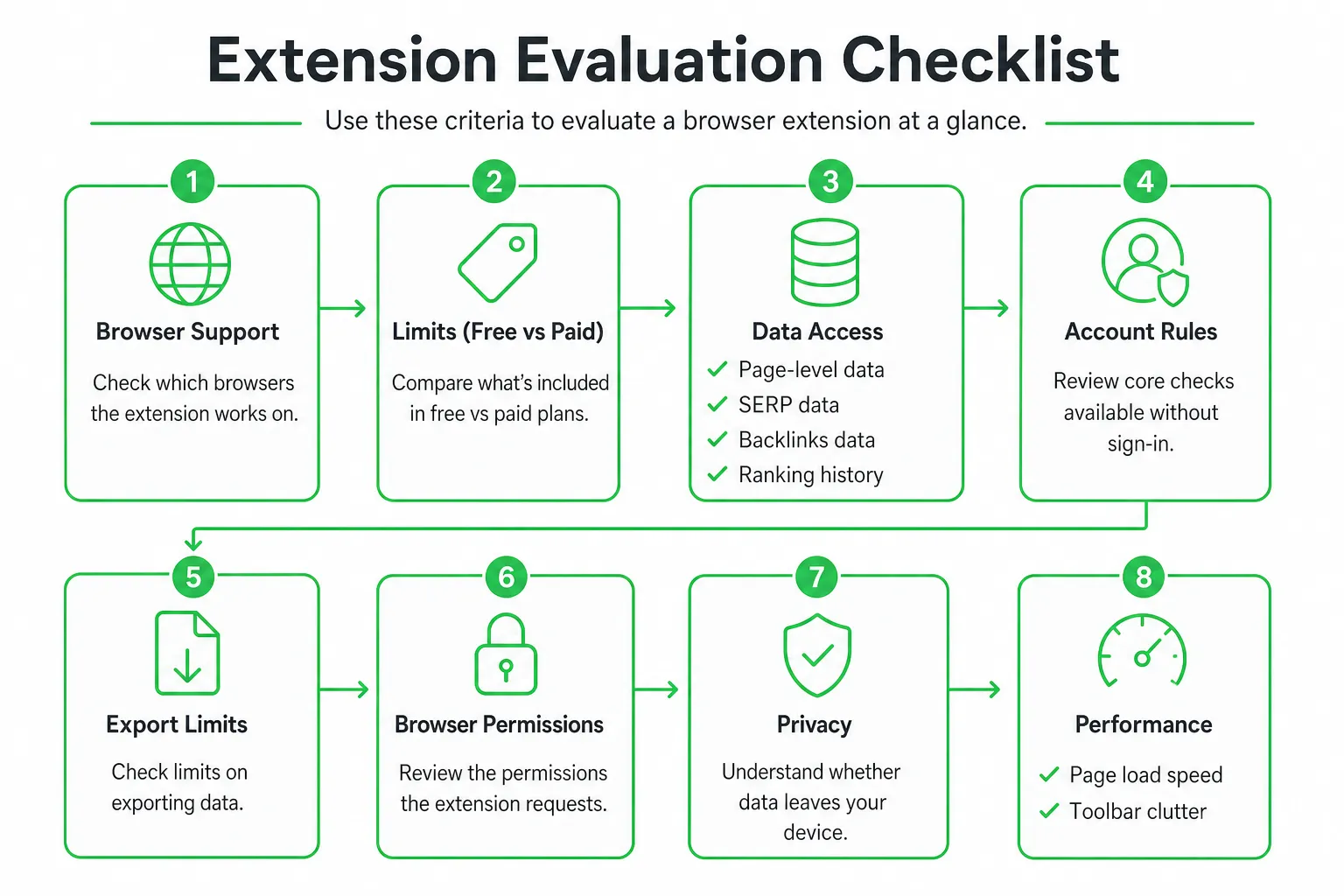
Begin with browser support. Confirm that the extension works in the browser your team actually uses and on the pages you need to analyze. Test your own site, a competitor page, a Google result, and a local search result if local visibility matters to you.
Then inspect the limits. A free add on may provide excellent metadata checks while restricting keyword metrics, backlink data, exports, rank tracking, or daily usage. An account may also be required before the most useful panels appear.
- Data access: Does it show page-level information, SERP data, backlinks, or ranking history?
- Account rules: Can you use the core checks without signing in?
- Export limits: Can you save findings for a content brief, client report, or technical ticket?
- Browser permissions: Does it explain which pages and browsing data it can read?
- Privacy: Does browsing activity leave your device, and how is connected account data stored?
- Performance: Does it slow page loads, crowd the browser toolbar, or inject scripts into every page?
The Main Types of SEO Add Ons
On-page audit add ons
These tools reveal the elements you need during a fast page review: titles, meta descriptions, headings, canonicals, robots directives, image ALT attributes, internal links, external links, structured data, and social metadata.
They suit content marketers, founders reviewing landing pages, and technical SEOs who need a quick diagnosis before opening a full crawler. They are especially useful during publishing, when fixing a missing title or incorrect canonical can happen immediately.
SERP and keyword research add ons
SERP tools help you understand what Google is rewarding for a query. Look for features that show ranking positions, related searches, keyword ideas, search intent clues, and People Also Ask questions.
The best workflow is not simply collecting keywords. Read the result types. Note whether the page is dominated by product pages, tutorials, comparison articles, videos, forums, or category pages. That tells you what kind of content your query may require.
Technical and performance add ons
Technical tools help you inspect redirects, indexation signals, robots.txt, XML sitemaps, mobile issues, Core Web Vitals, and page speed while you browse.
Use them for triage, not as a replacement for a complete technical audit. A browser check can reveal a suspicious redirect or missing directive. You still need to assign the fix, deploy it, and verify the result.
Backlink, rank-tracking, and content tools
Backlink and rank-tracking add ons are better for ongoing campaigns. They often require a connected account because the data comes from a larger index or project database.
Content optimization tools add another layer. They can support briefs, keyword coverage, internal-link suggestions, structure recommendations, and comparisons with competing pages. Choose one when content improvement is a repeated workflow, not just an occasional experiment.
Popular SEO Add Ons Compared
| Tool | Best fit | What to check |
|---|---|---|
| Ahrefs SEO Toolbar | SERP research, page inspection, and teams already using Ahrefs | Account connection, export usage, and the data your plan includes |
| SEOquake | Technical and competitive page checks | Whether its broad inspection view fits your daily workflow |
| SEO META in 1 CLICK | Fast manual metadata inspection | Whether you need deeper keyword, backlink, or rank data elsewhere |
| Mangools SEO extension | On-page and PageSpeed checks with optional account data | Which features require an account |
Ahrefs SEO Toolbar: Best for research connected to a larger platform
The Ahrefs SEO Toolbar provides free browser-based reports for on-page SEO, redirects, outgoing links, SERP positions, local search simulation, Web Vitals, keyword ideas, and People Also Ask questions, according to the Ahrefs Help Center.
That makes it useful when your research moves between Google results and individual pages. Ahrefs says the toolbar is trusted by 400,000+ SEO professionals and works with Chrome, Firefox, and Safari.
Watch the account behavior before making it part of a high-volume process. When connected to an Ahrefs account, the toolbar consumes one export row per URL for page or website metrics. A traditional 10-result SERP can consume 10 export rows, as documented by the Ahrefs Help Center.
SEOquake: Best for broad page-level checks
SEOquake is a practical option when your main job is inspecting pages and comparing competitors. Its rebuilt extension performs 28 page-level checks across page, mobile, technical, and social signals, including titles, meta descriptions, headings, image ALT attributes, canonicals, robots directives, schema markup, Open Graph tags, and Twitter Cards, according to Semrush.
That breadth suits technical reviews and content production. It can also be more information than a founder needs for a quick landing-page check, so use its panels selectively.
SEO META in 1 CLICK: Best for simple inspection
SEO META in 1 CLICK focuses on fast visibility into titles, descriptions, canonical URLs, robots directives, headings, image ALT information, links, Open Graph data, Twitter data, robots.txt, and sitemap.xml. Its Chrome Web Store listing makes it a low-friction choice for manual checks.
Choose it when you want a clean answer to questions such as “Does this page have a canonical?” or “What headings and social tags does this competitor use?” Do not expect a lightweight inspection tool to replace backlink research or rank tracking.
The Free-versus-Paid Choice
Use a free add on when you mainly need page inspection, metadata checks, redirects, structured-data visibility, or quick competitor comparisons during content production.
Pay when the decision requires a larger dataset. That includes keyword metrics, backlink discovery, historical comparisons, rank tracking, local SERP data, exports, or collaboration features. A free extension can diagnose a page. It usually cannot manage the full reporting workflow around that diagnosis.
Mangools offers a useful middle ground. Its extension provides unlimited on-page SEO and PageSpeed checks without a Mangools account, while keyword data, backlinks, and instant rank tracking require one, according to Mangools.
The Missing Piece: Turn Add Ons Into a Repeatable SEO Workflow
Most lists of SEO add ons stop at features. The time savings appear only when you connect the browser check to a repeatable process.
Create one page-review sequence and use it for every important article or landing page:
- Inspect the SERP: Record the search intent, result types, competing page formats, and useful People Also Ask questions.
- Audit leading pages: Review titles, descriptions, headings, canonicals, indexation signals, schema, links, and content structure.
- Check your draft: Compare its technical elements and coverage against the pages that match the query.
- Improve the page: Fix metadata, clarify headings, add missing sections, strengthen internal links, and validate structured data.
- Assign the next action: Give the change an owner and a review date instead of leaving it in a browser tab.
- Verify later: Use rank tracking and performance data to decide whether the change deserves another iteration.
Use a shared template with the same fields every time:
- Target query and search intent
- Competing page type
- Title and description
- Heading structure
- Canonical and indexation signals
- Schema and social metadata
- Content gaps
- Internal and external links
- Next action and owner
Separate diagnosis from action. A toolbar can identify a missing canonical or weak heading structure. Your workflow must still create the fix, publish it, and verify the result.
For small teams that need the process to continue after browser research, OneUp Today's SEO article and rank-tracking automation can research topics, create on-brand articles with diagrams and schema, publish them to your stack, and monitor performance on Google and Bing.
How to Choose the Right Add On for Your Team
Solo founder or indie hacker
Begin with a lightweight on-page and SERP inspection add on. Add content optimization and rank tracking after you establish a publishing habit. Avoid paying for backlink databases before you have pages worth promoting or comparing.
Content marketer
Prioritize keyword ideas, SERP intent, competitor-page inspection, schema visibility, and a workflow that moves from research to publishing without duplicate copying. The fastest tool is the one that keeps your brief and draft connected.
Technical SEO specialist
Prioritize redirects, canonicals, robots directives, sitemaps, indexation, structured data, mobile checks, and performance signals. Exportable findings matter when you need to turn observations into tickets or explain issues to developers.
Small agency or growing SaaS team
Compare browser support, account seats, shared reports, permissions, export rules, client-ready evidence, and integration with your wider SEO process. A feature that works for one analyst may not work for a team that needs repeatable documentation.
A Practical Setup Plan and Recommendation
Install one trusted on-page inspection add on. Test it on your own pages, a competitor page, and a Google result. Write down the checks you actually use, then remove extensions that duplicate them or create browser clutter.
Next, document your review sequence. Decide where you record search intent, who owns technical fixes, how content changes are approved, and when rankings are checked again.
Pair browser research with a system that handles the work after discovery. OneUp Today's SEO article and rank-tracking features fit teams that want topic research, on-brand publishing, schema, and ongoing visibility tracked in one workflow.
Bottom line: Choose the simplest free add on that solves your most frequent inspection task. Upgrade only for a dataset you genuinely need, and make every audit feed a documented content or technical action. Your next step is simple: pick one page, run the review sequence, and record the first fix.
Frequently asked questions
Can SEO add ons slow down my browser?
Yes, some SEO add ons can slow down your browser. This happens when an extension loads scripts on every page you visit, so it's best to test one tool at a time and disable it when not in use to maintain performance.
Do I need a paid account for an SEO add on to be useful?
No, many free SEO add ons are useful for basic page audits and SERP checks. However, paid accounts often unlock advanced features like keyword metrics, historical data, and rank tracking, which are valuable for ongoing monitoring.
How do I choose the right SEO add on for my workflow?
Start by identifying the SEO task you repeat most often, such as page audits or SERP research. Then pick an add on that specializes in that task, and test it on your own site and competitor pages before committing to a paid plan.
Are SEO add ons safe to install in my browser?
Most reputable SEO add ons are safe, but you should review their permissions and privacy policies. Check what data they can read, whether browsing activity leaves your device, and how account data is stored before installing.
Can I use an SEO add on for rank tracking without a subscription?
Some free SEO add ons offer basic rank tracking, but it is often limited to a few keywords or manual checks. For consistent monitoring and historical data, a paid subscription is typically required.