
Angular App SEO: A Practical Guide
Key takeaways
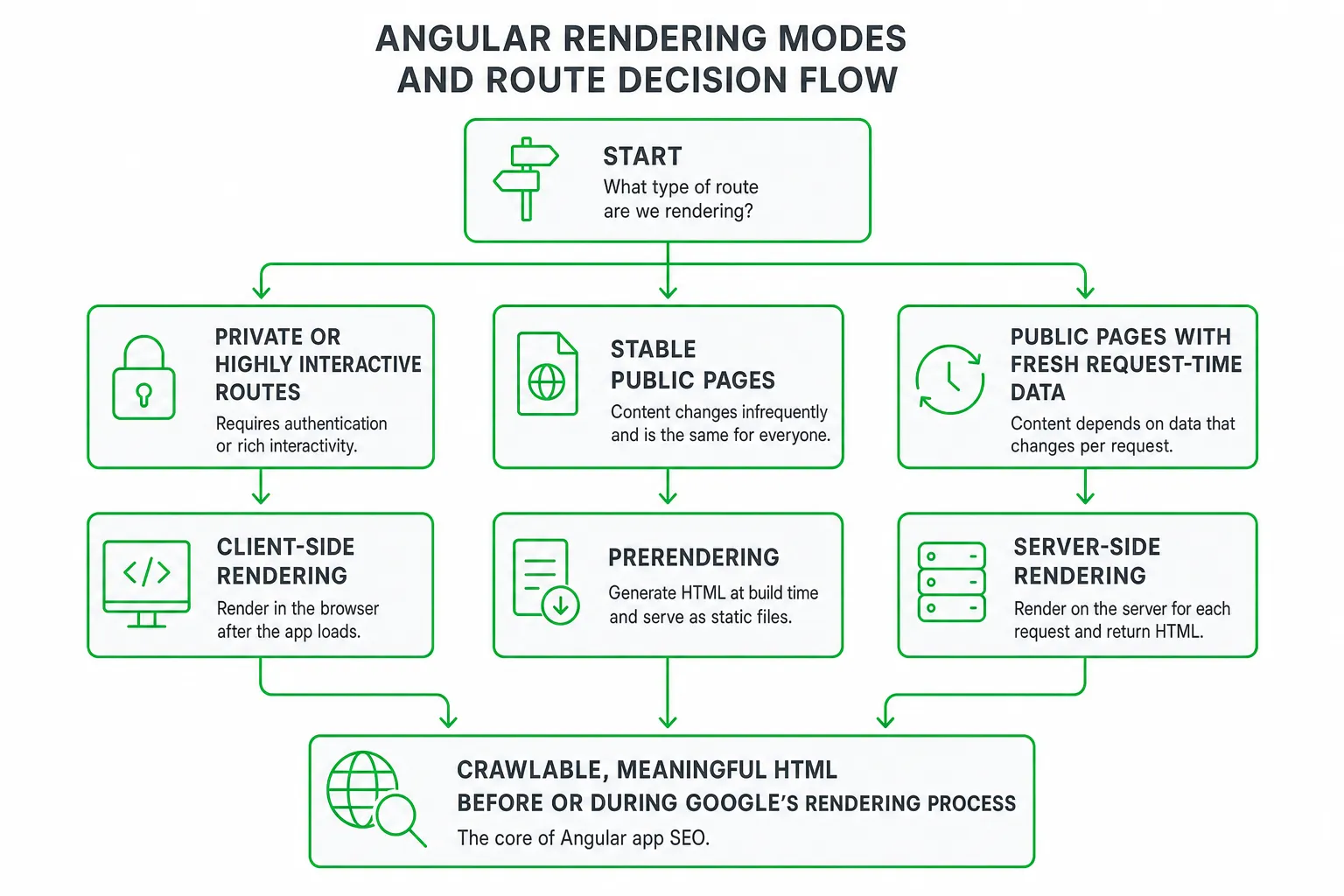
- Angular app SEO works best when important routes return meaningful, crawlable HTML before or during Google’s rendering process.
- Use client-side rendering for private app surfaces, prerendering for stable public pages, and SSR for public pages that need fresh request-time data.
- Manage titles, descriptions, canonicals, indexability, links, structured data, and visible content on a route-by-route basis.
- Validate both the raw HTML response and the rendered DOM. A page that looks correct in your browser can still send incomplete SEO signals to search engines.
Angular app SEO: the practical answer
Angular app SEO works best when important routes deliver crawlable, meaningful HTML before or during Google’s rendering process, rather than relying only on content that appears after client-side JavaScript runs.
Choose client-side rendering for private or highly interactive routes. Use prerendering for stable public pages. Use server-side rendering for public pages whose content changes by request. Then manage metadata, internal links, structured data, and performance for each route.
Why does this matter? Google Search Central explains that Google processes JavaScript applications through crawling, rendering, and indexing. Your Angular page needs to survive all three stages with its key content intact.
That makes Angular SEO a rendering and delivery problem, not only a keyword problem. You need to decide what HTML each route should return, how often it should change, and how you will prove that Google receives the right version.
How Angular rendering affects search visibility
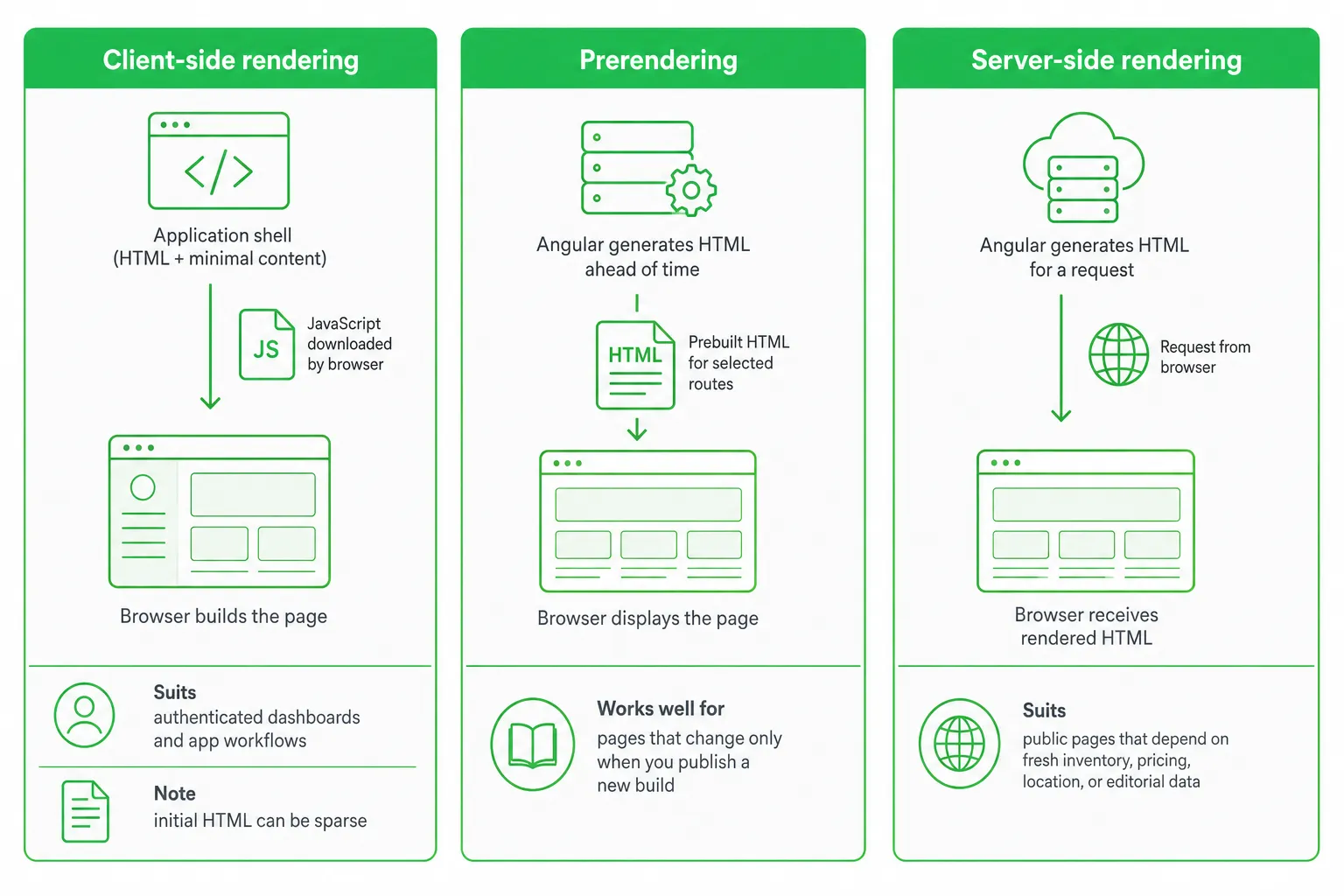
Angular’s rendering strategy documentation describes three primary approaches: client-side rendering, static site generation or prerendering, and server-side rendering.
- Client-side rendering: The browser receives an application shell and JavaScript builds the page. This suits authenticated dashboards and app workflows, but the initial HTML can be sparse.
- Prerendering: Angular generates HTML ahead of time for selected routes. This works well for pages that change only when you publish a new build.
- Server-side rendering: Angular generates HTML for a request. This suits public pages that depend on fresh inventory, pricing, location, or editorial data.
Angular applications ship as client-side rendered by default. Angular’s SSR guidance explains that SSR and prerendering can provide fully rendered HTML to crawlers.
Dynamic rendering can appear attractive when a legacy app is difficult to change. However, Google Search Central describes it as a workaround rather than a long-term solution and recommends server-side rendering, static rendering, or hydration instead.
Build the on-page SEO foundation
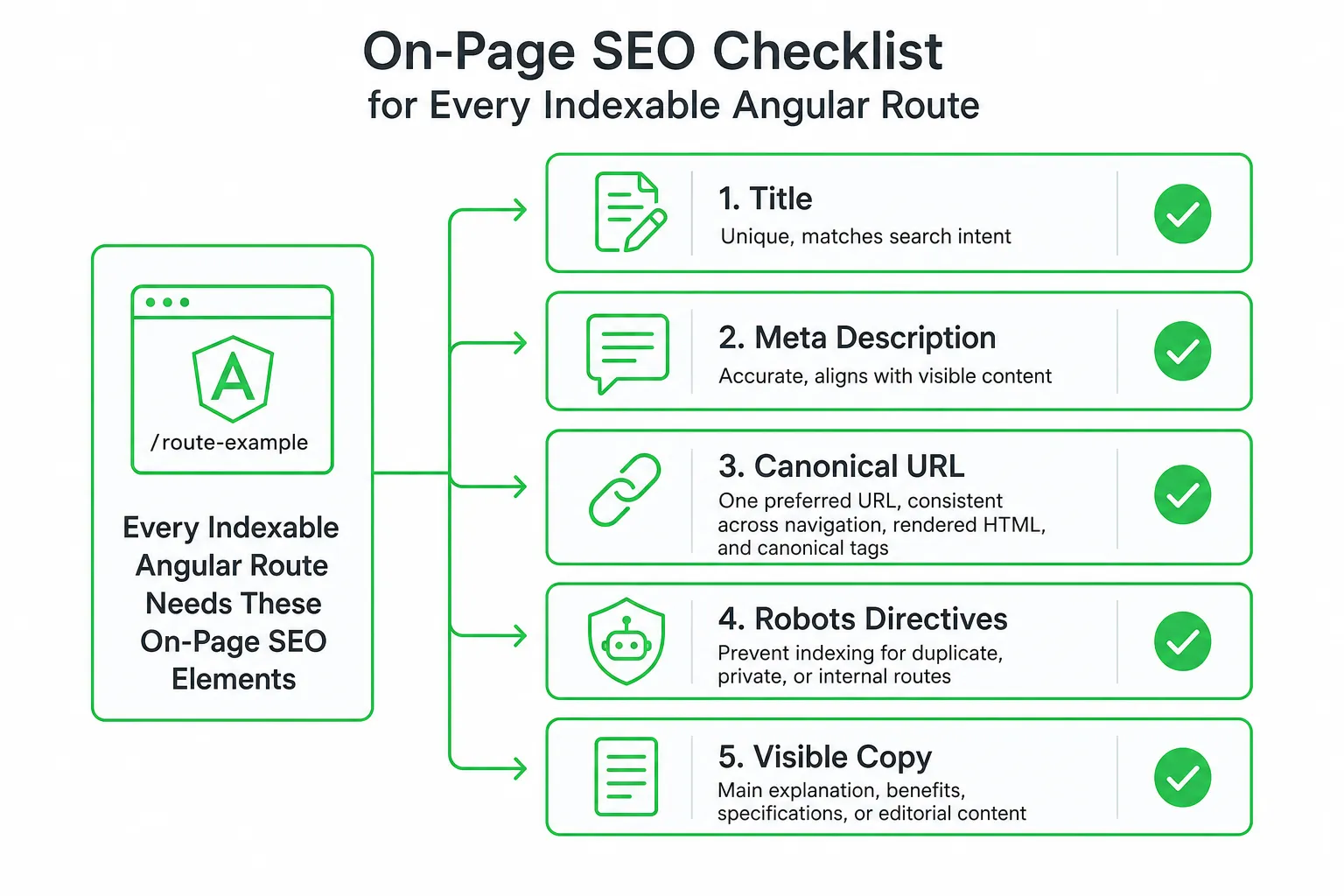
Rendering only solves part of the problem. Each indexable Angular route still needs complete, consistent on-page signals.
- Title: Generate a unique title that matches the page’s search intent.
- Meta description: Summarize the page accurately and align it with the visible content.
- Canonical URL: Use one preferred URL and keep it consistent across navigation, rendered HTML, and canonical tags.
- Robots directives: Prevent indexing where appropriate, especially for duplicate, private, or internal routes.
- Visible copy: Put the main explanation, benefits, specifications, or editorial content in the page HTML.
- Headings: Use a clear main heading and descriptive subheadings instead of relying on visual styling alone.
- Internal links: Link related pages with descriptive anchor text that Angular can render as crawlable links.
- Images: Add useful alt text and avoid using images as the only way to communicate important information.
Use Angular’s document metadata tools to update title and meta values when a route loads. Make sure those values also appear in the server-rendered or prerendered response. A title that appears only after a browser-side route change is weaker than one present in the initial HTML.
Add Open Graph and social preview metadata when sharing matters. Add Organization, WebSite, Article, Product, or FAQ structured data only when the page visibly supports it and the information is accurate. Do not add schema simply because a template makes it easy.
Choose rendering route by route
Start with a route inventory. For each route, record its content volatility, personalization, data dependencies, SEO value, conversion role, and rendering risks.
| Route type | Recommended mode | Why | Watch for |
|---|---|---|---|
| Marketing landing page | Prerendering | Stable HTML, fast delivery, easy caching | Rebuilds after content changes |
| Documentation or article | Prerendering | Search-focused content can be generated ahead of time | Publishing and invalidation workflow |
| Pricing or inventory page | SSR | Fresh request-time data reaches users and crawlers | Server load and data failures |
| Authenticated dashboard | CSR | Search visibility is usually irrelevant | Do not accidentally block linked public pages |
| Interactive internal workflow | CSR | Rich browser interaction matters more than indexable HTML | Keep public acquisition pages separate |
Prefer prerendering for evergreen landing pages, documentation, educational articles, and feature pages. Rebuild those routes when content changes.
Prefer SSR for pages that need fresh request-time data. Design caching around the freshness of that data. Do not render every request identically if pricing, stock, location, or editorial updates need different cache behavior.
Keep CSR for authenticated dashboards, internal workflows, and private app surfaces. If those areas support acquisition, link them to separate crawlable marketing pages rather than forcing the private interface to carry your SEO strategy.
Rendering trade-offs most guides overlook
The best Angular rendering mode is not automatically the one with the most server-rendered HTML. Compare server cost, build time, cacheability, data freshness, deployment complexity, hydration reliability, and maintenance effort.
- SSR: Delivers dynamic HTML, but increases request-time server work and creates more failure points around data fetching.
- Prerendering: Produces cache-friendly files, but build duration and content invalidation become part of your publishing process.
- CSR: Keeps the deployment model simple for app surfaces, but can leave search-focused content and metadata dependent on JavaScript execution.
Hydration can reduce the gap between server-rendered HTML and browser interactivity. According to Angular’s hydration documentation, reusing server-rendered DOM structures can improve Core Web Vitals, including First Input Delay, Largest Contentful Paint, and Cumulative Layout Shift.
Hydration also introduces its own reliability work. Audit browser-only APIs, random values, timestamps, unstable data, event handlers, and direct DOM mutations. Make each component deterministic where possible. Otherwise, defer it or exclude it from hydration when that is the safer choice.
Implement and validate Angular app SEO
Use this implementation sequence for each search-focused route:
- Classify the route as CSR, prerendered, or SSR based on its content and business purpose.
- Connect route-aware data fetching to the content that should appear in the initial HTML.
- Generate the title, description, canonical URL, robots directives, and social metadata from the route’s actual content.
- Render the main heading, body copy, links, images, and structured data in the same route output.
- Publish the URL in your XML sitemap when it is indexable and canonical.
- Inspect the raw response and the rendered page before release.
Inspect the raw HTML returned by the server or prerender build. Confirm that it contains the main heading, meaningful body copy, internal links, title, description, canonical, and relevant structured data.
Then inspect the rendered DOM after JavaScript executes. Look for content that disappears, links that become inaccessible, metadata that changes unexpectedly, and structured data that fails validation.
Use URL Inspection, rendered-page tests, crawl reports, structured-data validation, browser performance audits, and server monitoring. Investigate blocked assets, soft errors, redirect chains, hydration failures, missing routes, and request-time data errors.
If SSR data responses are unusually large, check Angular’s server-side HttpClient response limit. Angular documents a default limit of 1 MB and the maxResponseBodySize option for larger responses in its SSR guidance.
A practical SEO growth workflow for Angular teams
Start with commercial intent. List your landing pages, feature pages, comparison pages, documentation, articles, and conversion routes. Prioritize pages by organic opportunity, business value, and their role in the customer journey.
Do not migrate every route to SSR by default. A focused rendering plan is easier to deploy, test, cache, and maintain than a blanket architecture change.
Next, create a repeatable content workflow. Define keyword research, page briefs, internal linking, metadata review, publishing, and post-release monitoring as one process. Give each page an owner and a clear validation checklist.
For small SaaS teams and indie hackers, OneUp Today supports SEO and blog autopilot workflows alongside AI content creation, Google ranking efforts, Reddit lead generation, and multi-platform publishing. Its growth workflow can help you maintain content execution while a developer owns Angular rendering, deployment, structured data, and production validation.
That combination matters because SEO brings visitors, but consistent distribution creates more chances to reach buyers. In OneUp Today’s own data across 2,269 real Reddit cold DM conversations sent March to September 2026, 29.7% received at least one human reply, according to its Reddit DM benchmarks. Use that as a complementary acquisition channel, not a substitute for technically sound Angular pages.
Your next step for better Angular SEO
Angular app SEO becomes manageable when you make rendering a route-level decision, build complete metadata into every public page, and validate the HTML that search engines actually receive.
Take your route inventory today. Mark each route as CSR, prerendered, or SSR, then inspect one representative URL in raw HTML and rendered form. Fix the highest-value mismatch first.
Practical next step: Choose one commercial route, verify its rendering mode, inspect its metadata and visible HTML, and add it to your recurring SEO release checklist.
Frequently asked questions
Does Angular SEO require server-side rendering for all pages?
No. Client-side rendering works for private routes, prerendering suits stable public pages, and SSR fits pages needing fresh data. Choose per route.
How can I check if Google can crawl my Angular app properly?
Use Google Search Console's URL Inspection tool and the 'Fetch as Google' feature. Validate both the raw HTML response and the rendered DOM for key content.
What is the best way to handle dynamic content for Angular SEO?
Use server-side rendering for public pages with request-time data, like inventory or pricing. Prerender static content, and keep dynamic data in client-side rendering for private areas.
Can Angular prerendering improve SEO for e-commerce product pages?
Yes, if product details are stable between builds. Prerendering generates HTML ahead of time, ensuring crawlers see full content without waiting for JavaScript execution.
How do I set canonical URLs in an Angular app for SEO?
Use Angular's Meta service or a library like @ngx-meta to set canonical tags per route. Ensure the URL matches the page's preferred version and stays consistent across navigation.