
Sidebar Customization Now in OneUp Today Dashboard
Take Control of Your Workflow: Introducing Sidebar Customization in OneUp Today
Productivity platforms are at their best when they adapt to you, not the other way around. For busy professionals and teams who rely on OneUp Today to manage their content, campaigns, and analytics, a streamlined dashboard is essential. That’s why we’re excited to announce a highly requested update: the ability to fully customize your sidebar. Now, you can choose exactly which tools, features, and shortcuts appear in your workspace, ensuring a cleaner interface tailored to how you work. Read on to see how this small but powerful change can make a big difference in your daily productivity and brand management.
The Challenge: One Size Doesn’t Fit All
As digital workflows grow more complex, so do the platforms we use to manage them. Over time, dashboards can become cluttered, filled with features and navigation items that aren’t relevant to every user. For some, this means wasting precious seconds scrolling past unused sections; for others, it can lead to confusion or missed opportunities as important tools get buried. Especially in content marketing and social media management, fields where speed and clarity are essential, a cluttered sidebar isn’t just an inconvenience, it’s a productivity drain. Users have been asking for more control over their navigation, and we listened.
The Solution: A Sidebar That Works for You
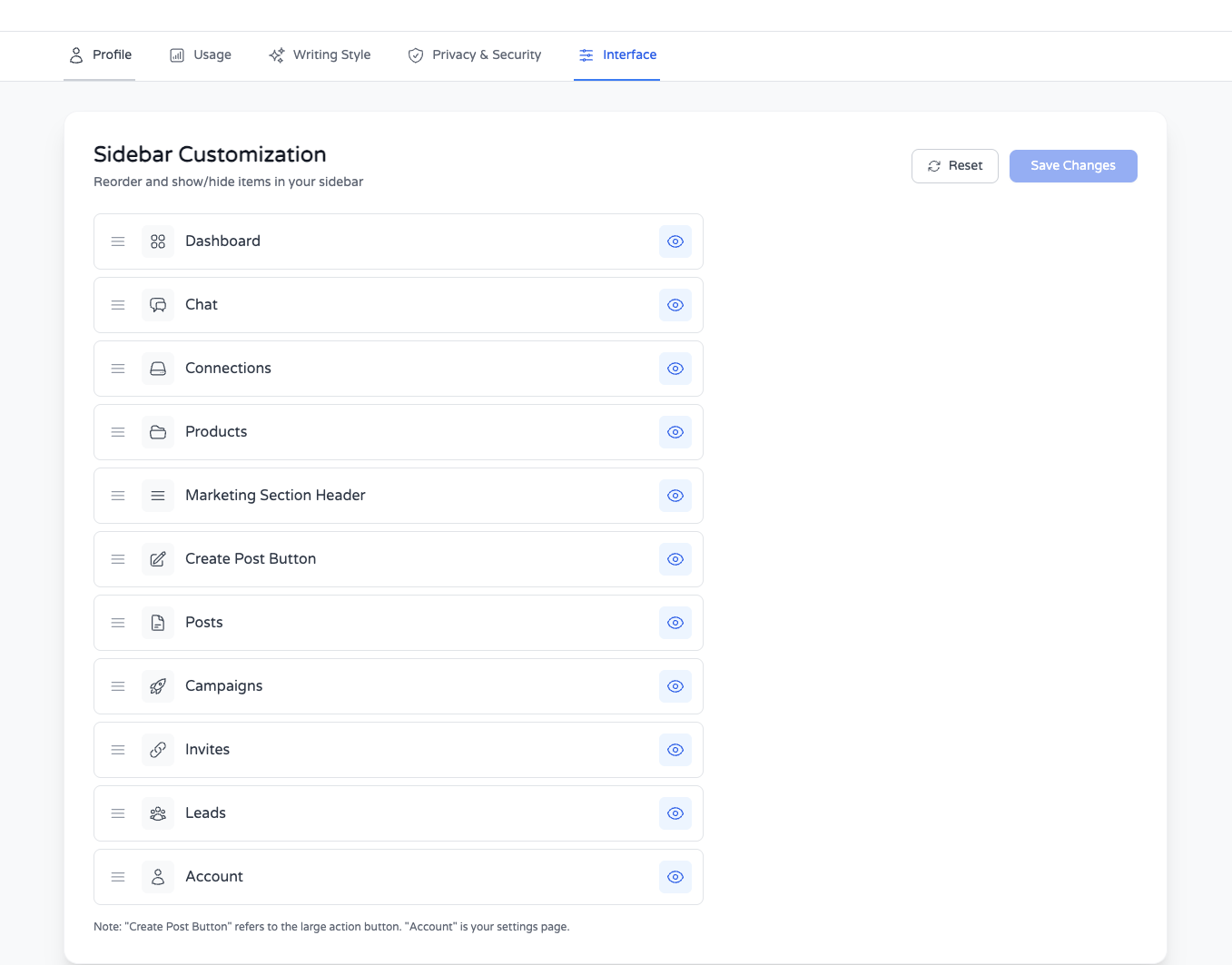
With our latest iteration, Iteration 28/10000 of building @oneup_today, we’re putting you in charge of your dashboard layout. The new sidebar customization feature allows you to:
- Customize sidebar items to fit your individual workflow
- Hide items you don’t use or need
- Reorder items so your most essential tools are always within easy reach
This isn’t just about aesthetics, it’s about efficiency and focus. By removing friction from your daily routine, you can concentrate more on what matters: creating high-performing content, engaging with your audience, and growing your brand.
How It Works: Simple, Flexible, and Powerful
Easy Customization for Any User
We designed sidebar customization to be both intuitive and robust. With just a few clicks, you can:
- Toggle visibility of sidebar items: Instantly hide sections you rarely use, such as legacy analytics or beta features.
- Drag-and-drop to reorder: Move your most-used modules, like Campaigns, Analytics, or Reddit Outreach, to the top for quick access.
- Save personalized layouts: Your sidebar preferences are securely saved to your profile, so your setup remains consistent wherever you log in.
Technical Approach
Under the hood, we’ve implemented a flexible configuration layer that maps sidebar components to user preferences. Each item is modular, so toggling visibility or changing order won’t disrupt the performance of the platform. User choices are stored in real time, enabling instant updates without the need for page reloads. This means less downtime and a seamless experience as you refine your workspace.
Real-World Scenarios
- Content Marketer: Jane manages multiple social channels but rarely uses the integrations tab. She hides it, brings Analytics to the top, and saves time every day.
- Startup Founder: Alex focuses on Reddit campaigns for lead generation. He places Reddit Campaigns and Conversation Tracking at the top, minimizing distractions from unused modules.
- Agency User: Priya runs reports for multiple clients. She customizes each team’s sidebar to highlight only the relevant campaign and reporting tools, simplifying onboarding and daily use.
Benefits & Outcomes: Your Dashboard, Your Rules
Sidebar customization is more than a cosmetic update, it’s a strategic improvement that empowers every user to work more efficiently. Here’s what you gain:
- Faster navigation: Go straight to the tools you use most, without distraction.
- Reduced cognitive load: Less clutter means greater focus and fewer mistakes.
- Personalized workflow: Adapt OneUp Today to your unique needs, whether you’re a solopreneur, agency, or enterprise team.
- Scalable efficiency: As your needs evolve, update your sidebar in seconds, no IT support required.
Ultimately, this feature enables users to reclaim control over their workspace and make OneUp Today truly their own, supporting the broader mission of helping brands grow with clarity and consistency.
Ready to Make OneUp Today Work for You?
The best productivity tools are those that adapt to their users. With fully customizable sidebars, OneUp Today continues to evolve into a platform that molds itself around your workflow, not the other way around. We invite you to log in, try out the new sidebar customization, and experience the difference for yourself. Have feedback or ideas for further improvements? Join the conversation and let us know, your insights shape the future of OneUp Today. For more details, check out our original announcement here. Your dashboard, your rules, let’s build the ultimate content management experience together.
Related articles
💬 Find customers on Reddit
Your next customer is on Reddit right now
OneUp Today finds people asking for a product like yours, drafts the DM or reply in your voice, and you approve every send.
$3 free credit · No card, no subscription · Leads in under 60 seconds