
Proactive Uptime: Custom Down Detector for Website Monitoring
Proactive Uptime: Building a Custom Down Detector for Your Website
Imagine waking up to a flood of customer messages, all reporting that your website or app has been down for hours. For many developers and business owners, this is an all-too-familiar nightmare. In today’s always-on digital landscape, every minute of downtime can mean lost revenue, damaged reputation, and frustrated users. That’s why monitoring uptime and reacting quickly to outages isn’t just a luxury, it’s a necessity.
Recently, I tackled this head-on by building my own custom down detector for my web application. The process was both enlightening and empowering, giving me full control over the monitoring and recovery process. In this article, I’ll share why I made this move, the specific problems I faced, how I implemented my solution, and the benefits it brings to anyone running online services. You can also check out my original announcement here.
The Problem: Blind Spots in Application Reliability
No matter how robust your application is, unexpected issues can and do occur. For small teams or solo developers, the challenge is even greater: without a dedicated operations team or expensive monitoring solutions, outages often go undetected until users start complaining. This reactive approach has several key pitfalls:
- Delayed Response: You only learn about downtime after users are affected, sometimes hours later.
- Customer Frustration: Users lose trust if issues aren’t caught and resolved quickly.
- Reputational Damage: Frequent or prolonged outages can harm your brand’s credibility, especially if they go unnoticed.
- Lost Revenue: Every minute your app is down could mean lost sales or missed opportunities.
Before I built my own down detector, my only way to know my app was offline was through customer notifications or if I happened to check manually. This approach simply wasn’t sustainable or scalable. I needed a proactive system to keep my site reliable, and to give my users peace of mind.
The Solution: A Custom Down Detector with Automated Rollback
To address these challenges, I decided to create a custom script that continuously monitors my website’s uptime and responds instantly to any issues. Here’s how the solution works at a high level:
- Automated Health Checks: After every deployment or update, the script checks if the server is up and responding correctly.
- Rollback on Failure: If the script detects an error or downtime, it automatically rolls back to the last known working version of the app.
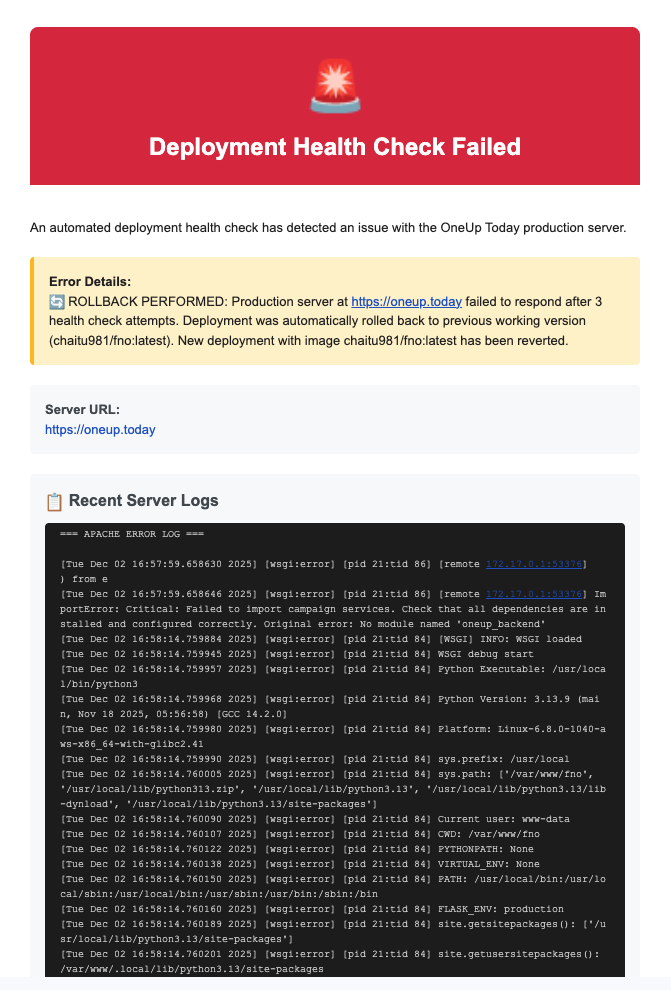
- Instant Alerts: Upon rollback or detection of downtime, it sends an alert email directly to me so I can investigate further.
This system transforms the way I handle uptime. Instead of waiting for users to find problems, I’m now the first to know, and the app can recover automatically, reducing disruption. Special thanks to @ramkoo9999 for alerting me to a previous outage, which inspired this improvement.
Implementation Details: How the Down Detector Works
Health Check Script
The core of the system is a script that pings the website at regular intervals (especially after deployments). It checks for:
- HTTP status codes to confirm the server is live
- Expected content in the response (to ensure the right page is loading)
- Response time, flagging any significant slowdowns
Automated Rollback
If the script detects any anomaly (like a 500 Internal Server Error or a missing element), it triggers a rollback mechanism. This is typically handled with version control tools or deployment scripts, reverting the live site to the previous stable release, minimizing downtime.
Alert Notifications
Simultaneously, the script sends an email alert with diagnostic details, so I can review logs and take further action if needed. This immediate notification loop keeps me in the driver’s seat, no matter where I am.
Real-World Scenarios
- Scenario 1: You push a new feature to production late at night. If something breaks, the script detects it within minutes, rolls back, and sends you an email, users never see a broken site.
- Scenario 2: A dependent service (like a database or external API) becomes unavailable. The system spots the outage, rolls back to a safe state, and alerts you, preventing cascading failures.
- Scenario 3: During a busy launch day, you can deploy confidently knowing your down detector is guarding your uptime, allowing you to focus on your users and marketing.
Benefits & Outcomes: What Users Gain
Implementing a custom down detector isn’t just about technical peace of mind, it delivers tangible benefits to both developers and users:
- Proactive Reliability: You address issues before users are impacted, strengthening trust.
- Continuous Deployment Safety: Deploy updates with confidence, knowing you have a safety net.
- Reduced Manual Checks: Free up time and mental bandwidth, no more obsessive refreshing or late-night site checks.
- Faster Incident Response: Instant alerts mean you can fix issues before they escalate.
- Better Customer Experience: Users enjoy a more stable, reliable app with fewer disruptions.
For anyone running a SaaS app, ecommerce site, or even a personal blog, this kind of automated monitoring is a game-changer. It’s a critical step toward professional-grade operations, even if you’re a team of one.
Next Steps: Bringing Proactive Monitoring to Your Workflow
Building your own down detector may seem like a small technical upgrade, but its impact is transformative. It’s about shifting from reactive firefighting to proactive reliability, delivering seamless service to your users and peace of mind to yourself. If you run any online service, consider implementing a similar system, tailored to your stack and needs.
If you’d like to see the inspiration for this project, check out my original post on Twitter. Got questions or want to share your own uptime strategies? Drop a comment below or reach out, I’d love to hear how you’re keeping your apps resilient!
Related articles
💬 Find customers on Reddit
Your next customer is on Reddit right now
OneUp Today finds people asking for a product like yours, drafts the DM or reply in your voice, and you approve every send.
$1 free credit · No card, no subscription · Leads in under 60 seconds