
Best Blogger SEO Plugin Options
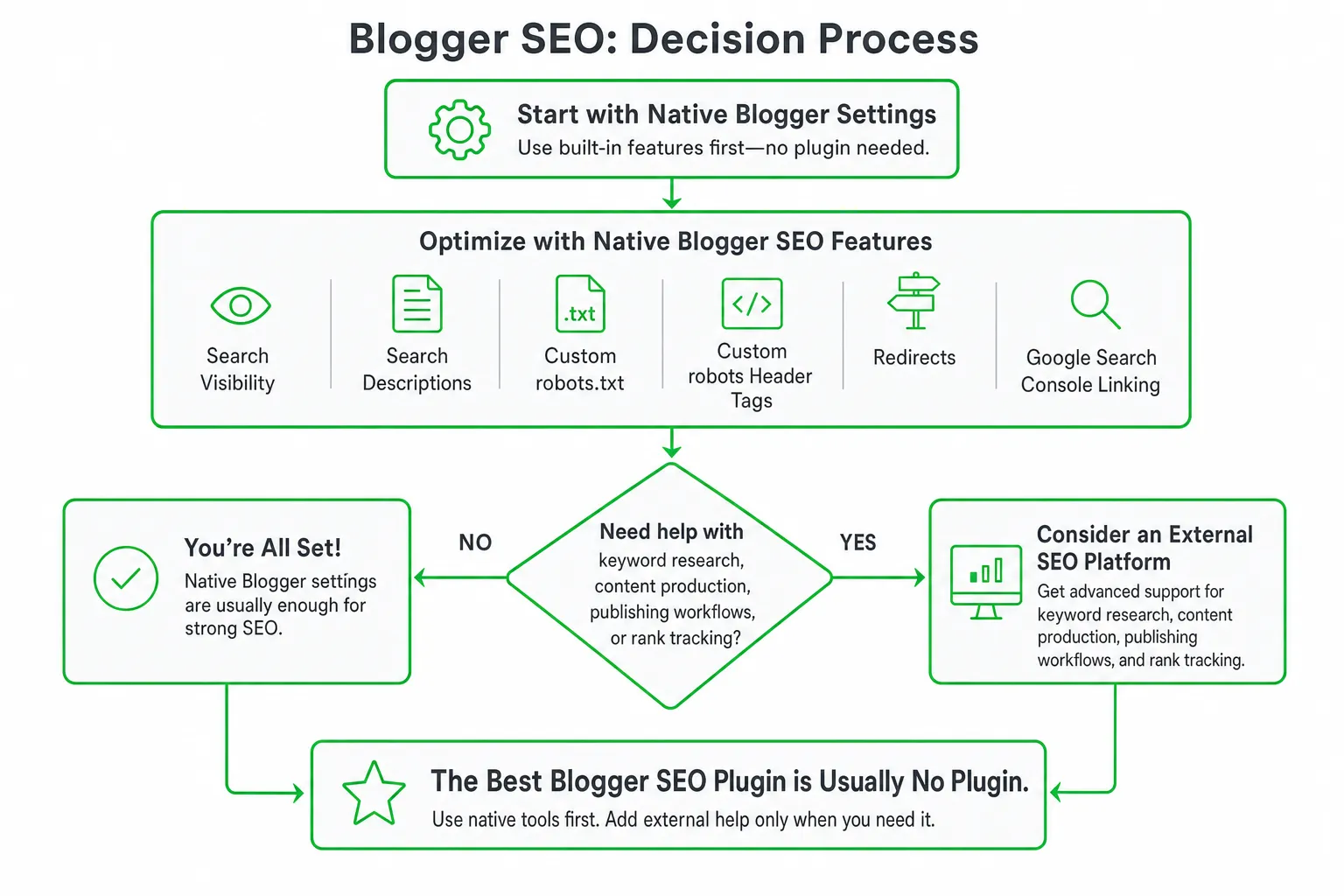
The best blogger SEO plugin is usually no plugin. Blogger already includes native controls for search visibility, search descriptions, custom robots.txt, custom robots header tags, redirects, and Google Search Console linking.
Use an external SEO platform only when you need help with keyword research, content production, publishing workflows, or rank tracking. That distinction matters because many tools ranking for this query are built for WordPress, not Blogger.
Key takeaways
- Blogger does not share WordPress’s plugin ecosystem, so WordPress SEO plugins cannot be assumed to work on Blogger.
- Configure Blogger’s native SEO settings before paying for an external tool.
- Use content and keyword tools to improve what you publish, not to pretend they edit Blogger’s technical settings.
- Verify whether a platform can publish directly to Blogger or only create drafts, export content, or track rankings.
The Best Blogger SEO Plugin Is Usually No Plugin
Blogger works differently from WordPress. You do not install a WordPress-style SEO plugin and expect it to control your Blogger blog. Instead, Blogger gives you a set of native settings for managing core search visibility.
According to Google Blogger Help, Blogger includes controls for search visibility, search descriptions, custom robots.txt, custom robots header tags, custom redirects, and Google Search Console linking.
That makes Blogger’s built-in settings the right starting point for most sites. You can control whether the blog is visible to search engines, describe the site, manage crawler instructions, handle changed URLs, and connect the blog to Search Console without adding a plugin.
External tools still have a role. They can help you find topics, organize content, draft articles, optimize images, publish through supported connections, or monitor rankings. They simply do not replace Blogger’s native technical settings.
Blogger SEO Tools Versus WordPress Plugins
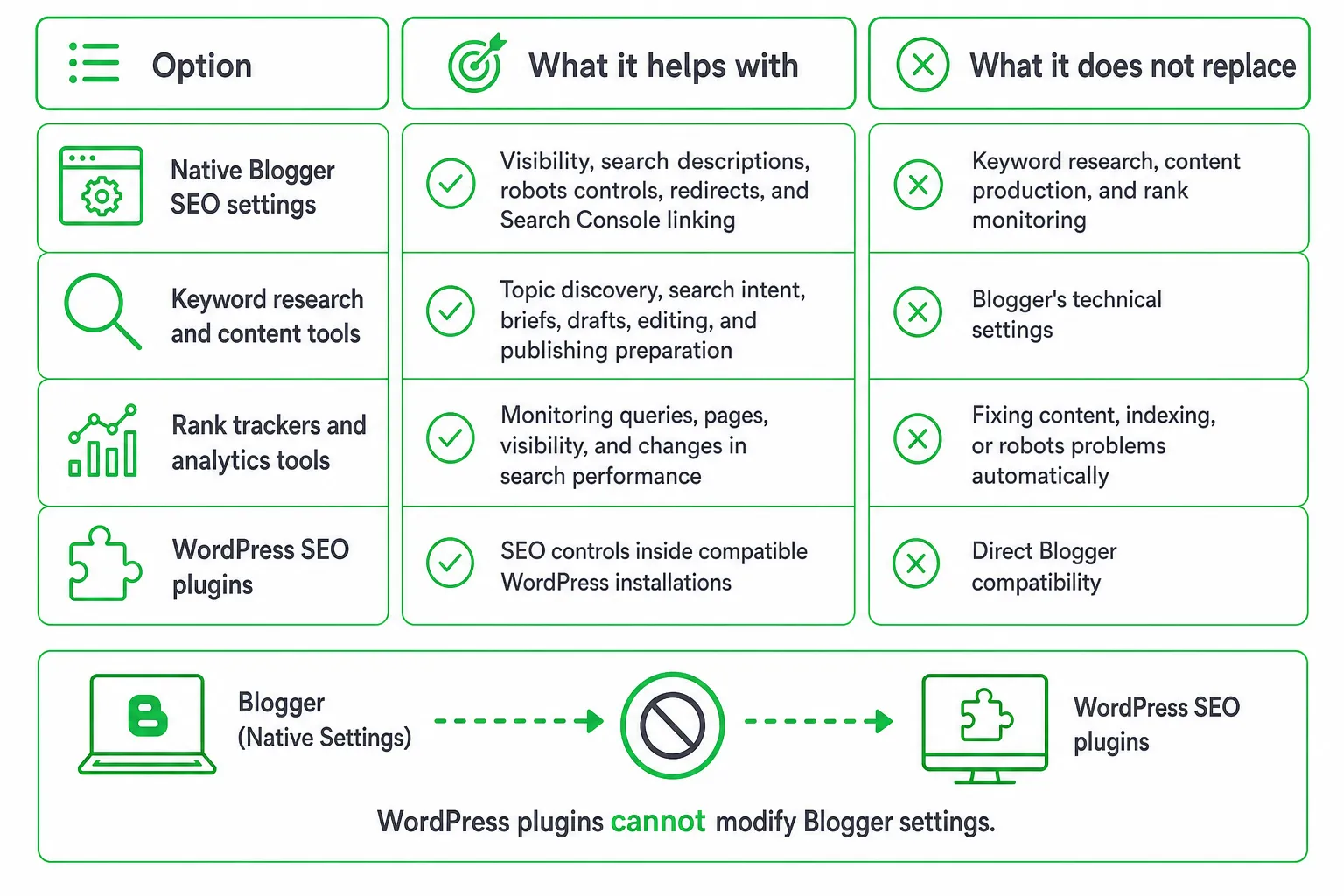
WordPress plugins can often modify metadata, sitemaps, schema, redirects, internal links, and other technical settings inside WordPress. That does not mean the same plugin can edit Blogger settings.
A Blogger workflow usually combines native Blogger controls with separate tools. Each tool handles a different job:
| Option | What it helps with | What it does not replace |
|---|---|---|
| Native Blogger SEO settings | Visibility, search descriptions, robots controls, redirects, and Search Console linking | Keyword research, content production, and rank monitoring |
| Keyword and content tools | Topic discovery, search intent, briefs, drafts, editing, and publishing preparation | Blogger’s technical settings |
| Rank trackers and analytics tools | Monitoring queries, pages, visibility, and changes in search performance | Fixing content, indexing, or robots problems automatically |
| WordPress SEO plugins | SEO controls inside compatible WordPress installations | Direct Blogger compatibility |
The commercial question is not simply, “Which plugin has the most features?” Ask instead, “Where is my bottleneck?” You may need better technical control, better content, a smoother publishing process, or clearer performance data.
Blogger’s Native SEO Settings to Configure
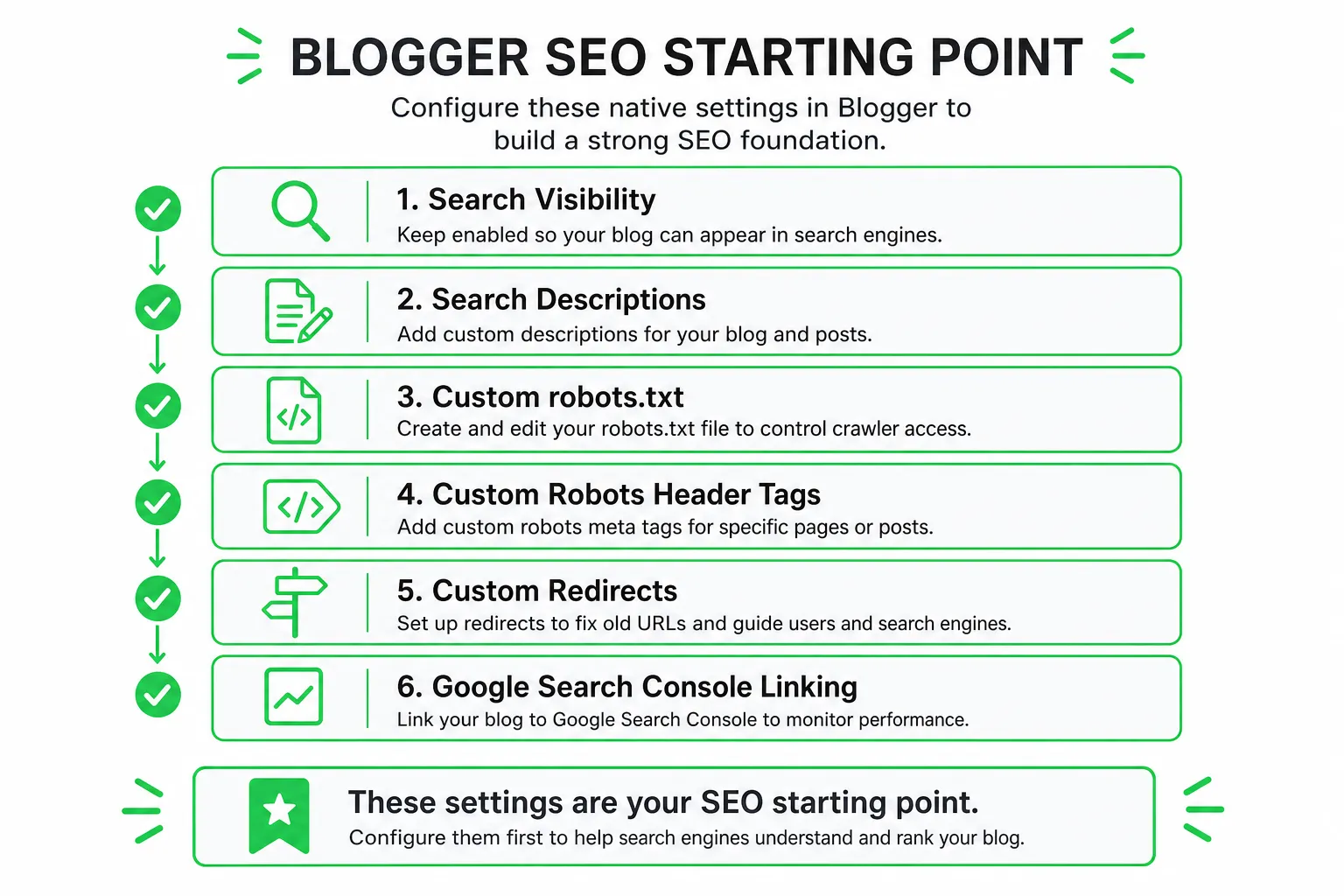
Start with the settings that affect whether search engines can discover and understand your blog. Open Blogger’s settings and review the search visibility option. Keep it enabled if you want your public posts to appear in search.
Next, write a useful blog search description. Describe what the site covers and who it helps. Avoid filling the field with disconnected keywords. A clear description gives visitors and search systems useful context.
Connect Google Search Console through Blogger’s available integration. This gives you a place to review indexing and search performance after you publish.
Review custom robots.txt and custom robots header tags carefully. These settings can tell crawlers which resources or pages they should not process. Use them for a clear reason, not because a template or tutorial recommends copying a complex rule.
Use custom redirects when a Blogger URL changes. Test the old and new addresses after saving the rule. A broad redirect can send visitors to the wrong page or interfere with valid URLs.
- Enable search visibility for the blog.
- Write a specific search description that matches the site.
- Connect Google Search Console.
- Review robots.txt and robots header tags before changing them.
- Add redirects only for URLs that genuinely moved.
- Publish a test post and verify its title, description, indexability, and final URL.
The Practical Blogger SEO Checklist
Native settings create the foundation. Your posts still need to answer real questions clearly and make the page easy to understand.
- Write descriptive titles: Google Blogger Help recommends keeping post titles under 60 characters and making them specific to the page.
- Use clear headings: Organize the post around the reader’s questions instead of adding headings for decoration.
- Add meaningful image text: Give useful images descriptive alt text and titles.
- Match one search intent: Decide whether the reader wants an explanation, comparison, tutorial, review, or product option.
- Use the topic naturally: Include the primary subject in the title and opening when it accurately describes the page.
- Build relevant internal links: Link to related posts where the reader needs more detail.
- Improve the actual answer: Add original examples, accurate instructions, readable formatting, and clear next steps.
- Use robots tags selectively: Apply them only when a page should not appear in search.
These recommendations follow Google Blogger Help, which covers descriptive headings, image alt text and titles, title length, and custom robots tags.
After publishing, use Search Console to inspect indexing and review the queries and pages associated with your site. If a page receives impressions but few clicks, improve the title and description. If a page is not indexed, investigate the page status and robots settings before rewriting the article.
Which Blogger SEO Plugin Options Are Worth Considering?
There are four practical categories to consider. Only one directly changes Blogger’s own SEO configuration.
Native Blogger SEO controls: Best for technical settings
Choose Blogger’s built-in controls when you need search visibility, search descriptions, robots settings, redirects, or Search Console linking. This is the closest thing to a native Blogger SEO plugin, and it does not require installing a WordPress extension.
External keyword and content tools: Best for production
Use an external platform when you need topic research, content briefs, drafting help, editing support, diagrams, or a repeatable publishing workflow. These tools can improve the material you send to Blogger, but they do not automatically modify Blogger’s robots settings or metadata unless they explicitly support that connection.
External rank trackers: Best for monitoring
A rank tracker helps you see how pages perform after publication. It reports search visibility and changes over time. It does not automatically fix weak content, blocked pages, poor internal linking, or mismatched search intent.
WordPress SEO plugins: Best for WordPress
WordPress plugins can be excellent when your site runs on WordPress and the plugin supports your installation. They are not automatically suitable for Blogger. Check the platform connection before you pay or install anything.
The Missing Distinction: Blogger Settings or External SEO Automation?
This is the distinction most “best Blogger SEO plugin” lists miss. A tool that edits Blogger settings is fundamentally different from a platform that creates articles, publishes through another connection, or reports rankings after publication.
Before buying, check what the product actually does:
- Can it connect directly to Blogger?
- Can it edit Blogger metadata?
- Can it manage Blogger robots controls?
- Can it publish a finished article to Blogger?
- Does it only export drafts or provide reports?
- Does it support the site platform you currently use?
Do not choose a WordPress plugin just because it ranks for this keyword. WordPress compatibility does not make a tool installable or effective on Blogger.
Google makes the same distinction from another angle. Google Search Central says third-party SEO tools can support SEO work, but using a tool does not guarantee that a site will rank successfully.
Your content, site structure, indexing, and usefulness still determine whether the workflow produces a strong page.
OneUp Today as an External Blogger SEO Workflow
OneUp Today fits the external content and monitoring category. Its SEO Autopilot can research keywords, create on-brand articles with diagrams and schema, and track rankings. Its listed publishing connections are self-hosted WordPress, signed webhooks for custom backends, and a private feed for Next.js or other headless or static sites. Blogger is not listed as a direct publishing connection on the OneUp Today SEO Autopilot feature page.
That means you should treat it as a research and content workflow for Blogger unless you confirm a transfer method that works for your setup. Create the article, review its claims and structure, move it into Blogger, then verify the final page inside Blogger and Search Console.
The listed SEO Autopilot pricing is $0.99 per article, $0.10 per image, and $1 per site per month for rank tracking, with $3 of starting credit and no credit card required. Its listed publishing schedule supports up to 3 articles daily, up to 7 articles weekly, and a maximum of 100 articles per month across connected sites. Those limits apply to the listed publishing connections, not a direct Blogger integration.
For broader content operations, OneUp Today also states that scheduling is free, with $0.02 per post, $0.10 per image, $0.50 per video, and $0.02 per X post. That pricing matters only if the external workflow saves you enough production time and still leaves you in control of the Blogger publishing and review process.
How to Choose and Start Without Wasting Money
Choose native Blogger controls if your priority is technical configuration. Choose an external platform if your bottleneck is topic research, writing, publishing preparation, or rank monitoring.
Test the workflow before committing to a larger subscription:
- Configure Blogger’s native search and robots settings.
- Choose a focused topic and create a draft for a real search intent.
- Transfer or publish the draft into Blogger using the method the tool actually supports.
- Check the title, search description, headings, images, links, and final URL.
- Inspect the page in Search Console and confirm that robots settings have not blocked it.
- Track the page and improve the content based on relevant search queries and visitor needs.
Avoid paying for several overlapping tools that all generate metadata while leaving the larger problems unresolved. Better fields cannot compensate for an unfocused article, missing internal links, weak examples, or an indexing mistake.
Bottom line: Configure Blogger first. Add Search Console and a suitable rank tracker. Then trial an external content platform only if it solves a specific production or monitoring problem. The best blogger SEO plugin option is the one that matches your platform and your actual bottleneck, not the one with the longest WordPress feature list.
Next step: Review Blogger’s native SEO settings today, then test one external content workflow from draft to indexed page before buying anything larger.
Frequently asked questions
Can I install a WordPress SEO plugin on Blogger?
No, WordPress SEO plugins cannot be installed on Blogger. Blogger uses its own platform with native settings for SEO, not a plugin system. To manage SEO on Blogger, you must use its built-in controls or external tools that integrate with Blogger.
What is the best free SEO plugin for Blogger?
There is no single best free SEO plugin for Blogger because the platform lacks a plugin ecosystem. Instead, use Blogger's free native settings for technical SEO, and pair them with free tools like Google Search Console or keyword research tools for content optimization.
How do I add meta tags to Blogger without a plugin?
You can add meta tags to Blogger by editing the HTML template directly. Go to Theme > Edit HTML, and insert meta tags like description or keywords in the <head> section. However, Blogger already generates basic meta tags automatically based on your search description settings.
Does Blogger have a built-in sitemap feature?
Yes, Blogger automatically generates a sitemap for your blog. It is accessible at yourblog.blogspot.com/sitemap.xml. You do not need a plugin for this; just submit the sitemap URL to Google Search Console for indexing.
What external SEO tools work best with Blogger?
External SEO tools that work best with Blogger include keyword research tools like Ahrefs or SEMrush for topic discovery, and rank trackers like AccuRanker. These tools help with content and monitoring but do not replace Blogger's native technical settings.