
Best Feedback Collection Tools for Small Teams
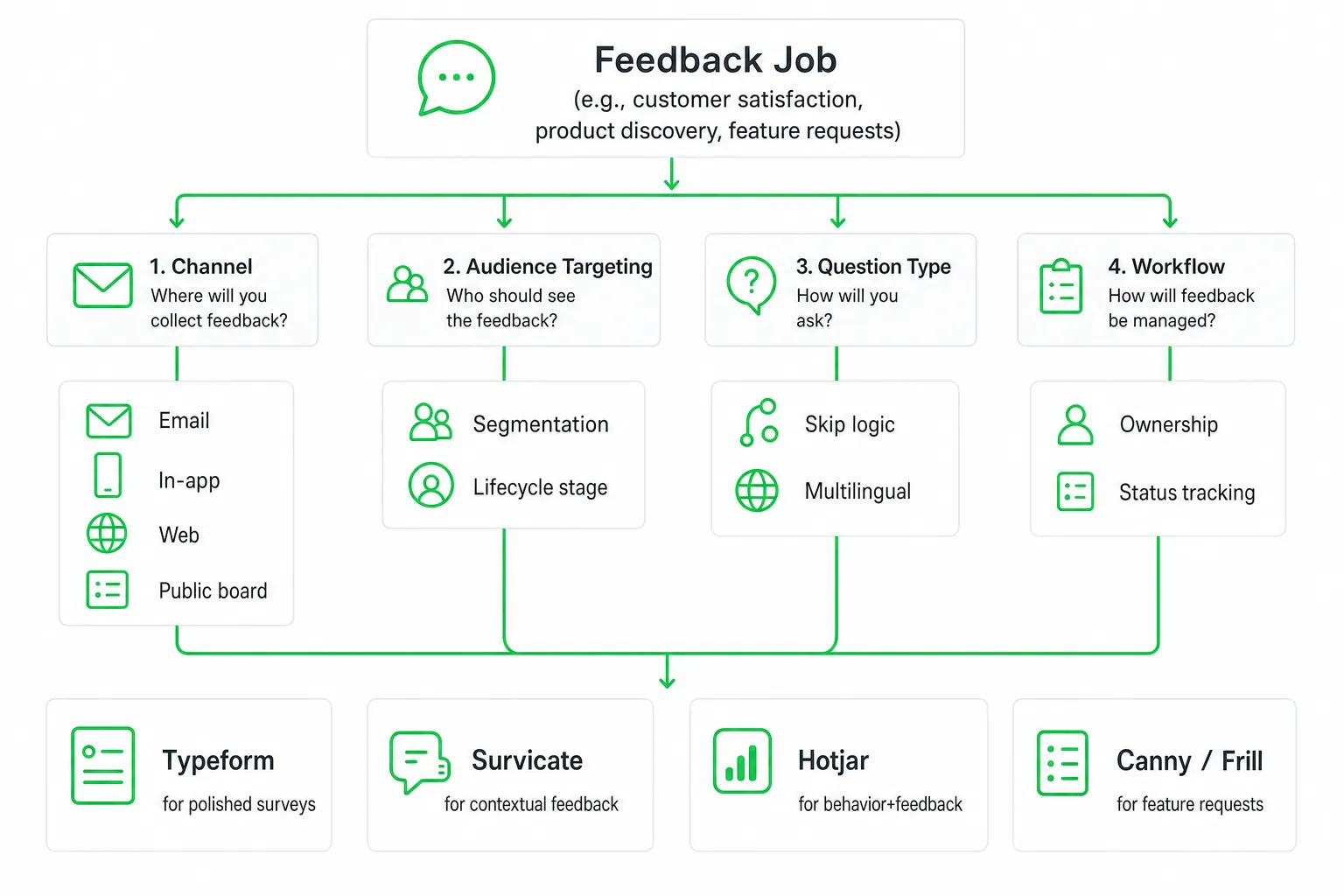
Typeform, Survicate, Hotjar, Canny, and Frill are among the best feedback collection tools for small teams. Choose based on the feedback job, the channel where customers already engage, and how easily your team can turn responses into owned actions. The right tool should collect useful input without creating another system nobody checks.
That distinction matters because response rates are uneven, participation is declining, and many teams still collect feedback without routing it to someone who can act.
Key takeaways
- Choose Typeform for polished surveys, Survicate for contextual website and in-product feedback, Hotjar for behavior-plus-feedback research, and Canny or Frill for feature requests.
- Compare channels, targeting, integrations, ownership workflows, and total implementation effort, not just templates.
- Build a loop that assigns feedback to an owner, records the next action, and closes the loop with the customer.
- Use a small pilot to test whether your team will consistently collect, interpret, and act on feedback.
The Best Feedback Collection Tools at a Glance
Start with the feedback job. A survey builder is not automatically the best product-feedback platform, and a public roadmap is not the right tool for a private customer interview.
| Tool | Best for | Why small teams consider it |
|---|---|---|
| Typeform | Polished surveys and forms | Conversational questionnaires that represent a modern SaaS brand. |
| Survicate | Targeted website, email, and in-product feedback | Contextual questions without a heavy implementation. |
| Hotjar | Feedback plus website behavior | Combines surveys with recordings, heatmaps, and qualitative context. |
| Canny or Frill | Feature requests and public roadmaps | Organizes ideas, votes, customer context, and product communication. |
| OneUp Today | Growth follow-through | Useful when customer insight should inform approved AI-assisted content, outreach, chat, and growth workflows rather than replace a dedicated feedback platform. |
Typeform: Make the request feel easy. Use it for onboarding feedback, post-purchase questions, user research, and structured forms where presentation matters.
Survicate: Ask in context. Use it when you want to ask about a page, feature, or moment in the customer journey without building a large experience-management program.
Hotjar: Add behavioral evidence. Survey answers tell you what someone says. Behavior tools help you understand what happened around that answer.
Canny or Frill: Make product requests visible. These tools fit teams that need voting, customer segmentation, roadmap communication, and a consistent way to manage ideas.
How to Choose a Feedback Collection Tool
First, define the decision the feedback will support. You may need customer satisfaction feedback, product discovery, bug reports, feature requests, user research, reviews, or ongoing voice-of-customer tracking. Each job needs a different collection experience.
- Match the channel: Consider email surveys, web links, embedded forms, in-app prompts, chat, SMS, review requests, and public feedback boards.
- Match the audience: Look for segmentation, lifecycle targeting, account context, anonymous responses, and duplicate prevention.
- Match the question: Check skip logic, question types, multilingual support, accessibility, and mobile usability.
- Match the workflow: Prioritize tagging, sentiment analysis, dashboards, alerts, exports, integrations, ownership, and status tracking.
Then test the complete path. Create a request, target an audience, submit a response, tag it, assign an owner, notify a teammate, export the data, and send a follow-up. A tool that looks simple during a demo can feel very different when you operate it every week.
The Main Types of Feedback Tools
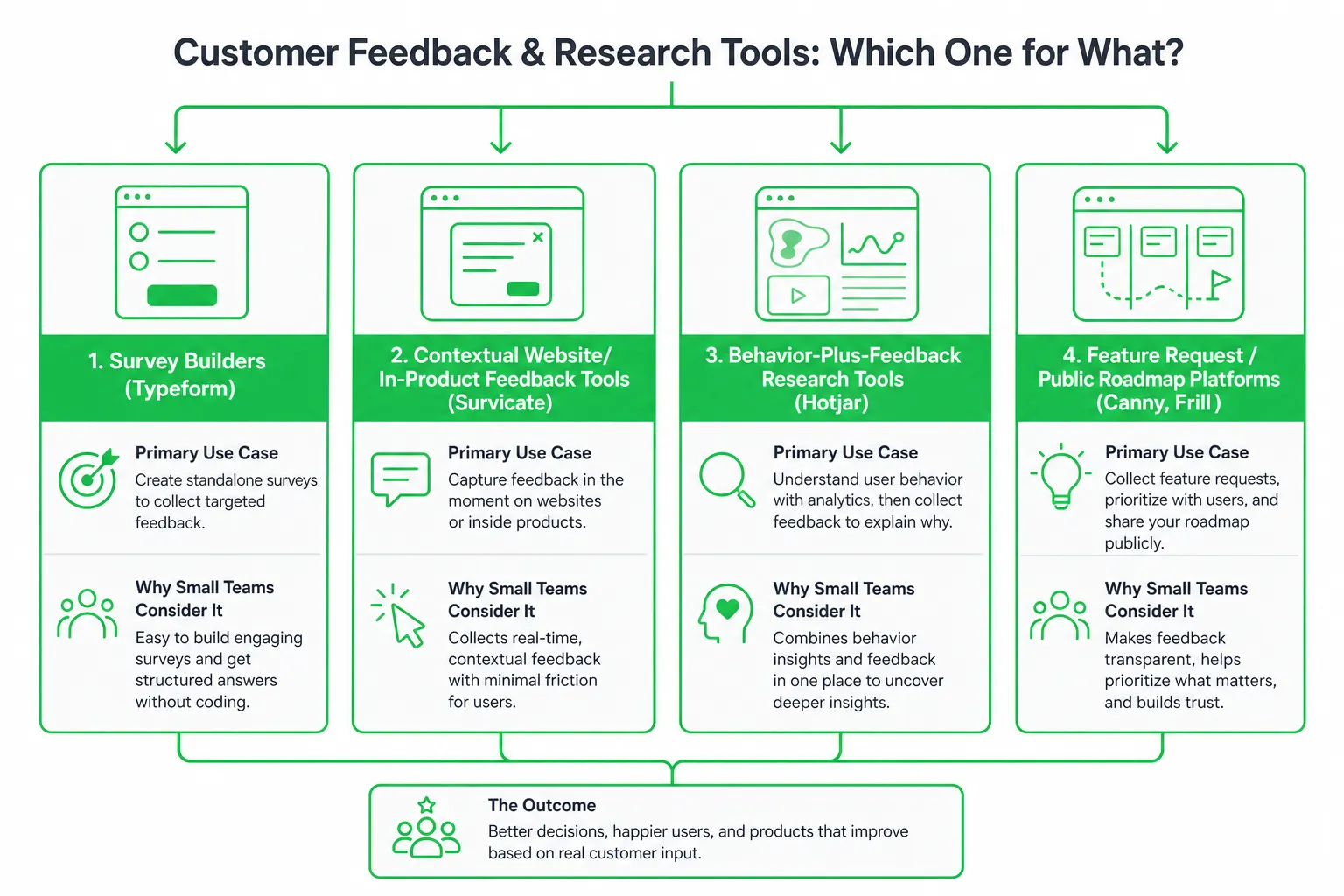
Survey and form builders
Typeform and Google Forms work well for structured research, onboarding feedback, post-purchase surveys, and simple internal workflows. They are a good fit when you need flexible questionnaires and low setup effort.
They become less suitable when you need product-request prioritization, account-level context, public status updates, or a complex feedback operation.
Website and in-product feedback tools
Survicate and Hotjar help you capture feedback at the moment a user experiences a page, feature, or point of friction. This context can make an answer more useful than a generic request sent long after the interaction.
Use targeting carefully. Ask a relevant question to a relevant audience, rather than showing the same prompt to every visitor.
Product feedback platforms
Canny and Frill organize feature requests, votes, customer context, roadmaps, and public responses. They are particularly useful when customers repeatedly ask for similar improvements and your team needs a visible prioritization process.
Public boards also create a communication obligation. If customers can see requests, give them a clear status or explanation when priorities change.
Experience-management platforms
Qualtrics and Medallia support broader experience programs, governance, analytics, and cross-channel reporting. They can suit larger organizations or teams with formal customer-experience operations.
For a small team, the added administration may outweigh the extra capability. Buy that level of tooling only when the operating model justifies it.
Chat, support, and community tools
Support conversations, website chat, and communities capture unsolicited feedback that surveys never request. They often reveal confusion, objections, missing features, and language customers naturally use.
Use these channels alongside a structured tool. Store recurring themes, connect them to customer context, and route actionable feedback to an owner.
What Feedback Collection Tools Often Miss
Feature lists rarely show the hardest part of feedback collection: earning participation and doing something useful with the answer.
Response rates depend on the channel
SurveyMonkey’s 2025 platform data reports average response rates of 49.17% for email, 34.37% for mobile in-app surveys, 29.95% for web links, 18.54% for SMS, and 3.65% for pop-up surveys. SurveyMonkey shows why channel fit and timing matter more than counting templates.
Use email when you have a relationship and enough context. Use an in-product prompt when the question relates directly to an action. Treat a pop-up as a deliberate interruption, not a default collection method.
Participation is getting harder to earn
Medallia reports survey response rates declining from 10.5% in Q1 2024 to 8.6% in Q3 2025. Feedback-request email open rates also declined from 56.2% to 50.7% over the same period. See Medallia’s 2026 State of CX report.
That makes timing, relevance, brevity, and follow-up operational requirements. A tool cannot compensate for an irrelevant request sent at the wrong moment.
Collection is not the same as action
The best tool routes each response to an owner, triggers an alert or workflow, records the next action, and gives the customer a clear status or reply.
Judge usability operationally. Ask how quickly a nontechnical teammate can launch a request, segment recipients, interpret results, connect feedback to a customer, and remove stale or duplicate requests.
A Practical Comparison for Small Teams
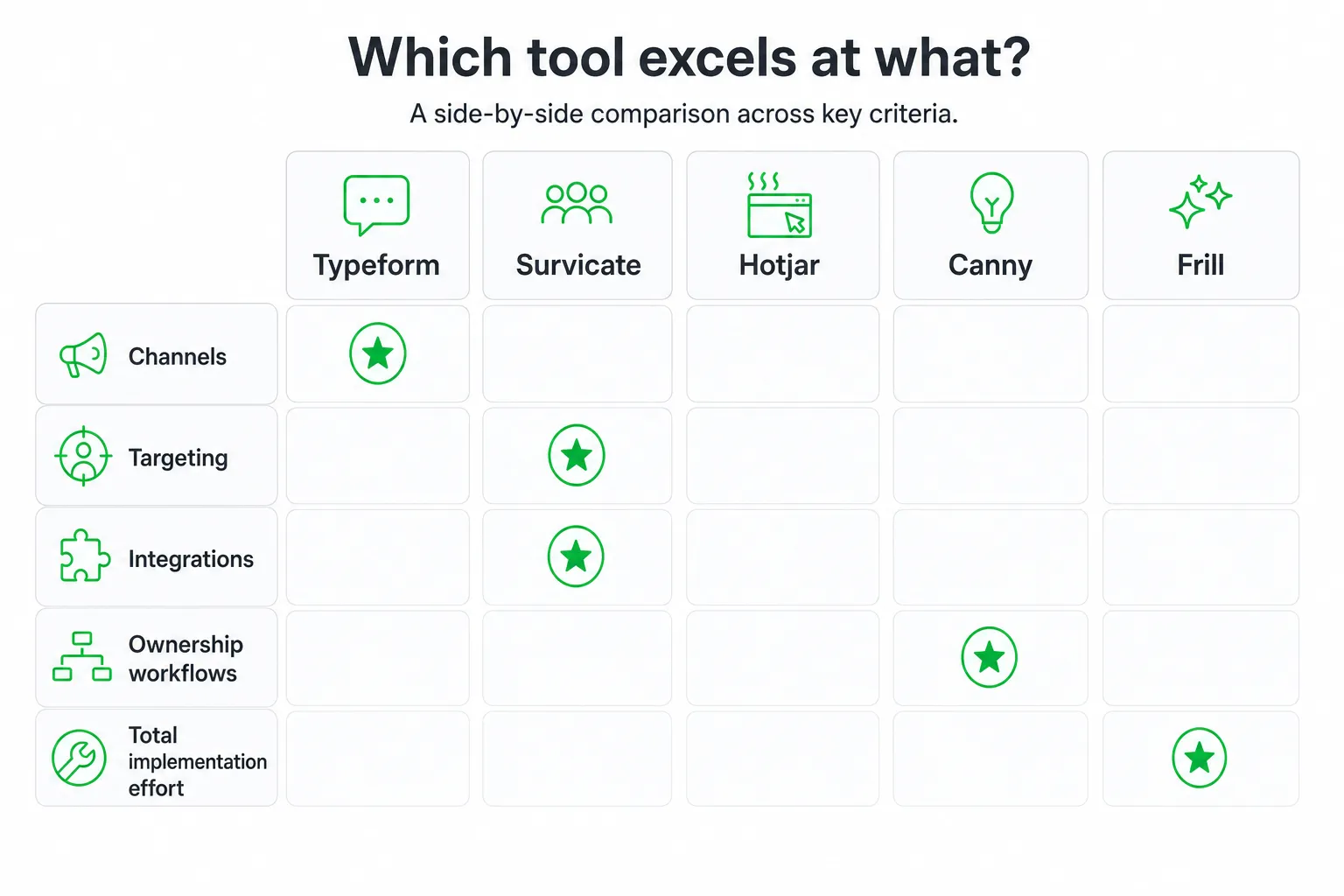
Use the following fit test before comparing advanced features:
- Choose Typeform or Google Forms when low setup effort and flexible questionnaires matter more than product-feedback prioritization.
- Choose Survicate when you need lightweight website or in-app targeting, contextual questions, and fast feedback loops.
- Choose Hotjar when behavioral evidence and qualitative context are as important as survey answers.
- Choose Canny or Frill when feature requests need public voting, roadmap visibility, customer segmentation, and structured prioritization.
- Choose Qualtrics or Medallia when governance, advanced experience programs, and organization-wide reporting justify added implementation effort.
- Add support or chat workflows when unsolicited feedback and fast owner assignment matter.
Do not treat the platforms as interchangeable. A clean survey answer, a frustrated chat message, a feature vote, and a session recording are different evidence types. Your process should preserve that context.
Cost, Implementation, and Usability Checklist
Estimate the full cost of ownership before you buy. Include the subscription tier, response or contact limits, seats, integrations, data retention, advanced analytics, implementation, and the time required to maintain surveys.
Ask how pricing scales. It may depend on seats, responses, contacts, sites, projects, or features. Confirm which capabilities disappear on lower plans before you build a workflow around them.
Ease of use and ease of implementation should lead the evaluation. Alchemer reports that 46% of buyers would consider switching because a platform is difficult to use, while 45% cite high cost as a switching trigger. See Alchemer’s 2026 feedback-platform research.
- Can a teammate launch a feedback request without technical help?
- Can you target the right customers and exclude irrelevant audiences?
- Can you connect feedback to an account, conversation, or product area?
- Can you assign an owner and track the next action?
- Can you export your data if your process changes?
- Can you keep the system useful without specialist administration?
Prefer the tool your team will use consistently over the more powerful platform that requires an administrator for every change.
How to Build a Feedback Loop That Gets Results
- Define the decision first. Identify what the team will change, validate, prioritize, or communicate based on the feedback.
- Ask at the right moment. Keep the path short and use segmentation so customers see relevant requests.
- Centralize the evidence. Tag responses by theme, account, urgency, sentiment, product area, and lifecycle stage.
- Assign the next action. Connect each actionable item to a named owner and a due action.
- Close the loop. Acknowledge input, explain what happens next, and report back when a request is addressed or declined.
- Review multiple sources. Combine surveys with support conversations, chat transcripts, interviews, community posts, and product behavior.
Small teams can also learn from direct conversations. In OneUp Today’s own data across 2,269 real Reddit cold DM conversations sent from March to September 2026, 29.7% received at least one human reply. OneUp Today’s Reddit DM benchmark illustrates the value of treating real conversations as a feedback source, not just as a marketing channel.
Which Tool Should Your Small Team Start With?
Start with Survicate for fast contextual website or product feedback, Typeform for polished structured surveys, Hotjar for behavior-plus-feedback research, or Canny or Frill for feature-request management.
Choose the simplest option that fits your collection channel and includes the integrations, ownership workflow, and reporting your team will actually use. Then run a small pilot with a defined audience, a named owner, a follow-up action, and a success criterion.
If your main bottleneck is turning customer insight into growth activity, pair a dedicated feedback tool with OneUp Today for approved AI-assisted content, Reddit outreach, chat, and follow-up workflows. Keep the approval step in your process so automation supports your voice rather than replacing judgment.
Next step: Pick one feedback question and one audience. Run the complete collection-to-follow-up workflow before expanding. The best feedback collection tool is the one that helps your team make a better decision and show customers what happened next.
Frequently asked questions
What is the difference between Typeform and Survicate for feedback collection?
Typeform is best for polished, conversational surveys and forms, while Survicate excels at contextual in-product or website feedback. Typeform focuses on presentation and ease of use, whereas Survicate targets specific moments in the customer journey without heavy implementation.
How can small teams ensure feedback is acted upon after collection?
Yes, by building a closed loop that assigns each feedback item to an owner, records the next action, and follows up with the customer. This prevents feedback from being ignored and ensures it drives improvements, as highlighted in the article's key takeaways.
What are the main types of feedback tools mentioned in the article?
The main types are survey and form builders, contextual feedback tools, behavior-plus-feedback research tools, and feature request platforms. Examples include Typeform for surveys, Survicate for contextual feedback, Hotjar for behavioral evidence, and Canny or Frill for product requests.
Why should teams test a feedback tool with a pilot before full adoption?
A pilot helps verify if the team will consistently collect, interpret, and act on feedback. It reveals practical challenges like workflow integration and owner assignment that may not appear during demos, ensuring the tool fits the team's daily operations.
What is the recommended first feedback workflow for new teams?
Start by asking new customers what almost stopped them from signing up, assign each actionable answer to a named owner, and review themes on a recurring cadence. This simple loop builds a habit of acting on feedback and closes the loop with customers.