
How to Automate Social Media Posting
To learn how to automate social media posting, choose the platforms that match your audience, prepare a reusable content queue, adapt each post by channel, and schedule publication through a trusted tool. Automate repetitive work such as formatting, drafting variations, approvals, scheduling, and reporting, but keep human review for sensitive or conversational content.
The best system does not simply publish while you are away. It helps you publish consistently, protect your voice, and respond when people comment, ask questions, or show buying intent.
Key takeaways
- Automate predictable publishing tasks, not judgment-heavy conversations.
- Choose a platform-specific cadence instead of copying the same schedule everywhere.
- Adapt each content idea for the channel, audience, format, and call to action.
- Monitor replies and customer-service conversations after every post goes live.
- Start with a controlled pilot and expand only when quality stays high.
The short answer: build a controlled publishing workflow
Start by choosing the social networks that support your business goals. Then create a content queue from useful sources such as product updates, blog posts, tutorials, customer questions, and founder insights.
Turn each idea into platform-specific posts. Add approved images, links, calls to action, and publishing windows. Route the drafts through an approval queue before anything goes live.
After publication, monitor replies, mentions, direct messages, clicks, saves, and negative feedback. Your workflow is not complete when a post is published. It is complete when you have handled the response and learned what to change next.
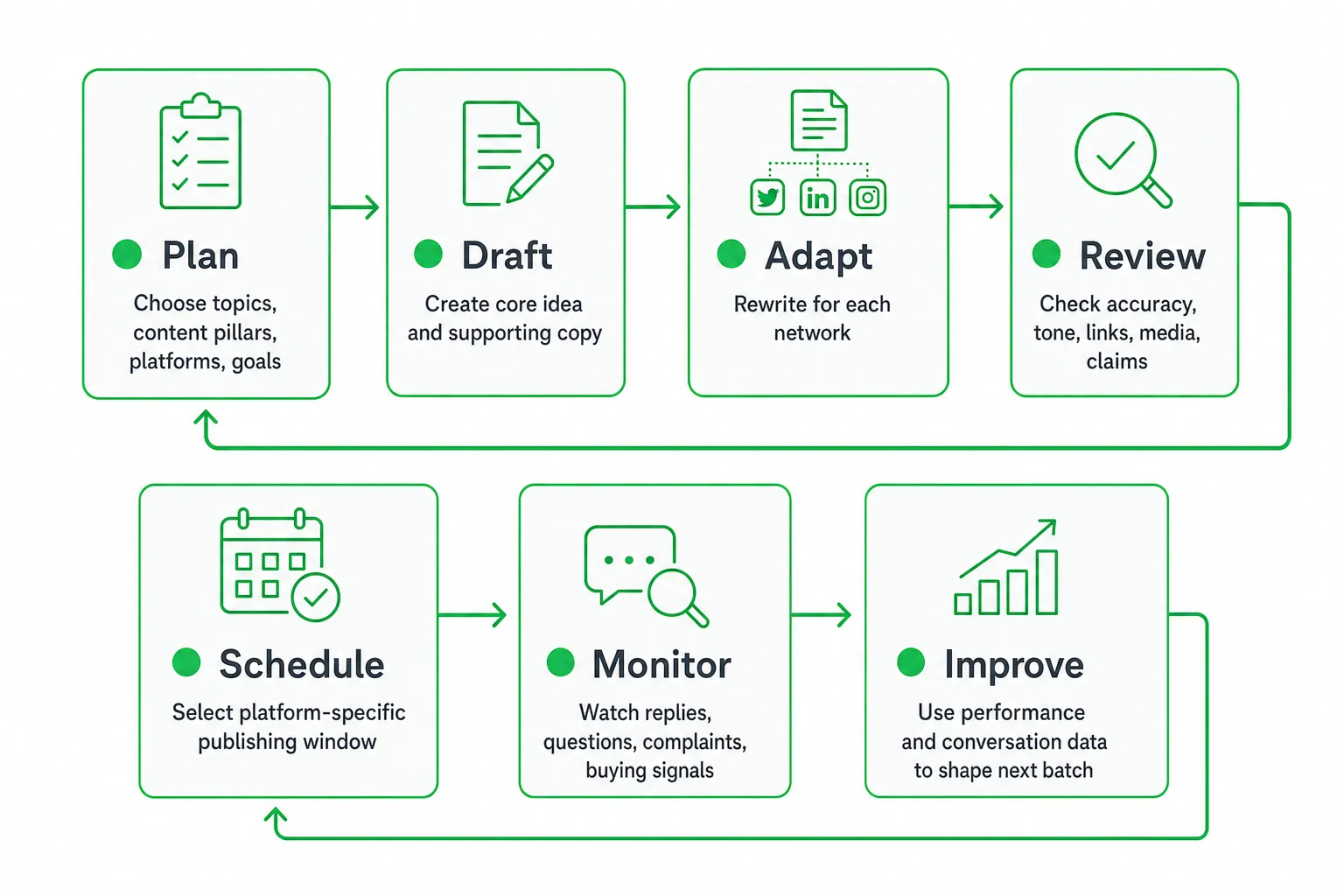
- Plan: Choose topics, content pillars, platforms, and goals.
- Draft: Create the core idea and supporting copy.
- Adapt: Rewrite the idea for each network.
- Review: Check accuracy, tone, links, media, and claims.
- Schedule: Select a platform-specific publishing window.
- Monitor: Watch replies, questions, complaints, and buying signals.
- Improve: Use performance and conversation data to shape the next batch.
Decide what to automate before choosing a tool
Automate work that is repetitive, predictable, and easy to check. Keep people involved when context, risk, or emotional judgment matters.
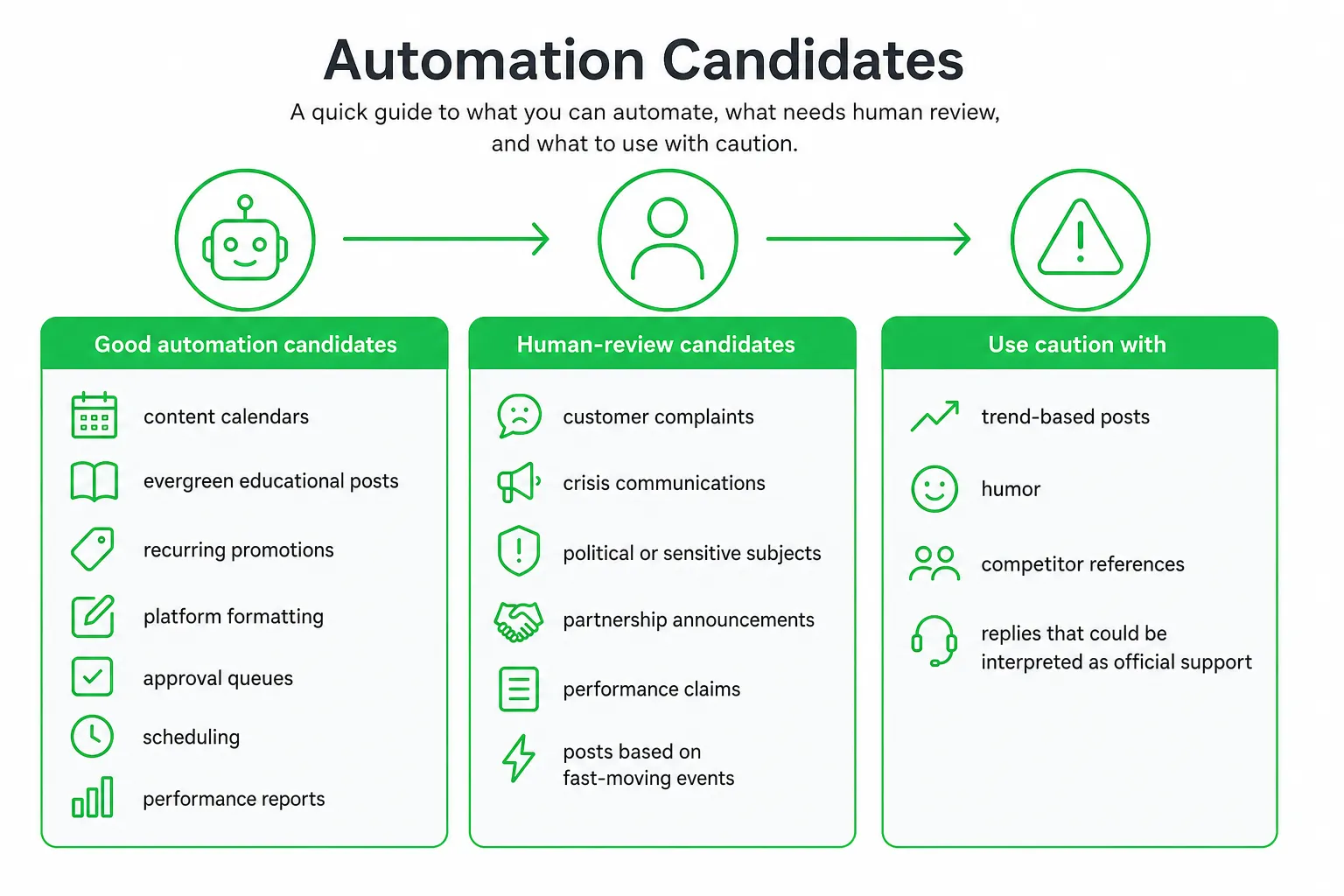
- Good automation candidates: content calendars, evergreen educational posts, recurring promotions, platform formatting, approval queues, scheduling, and performance reports.
- Human-review candidates: customer complaints, crisis communications, political or sensitive subjects, partnership announcements, performance claims, and posts based on fast-moving events.
- Use caution with: trend-based posts, humor, competitor references, and replies that could be interpreted as official support.
Separate your content into three categories: evergreen, timely, and conversational. Evergreen posts can move through a structured approval process. Timely posts need a shorter review window. Conversational content often needs a person to decide what to say and whether to say it publicly.
Do not automatically post everywhere. HubSpot’s 2026 research found that 70% of brands used Instagram and 69.6% used Facebook. That finding from HubSpot supports choosing channels according to your audience and goals rather than treating every network as mandatory.
Set up an automated social media posting system
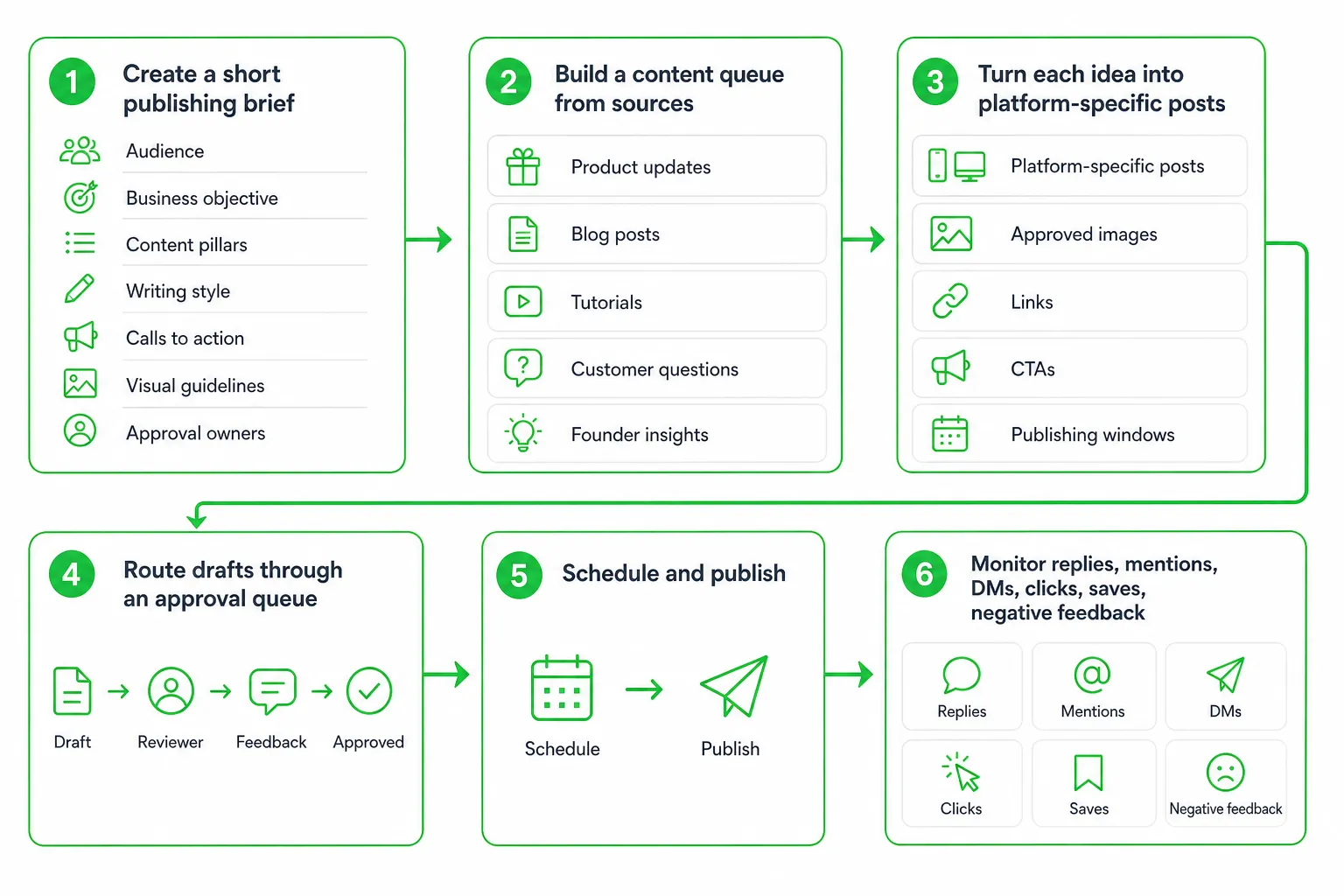
Begin with a short publishing brief. Document your audience, business objective, content pillars, writing style, calls to action, visual guidelines, and approval owners.
Then build a content source. Pull ideas from:
- Product updates and feature explanations
- Blog posts and search-focused articles
- Customer questions and objections
- Tutorials and practical examples
- Case studies and lessons learned
- Founder insights and behind-the-scenes work
- Curated resources your audience will find useful
Do not copy the same text to every platform. Keep the underlying idea, then change the hook, length, format, visual treatment, and conversation prompt for each audience.
Next, connect your accounts to a scheduler or publishing platform. Configure the approval queue, publishing windows, link tracking, and performance reporting. Add permissions so the right person can approve content and pause publication when needed.
OneUp Today’s multi-platform publishing feature turns an approved draft into platform-ready versions, applies templates trained on your writing style, schedules them, and tracks views, likes, replies, and saves. That fits a workflow where you want to reduce manual formatting without giving up review.
Choose the right automation option
There is no single best social media automation tool. Choose based on how your team plans, reviews, publishes, and responds.
| Option | Best for | Watch for |
|---|---|---|
| Native platform scheduler | Managing a single network and using its full publishing controls | Limited cross-platform planning and shared approval workflows |
| Dedicated scheduling tool | Shared calendars, queues, approvals, analytics, and multiple networks | Platform support, media limits, failure alerts, and total cost |
| AI-assisted publishing tool | Drafting variations, repurposing content, and maintaining a consistent voice | Accuracy, originality, tone, context, and review controls |
Compare tools by workflow fit, not by the promise of fully hands-off publishing. Check account support, platform-specific editing, approval controls, scheduling flexibility, inbox monitoring, analytics, integrations, export options, security, and pricing.
A useful tool makes review faster. It should let you edit a platform-specific version, see the original source, inspect links and media, and approve or reject content without searching through disconnected systems.
Create platform-specific posts from one content idea
Start with a useful idea, not a generic announcement. For example, a product onboarding lesson can become a discussion prompt, a visual demonstration, a professional explanation, and a short objection-handling post.
- Discussion-led version: Lead with a question or point of view that invites useful responses.
- Visual-led version: Show a workflow, example, comparison, or result through an image or short video.
- Professional version: Explain the business problem, decision, or lesson for a work-focused audience.
- Conversion-led version: Use a direct call to action only when the reader has enough context to act.
Create reusable templates for launches, educational tips, customer stories, product explanations, objections, events, and behind-the-scenes content. Keep the structure consistent while leaving room for original wording and current context.
Do not assume that posting more frequently or at the same time will work for every account. Buffer analyzed 4.8 million channel-week observations and found that posting generally outperformed going silent, while timing worked best as an amplifier rather than a substitute for strong content. Buffer supports treating cadence and timing as account-specific decisions.
The missing layer: safeguards after automation goes live
Most publishing guides stop at scheduling. That is where the operational risk begins. Automated publishing works only when you also manage cadence, replies, customer service, voice, and exceptions.
Set a platform-specific cadence
Choose a cadence based on audience response, production capacity, content quality, and business goals. A schedule you cannot maintain will create rushed content and unanswered conversations.
Review the queue regularly. Remove outdated promotions, update links, and pause content that no longer fits the moment. Treat publishing windows as a working hypothesis, not a permanent rule.
Monitor replies after publication
Watch comments, mentions, direct messages, clicks, saves, and negative feedback after a post goes live. A question may reveal a product objection. A reply may reveal a warm lead. A complaint may need immediate attention.
Assign response ownership for every active platform. Use alerts or a centralized inbox so publishing never outruns your ability to respond.
Handle public customer service conversations carefully
Define which questions can receive a public answer and which cases must move to private support. Escalate complaints, account issues, refunds, safety concerns, and sensitive cases to a named owner.
Never let an automated reply argue with, dismiss, or speculate about a customer. A fast wrong answer can create more work than a slower approved response.
Preserve your brand voice
Give your system approved examples, prohibited claims, preferred phrases, and clear guidance on humor, formatting, and calls to action. Review uncertain content instead of forcing every draft into publication.
At OneUp Today, the DM generator uses a hard validator that blocks 23 corporate buzzwords because simply prompting an AI model to avoid them was not enough. The lesson applies to social publishing too: encode important voice rules as checks, then keep a human approval step for nuance.
Keep trend-driven content human-reviewed
Relevance matters, but trend-chasing can damage trust. Sprout Social found that 93% of consumers considered cultural relevance important, while one-third viewed brands jumping on viral trends as embarrassing and 27% said trend-based content was effective only within 24–48 hours. Sprout Social supports using judgment instead of blindly automating trends.
Keep a human in the loop for posts that depend on cultural context, breaking news, humor, or a fast-changing public conversation.
Measure results and start with a safe pilot
Track output and outcomes separately. Output tells you whether the system is working. Outcomes tell you whether it is worth continuing.
- Workflow measures: posts published, approval time, rejected drafts, failed publications, and response ownership.
- Audience measures: reach, meaningful replies, saves, profile actions, and negative feedback.
- Business measures: site visits, qualified conversations, leads, and conversions.
Review results by platform, topic, format, call to action, and publishing window. Optimize for useful conversations and business outcomes, not surface-level engagement alone.
Start with a small pilot. Select your priority platform, a few repeatable content types, and a clear approval process. Schedule a review after publication, then expand only when accuracy, voice, and response quality remain strong.
Common objections and the next step
“Automation will make us sound robotic.”
Use approved voice examples, platform-specific rewrites, and human approval for posts where nuance matters. Automate the mechanics, not the judgment.
“We cannot monitor every network.”
Reduce the number of active platforms, assign response ownership, and use alerts or a centralized inbox. About 73% of consumers expect brands to respond on social media within 24 hours or sooner, according to Sprout Social.
“We are worried about accidental posts.”
Add approval gates, permission controls, content exclusions, an emergency pause process, and a final checklist for links, media, claims, and tone.
The practical answer to how to automate social media posting is simple: automate repeatable publishing work, preserve human control over risk and relationships, and monitor what happens after every post goes live.
Next step: Choose your priority platform, document your voice, prepare a small batch of useful ideas, connect a scheduler, approve the first queue, and schedule a review of replies and performance. OneUp Today can help turn a draft into platform-specific posts while keeping your approval step in the workflow.
Frequently asked questions
What is the best free tool to automate social media posting?
Buffer is widely considered the best free tool for automating social media posting. It allows you to schedule up to 10 posts per account across multiple platforms, with basic analytics to track performance, making it ideal for small businesses or beginners.
Can you automate social media posting without losing engagement?
Yes, you can automate posting without losing engagement by scheduling during peak activity times and using tools that allow real-time monitoring. The key is to balance automated posts with manual responses to comments and messages, ensuring your audience feels heard.
How do I automate social media posting for multiple accounts at once?
To automate posting for multiple accounts, use a social media management tool like Hootsuite or Later that supports bulk scheduling. These platforms let you connect several profiles, create a unified content calendar, and publish across networks simultaneously, saving time while maintaining consistency.
What is the difference between scheduling and automating social media posts?
Scheduling involves setting a specific time for a post to go live, while automation includes additional tasks like content curation, formatting, and approval workflows. Automation goes beyond scheduling by handling repetitive processes, such as adapting posts for different platforms, without manual input each time.