
AI Email Automation Tools for Small Teams
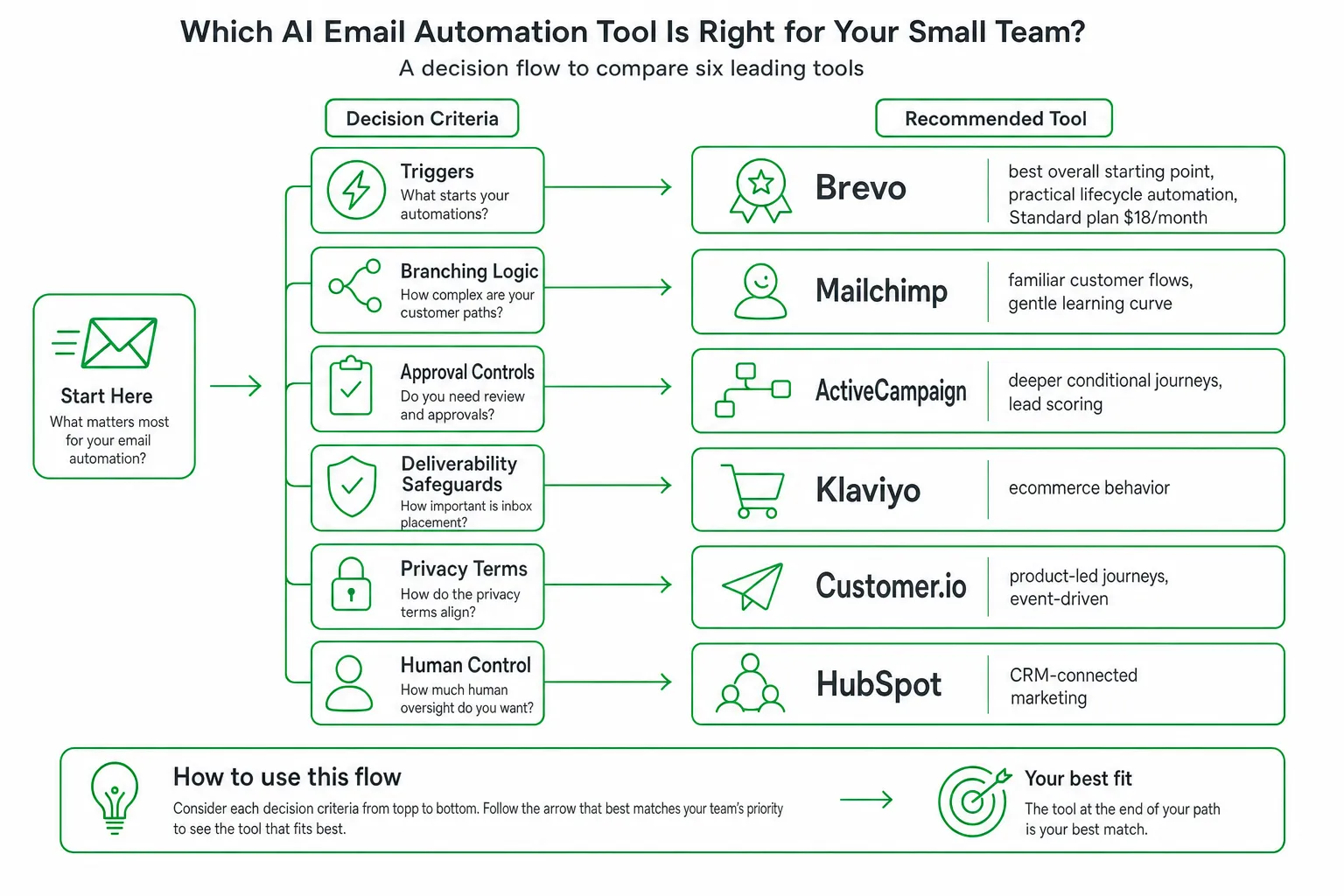
For most small teams, Brevo is the strongest starting point for AI email automation tools because it combines lifecycle journeys, testing, reporting, and AI send-time optimization at a clear entry price. Choose Mailchimp for approachable customer flows, ActiveCampaign for deeper conditional automation, and Klaviyo or Customer.io when behavioral data drives every message.
The deciding factor is not whether a platform can write a subject line. Check its triggers, branching logic, approval controls, deliverability safeguards, privacy terms, and ability to keep a human in control.
Key takeaways
- Best overall starting point: Brevo for practical lifecycle automation and transparent entry pricing.
- Best for complex journeys: ActiveCampaign, with strong conditional logic and guided automation recommendations.
- Best for ease of adoption: Mailchimp, especially when your team wants familiar campaign workflows.
- Best for behavioral data: Customer.io, Klaviyo, or HubSpot, depending on whether you prioritize product events, ecommerce, or CRM context.
- Best for prospecting: Use an outreach tool alongside your lifecycle platform rather than treating cold outreach as customer email automation.
The Best AI Email Automation Tools for Small Teams
Brevo: Practical lifecycle automation. Brevo is a strong fit when you want automated customer journeys, A/B testing, reporting, and AI send-time optimization without assembling several tools. Its Standard plan starts at $18 per month, according to Brevo.
Mailchimp: Familiar customer flows. Choose Mailchimp when your team values a recognizable interface, campaign templates, and a gentler learning curve. It works well for welcome sequences, post-purchase messages, newsletters, and basic re-engagement.
ActiveCampaign: Deeper conditional journeys. ActiveCampaign suits teams that need multiple conditions, lead scoring, sales handoffs, and behavior-based follow-up. It gives you more room to model what happens when a contact clicks, ignores, purchases, visits, or changes stage.
Klaviyo: Ecommerce behavior. Klaviyo is a natural choice when product views, carts, orders, customer value, and catalog data shape your email program.
Customer.io: Product-led journeys. Customer.io fits SaaS and product teams that need event-driven messages based on actions inside an application. Use it when product analytics and messaging need to work closely together.
HubSpot: CRM-connected marketing. HubSpot makes sense when email must share context with your CRM, forms, sales pipeline, support activity, and broader marketing operations.
OneUp Today: Prospecting and personal outreach. Use it alongside one of these platforms when your immediate need is finding contact emails, drafting personal notes, sending only after approval, and tracking opens, clicks, and replies. It complements lifecycle email software rather than replacing it.
What AI Email Automation Tools Actually Do
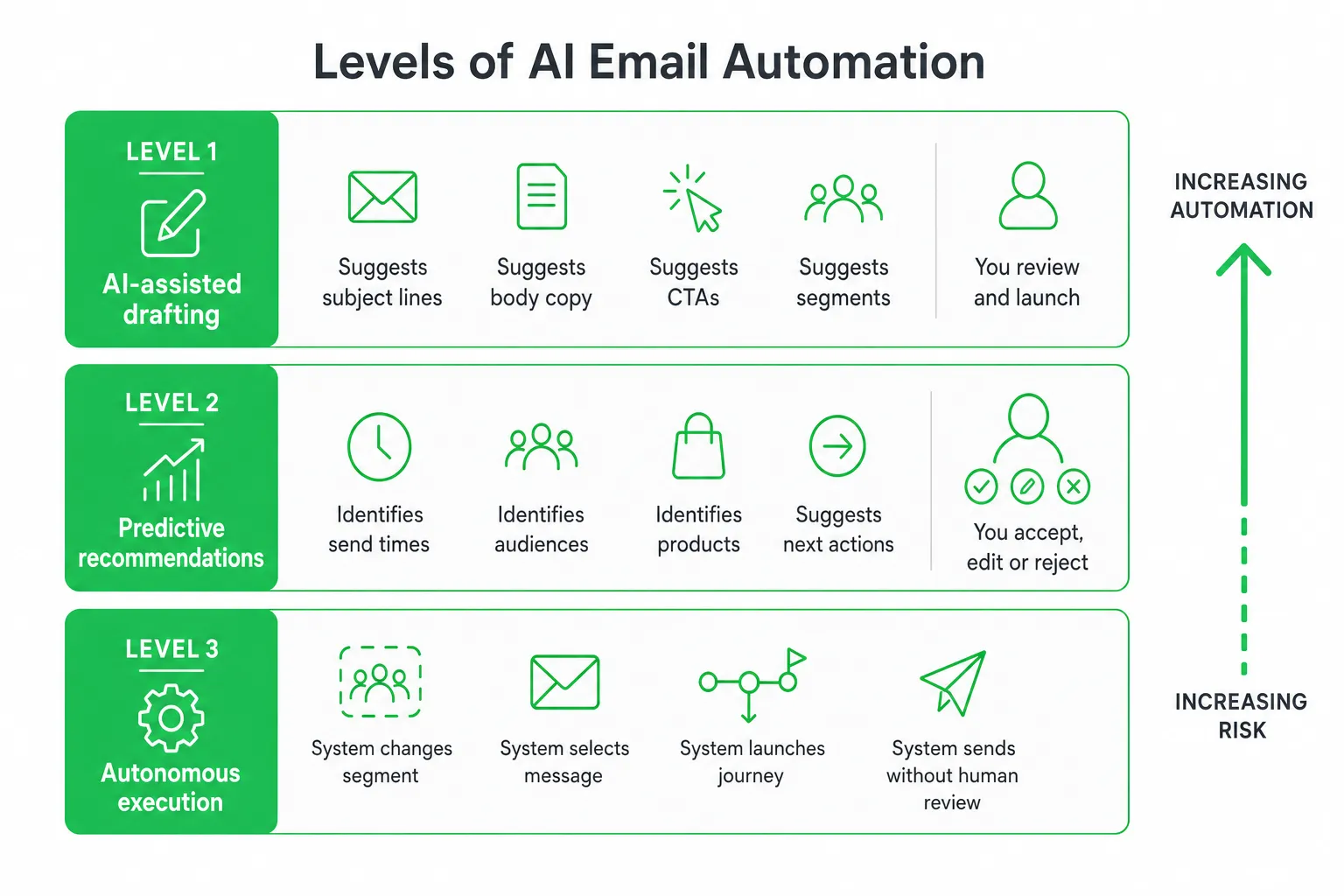
AI email automation has three distinct levels. Confusing them creates bad buying decisions.
- AI-assisted drafting: The platform suggests subject lines, body copy, calls to action, segments, or content variations. You review and launch the campaign.
- Predictive recommendations: The platform identifies likely send times, audiences, products, or next actions from engagement data. You accept, edit, or reject the recommendation.
- Autonomous execution: The system can change a segment, select a message, launch a journey, or send without a person reviewing each action.
Most small teams should start with the first two. They reduce production work without surrendering campaign ownership. Autonomous execution can help with mature, low-risk workflows, but you need clear limits, audit logs, and a way to stop or reverse an action.
Expect modern platforms to offer campaign generation, subject-line suggestions, audience segmentation, personalization, triggered sequences, testing, analytics, and send-time optimization. Then ask how each feature behaves in practice. Does the AI use your brand guidance? Can you see why it made a recommendation? Can you override it for a specific contact or segment?
Do not confuse lifecycle automation with cold-email outreach, inbox assistants, or broad marketing suites. Lifecycle email responds to known customer or subscriber behavior, such as a signup, purchase, product event, or period of inactivity. Outreach tools find prospects and help you begin a relationship. Inbox assistants help manage conversations. These are different jobs.
Production speed also does not remove strategy, consent management, accessibility checks, brand review, or deliverability monitoring. In a survey of 500 marketing professionals, Litmus reported that 78% of surveyed teams deployed an email within three days or less in 2026, compared with 44% in 2025. Faster execution makes disciplined review more valuable, not less.
AI Email Automation Tools Compared by Use Case
Use this table to narrow your shortlist. “Lifecycle depth” refers to how well a tool handles ongoing customer journeys, not how many AI writing features it advertises.
| Tool | Best for | Lifecycle depth | Triggers and branching | AI features | Approval controls | Analytics and pricing model | Main limitation |
|---|---|---|---|---|---|---|---|
| Brevo | Small teams wanting an accessible all-in-one platform | Strong for common lifecycle programs | Behavior, forms, contact changes, and campaign activity; branching depends on plan and workflow design | Send-time optimization, writing support, and campaign assistance | Campaign review before launch; workflow testing required | Reporting and A/B testing; Standard plan starts at $18 per month | May require workarounds for highly specialized product events |
| Mailchimp | Teams prioritizing familiarity and quick adoption | Good for standard customer flows | Customer activity and contact events; step and branch depth varies by plan | Content and campaign recommendations | Strong manual campaign review; inspect automated paths carefully | Plan-based pricing with reporting features | Complex journeys can become harder to manage |
| ActiveCampaign | Conditional journeys and sales-marketing coordination | Very strong for detailed automation design | Broad behavioral triggers, conditions, scoring, and branching | Automation recommendations and content assistance | Detailed workflow controls and human launch decisions | Plan-based pricing with automation and CRM features | More setup and governance work for a small team |
| Klaviyo | Ecommerce personalization | Very strong for commerce-driven journeys | Catalog, browsing, cart, purchase, and customer events | Personalization and predictive campaign support | Review and testing controls; monitor data-driven sends | Usage and contact-based pricing | Less natural for teams without ecommerce data |
| Customer.io | Product-led and event-driven messaging | Very strong when event data is reliable | Custom product events, attributes, webhooks, and branching | Message drafting and journey assistance | Workflow review, testing, and controlled activation | Usage and plan-based pricing | Needs clean event instrumentation and technical ownership |
| HubSpot | CRM-connected marketing | Strong across marketing and sales workflows | CRM properties, forms, lifecycle stages, and activity | Campaign and content assistance | Approval processes depend on workspace setup | Suite and hub-based pricing | Can be more platform than a small email program needs |
| OneUp Today | Prospecting and approved personal outreach | Not a replacement for lifecycle journeys | Lead discovery and outreach follow-up rather than customer-event automation | Personal notes, replies, and lead prioritization | Every send is approved before it goes out | Daily mix and usage-based costs are shown upfront | Use a dedicated email platform for subscriber and customer lifecycle programs |
The Lifecycle Automation Features Most Comparisons Miss
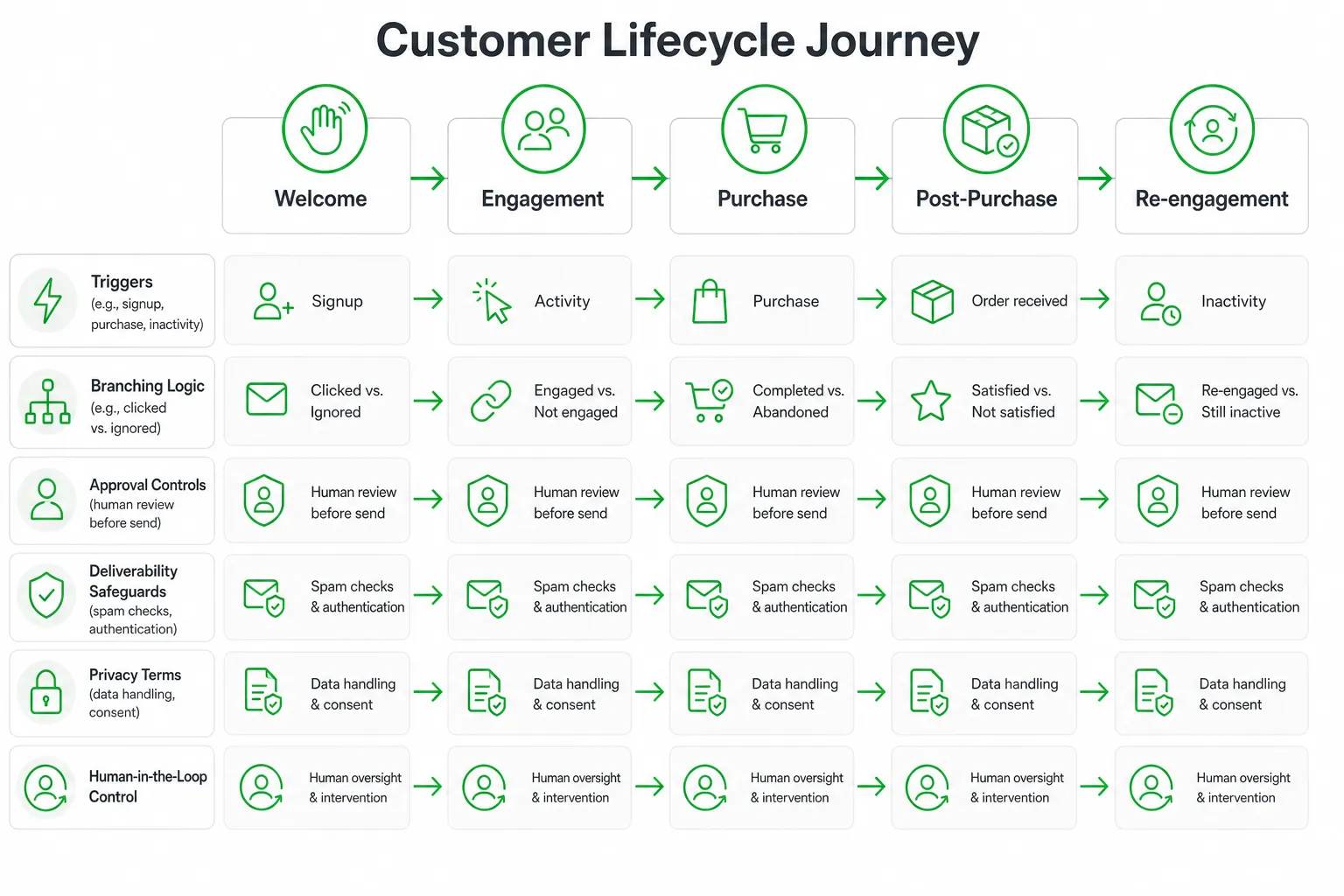
Many comparison pages count templates and AI features. You should count decisions the platform can make safely.
Measure trigger depth. Check support for signup, purchase, inactivity, product events, form completion, support activity, lead-score changes, and custom API or webhook events. A welcome email is easy. A journey that reacts differently to product adoption, billing status, and support friction is where platforms separate.
Inspect branching limits. A workflow with many templates can still be shallow. Mailchimp Essentials supports automated flows with up to four steps, while Standard and Premium support flows with up to 200 steps and multiple branching points, according to Mailchimp.
Ask whether branches can evaluate several conditions together. Can a contact exit after purchasing? Can the workflow pause when a support ticket opens? Can it send a different message when someone clicks but does not convert? These details matter more than a large template library.
Test send-time optimization. Find out whether the AI learns from each contact or applies a general recommendation. Check support for time zones, frequency caps, throttling, quiet hours, and manual overrides. A “best time” feature is not useful if it ignores a customer’s communication preferences.
Separate recommendations from autonomous actions. Document whether AI can alter segments, launch campaigns, or send without review. Require approval gates, audit logs, rollback options, and named human ownership before enabling autonomous behavior.
Deliverability, Privacy, and Accessibility Checklist
AI can produce more email. It cannot guarantee that your messages deserve to arrive.
- Authentication: Confirm domain authentication, bounce handling, suppression lists, complaint monitoring, and reputation guidance.
- Consent: Check unsubscribe controls, consent records, regional rules, and protections against sending to stale or low-consent contacts.
- Frequency: Set caps across campaigns and automations so one contact does not enter overlapping journeys.
- Privacy: Review retention, subprocessors, regional hosting, permission controls, and model-training policies.
- Accessibility: Verify semantic structure, contrast, keyboard navigation, alt text, mobile rendering, and plain-text fallbacks.
- AI safety: Require factual checks and block sensitive inferences from being used as personalization.
Accessibility belongs in the buying process, not at the end of a campaign. Litmus found that advanced AI adopters were 54% more likely to follow WCAG standards and 52% more likely to comply with the European Accessibility Act.
Also inspect how the vendor handles your customer data. Ask whether prompts and email content are used to improve shared models, which team members can access campaign data, and whether you can delete or export records. Keep a human approval step for unusual, high-impact, or highly personalized messages.
How to Choose and Set Up the Right Tool
Start with one revenue or retention journey. Do not begin by importing every contact and turning on every AI feature.
- Define the journey. Write down the entry trigger, audience, desired action, exit condition, frequency limit, and success metric.
- Map your data. List the CRM, product analytics, payment system, forms, support platform, website, and data warehouse that need to connect. Identify which events sync in real time and which need a workaround.
- Choose the minimum viable workflow. Build a short journey with one primary path, a fallback message, and an exit rule. Add branches only when they change the customer experience.
- Run a controlled pilot. Use a consented segment. Test every branch, link, fallback, unsubscribe path, and personalization field.
- Keep approval enabled. Review AI copy, confirm tracking, and check the rendered email before launch. Expand automation only after the workflow behaves reliably.
- Review the right signals. Monitor conversions, unsubscribes, bounces, complaints, AI accuracy, and the amount of manual oversight the workflow still requires.
ActiveCampaign can help you move from a blank canvas to a concrete design. Its AI Automation Recommendations feature creates three fully built, industry-specific automation options from a stated goal and is available on all plans, according to ActiveCampaign. Treat those options as starting points, not permission to launch without review.
Final Recommendation and Next Steps
Choose Brevo when transparent pricing and practical lifecycle features matter most. Choose ActiveCampaign when branching logic and guided automation design matter most. Choose Mailchimp when ease of adoption is the deciding factor. Choose Klaviyo or Customer.io when ecommerce or product events provide the data your journeys depend on.
Do not choose a platform solely because it writes attractive emails. Prioritize trigger coverage, branching, approval controls, deliverability protections, privacy terms, reporting, accessibility, and integration fit.
If you need prospecting rather than customer nurturing, keep that workflow separate. At OneUp Today, the DM generator blocks 23 corporate buzzwords with a hard validator because prompting the model to avoid them was not enough, according to the publisher’s own data at OneUp Today. That kind of controlled drafting can support personal outreach while your email platform manages consented lifecycle communication.
Next step: Pick one journey, write its trigger and exit condition, then test it in your shortlisted platform with approval enabled. Expand only after the workflow earns trust through clean delivery, accurate personalization, and measurable customer action.
Frequently asked questions
Can AI email automation tools replace a human copywriter?
No, most small teams should use AI as an assistant, not a replacement. AI can draft subject lines and body copy, but human review ensures brand voice, accuracy, and strategic alignment with campaign goals.
What is the typical cost range for AI email automation tools suitable for small teams?
Entry-level plans start around $18 per month for Brevo's Standard plan, while more advanced tools like ActiveCampaign or Klaviyo can range from $20 to $50 per month. Pricing varies based on contact count and feature set.
How do AI email automation tools handle data privacy and compliance with regulations like GDPR?
Most reputable tools include built-in consent management, data encryption, and privacy controls. You must review each platform's terms and settings to ensure they align with your regional regulations and maintain human oversight over automated actions.
What is the difference between AI-assisted drafting and autonomous execution in email automation?
AI-assisted drafting suggests content for you to approve, while autonomous execution allows the system to send messages without human review. Small teams should start with assisted drafting to maintain control and only use autonomous execution for low-risk, mature workflows.
Can AI email automation tools integrate with my existing CRM or ecommerce platform?
Yes, most tools like HubSpot, Klaviyo, and Customer.io offer native integrations with popular CRMs and ecommerce platforms. Check each tool's integration directory to confirm compatibility with your specific systems before committing.