
Alternatives to Buffer: Top Tools for Social Media Management
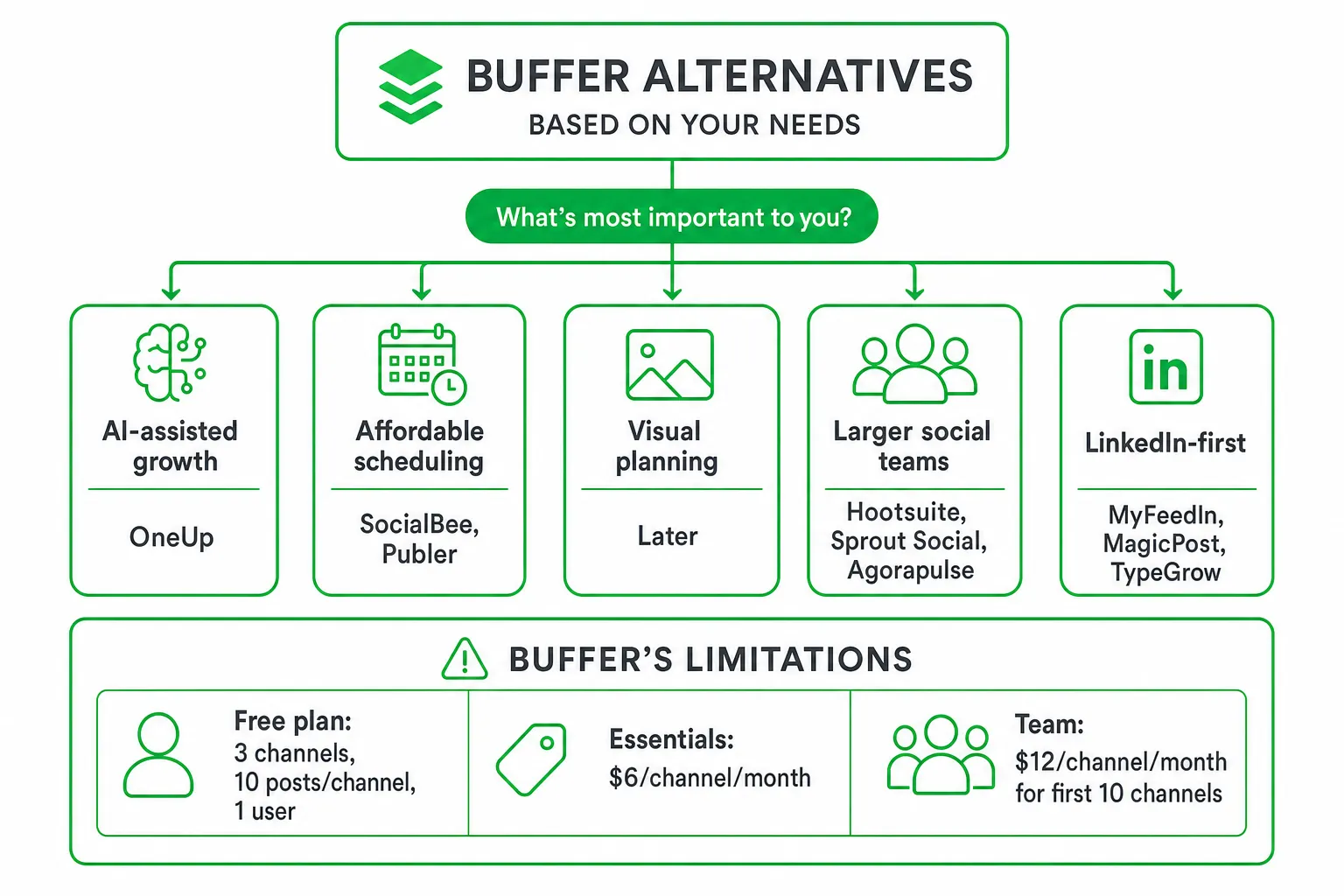
If you want more than a simple content calendar, the best alternatives to Buffer depend on your growth goal. Choose a conventional scheduler such as SocialBee, Publer, Later, or Metricool for publishing. Choose a broader platform such as Hootsuite, Sprout Social, or Agorapulse for inboxes and reporting. Choose OneUp when you want social publishing connected to Reddit lead generation, AI outreach, SEO, blog automation, website chat, and human approval.
Buffer still works well for straightforward scheduling. But if you need to find buying intent, qualify conversations, or connect social activity to pipeline, you should compare tools by workflow depth, not just by the number of networks they support.
Key takeaways
- Choose OneUp for AI-assisted marketing that combines publishing with Reddit prospecting, personalized outreach, SEO, blog automation, website chat, and approval controls.
- Choose SocialBee or Publer for affordable, conventional multi-network scheduling and evergreen content organization.
- Choose Later for visual planning, or Hootsuite and Sprout Social for broader team workflows, monitoring, inboxes, and reporting.
- Choose MyFeedIn, MagicPost, or TypeGrow when LinkedIn publishing and analytics matter more than broader growth automation.
The Best Buffer Alternatives at a Glance
Start with the job you need the software to perform. The right Buffer alternative for a solo creator may be the wrong choice for a SaaS team managing leads, content, and customer conversations.
- Best for AI-assisted growth: OneUp connects social publishing with Reddit lead generation, intent-based prospecting, personalized DMs and emails, SEO, blog production, website chat, and approval-controlled outreach.
- Best for affordable scheduling: SocialBee and Publer organize queues, evergreen content, and cross-network publishing without the broader growth layer.
- Best for visual planning: Later suits content-heavy brands that plan around images, video, and visual calendars.
- Best for larger social teams: Hootsuite, Sprout Social, and Agorapulse are worth comparing for monitoring, social inboxes, customer care, reporting, and administration.
- Best for LinkedIn-first workflows: MyFeedIn, MagicPost, and TypeGrow focus more tightly on LinkedIn publishing, comment activity, personal branding, and analytics.
Why Look Beyond Buffer?
Buffer remains a sensible choice when your main requirement is scheduling posts across a manageable set of channels. Its clean interface and familiar publishing workflow make it easy to plan content without building a complex operating system.
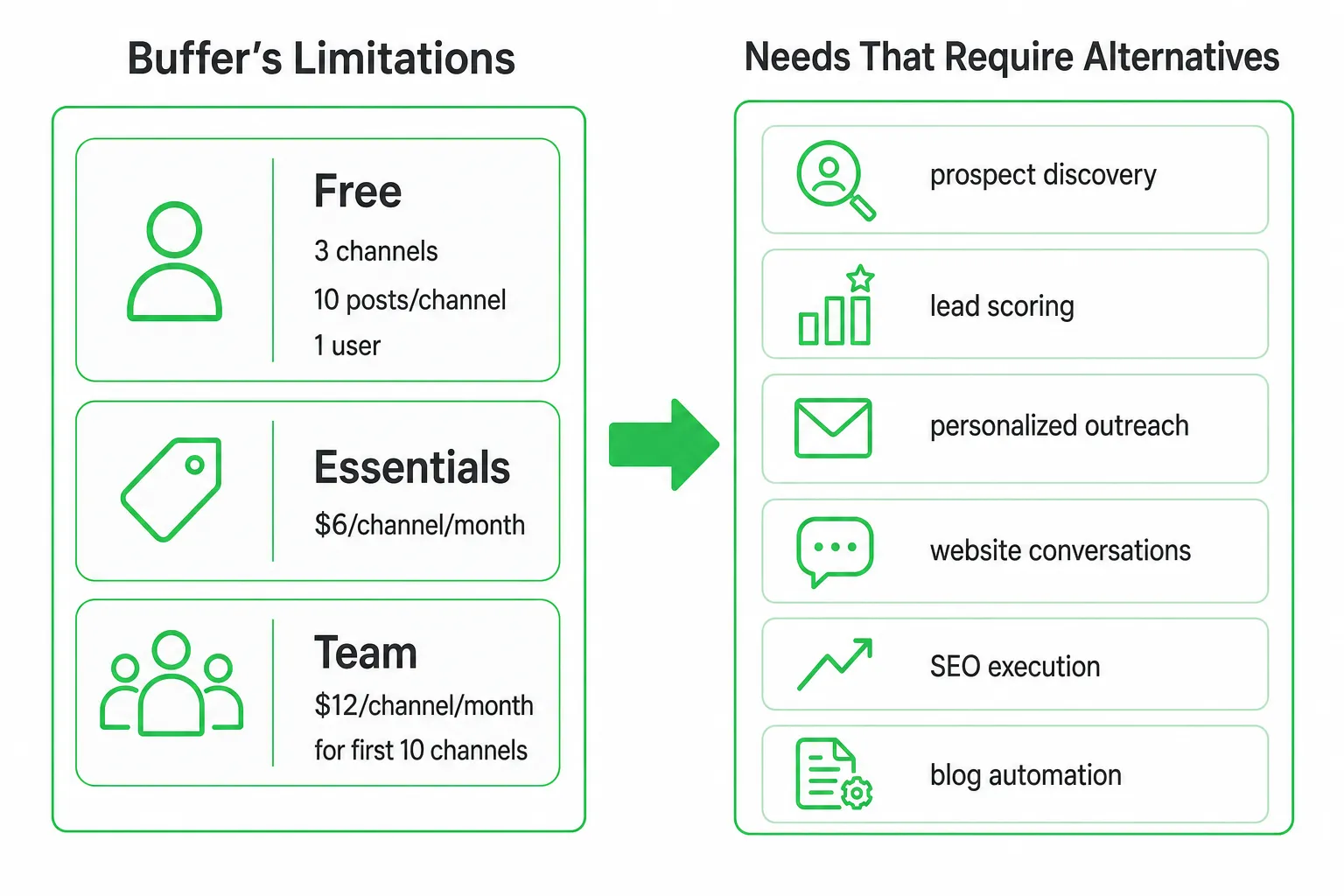
Limits become more noticeable when your team grows or your workflow expands. Buffer’s Free plan supports three channel connections, ten scheduled posts per channel, and one user. Essentials starts at $6 per channel per month when billed monthly, while Team starts at $12 per channel per month for the first ten channels. Check the current fit in the Buffer Help Center.
Buffer also offers a fourteen-day trial that places new accounts on the Team plan, with access to paid features and additional users. That gives you a useful way to test collaboration before switching, but confirm the current terms in the Buffer Help Center.
Look beyond Buffer when you need prospect discovery, lead scoring, personalized outreach, website conversations, SEO execution, or blog automation alongside publishing. A scheduler can keep your calendar full. It does not necessarily help you identify who is actively asking for a solution.
Compare Buffer Alternatives by Core Capabilities
Compare tools by the complete workflow, not by dashboard screenshots. A platform may support your preferred networks but still require manual work for approvals, replies, lead tracking, or reporting.
| Need | What to check | Best-fit alternatives |
|---|---|---|
| Publishing | Queues, calendars, reusable content, formats, network support, and platform-specific publishing | Buffer, SocialBee, Publer, Metricool |
| Visual planning | Media calendars, previews, asset organization, and content review | Later, Planable |
| Team control | Roles, drafts, review comments, approval history, notifications, and workspaces | Planable, Hootsuite, Sprout Social |
| Engagement | Social inboxes, comment replies, direct messages, saved replies, and escalation rules | Agorapulse, Sprout Social, Hootsuite |
| Demand generation | Intent discovery, lead scoring, personalized outreach, website chat, SEO, and blog automation | OneUp |
| LinkedIn focus | Personal-brand publishing, comment activity, and LinkedIn analytics | MyFeedIn, MagicPost, TypeGrow |
Check analytics beyond reach and engagement. Look for conversion tracking, audience insights, exportable reports, post-level recommendations, and a way to connect a social interaction to a lead or customer conversation.
Then test collaboration. Can you assign a draft, edit the voice, request a change, approve the send, and see who took the final action? These safeguards matter when multiple people publish from the same brand account.
Top Buffer Alternatives and Who They Suit
SocialBee, Publer, and Metricool: Scheduling and content organization
Choose SocialBee or Publer when you want content categories, queues, evergreen publishing, and straightforward cross-network scheduling. They suit small teams that already know what to publish and mainly need a reliable system for planning it.
Metricool is worth considering when analytics and content planning need to sit closer together. Compare reporting depth, supported formats, approval features, and the networks you actually use rather than choosing from a feature checklist alone.
Later and Planable: Visual planning and reviews
Later fits brands that plan around visual assets, campaign themes, and feed presentation. It can be a strong choice for content teams that need to see how a collection of posts will look before publishing.
Planable is better suited to review-heavy workflows. Consider it when clients, founders, or several stakeholders need to comment on drafts and approve content before it goes live.
Hootsuite, Sprout Social, and Agorapulse: Broader team operations
Compare Hootsuite, Sprout Social, and Agorapulse when social care, listening, inbox management, and reporting outweigh simplicity. These platforms are more relevant when your team needs to monitor conversations, route responses, and produce structured reports.
Ask whether the inbox covers every channel you care about. Also check how each platform handles saved replies, ownership, escalation, permissions, and the handoff from a public comment to a private conversation.
MyFeedIn, MagicPost, and TypeGrow: LinkedIn specialists
LinkedIn-focused tools make sense when your personal brand, founder content, comment activity, and LinkedIn analytics are the center of your strategy. They may offer a tighter workflow than a general scheduler.
Do not choose a LinkedIn specialist if you also need Reddit prospecting, multi-network publishing, website chat, or SEO automation. In that case, compare the cost and complexity of stitching together several point solutions.
The Missing Category: Alternatives for Leads, Not Just Posts
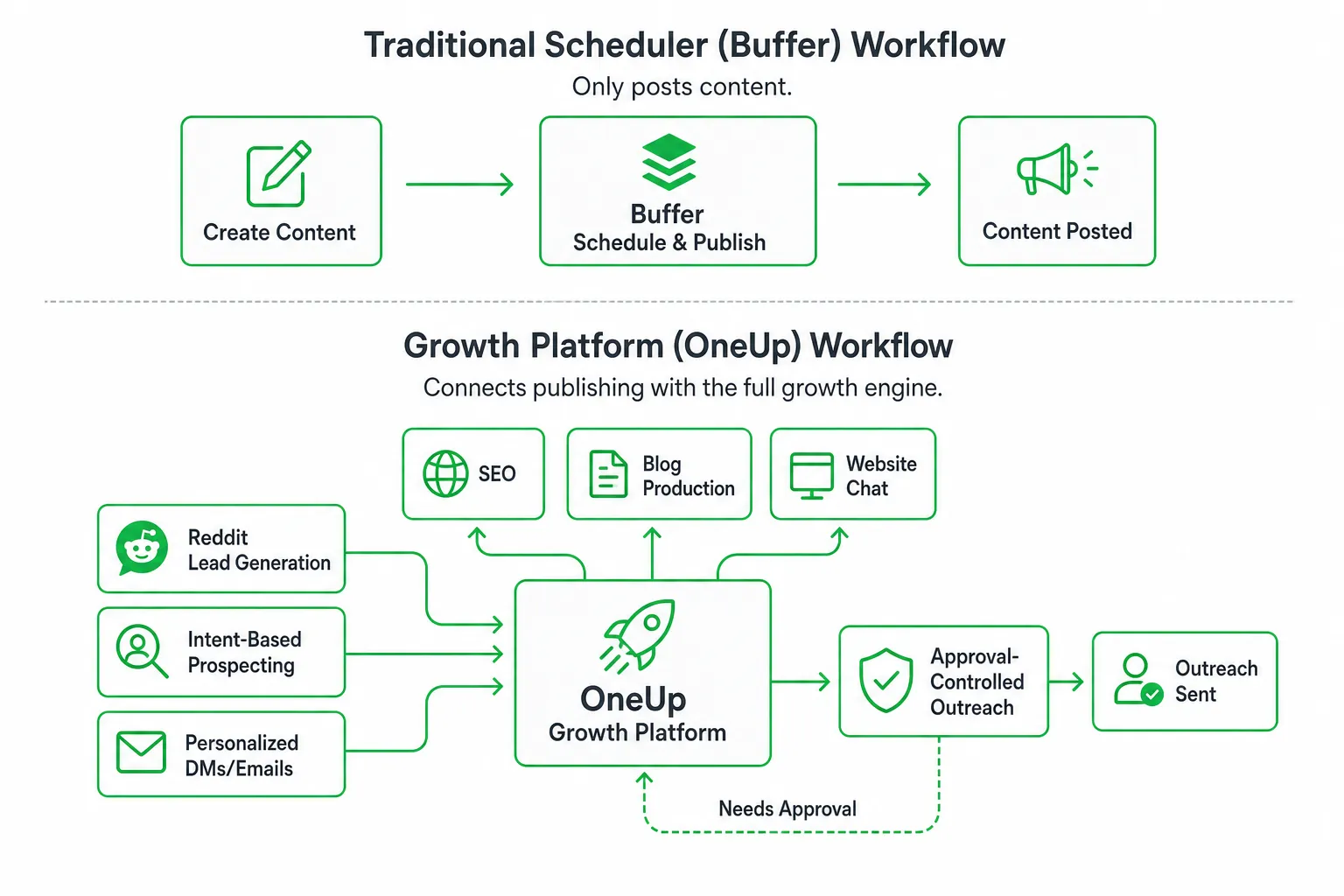
Most Buffer comparisons stop at scheduling, analytics, and LinkedIn publishing. That misses a valuable category: tools that help you find people already asking for a solution and turn those conversations into qualified pipeline.
Reddit is especially useful for intent-based prospecting because users often describe a problem before they search for a vendor. A growth-focused alternative should help you find relevant discussions, score the opportunity, draft a useful response, and keep outreach under human control.
Look for AI assistance that can draft personalized Reddit replies, DMs, emails, and social responses in your voice. Every send should remain behind an approval step so you can edit the message, reject poor-fit opportunities, and protect the authenticity of the conversation.
The strongest workflow connects discovery to action. It should move from intent signals to lead scoring, approved outreach, website chat, content publishing, SEO execution, and blog production without forcing you to copy information between disconnected tools.
OneUp is built for this gap. It combines Reddit lead generation, AI outreach, multi-platform publishing, SEO and blog automation, an AI chatbot, and approval-controlled execution. Its API documentation lists support for Facebook, Instagram, X/Twitter, LinkedIn, Pinterest, Google Business Profile, Threads, YouTube, Snapchat, TikTok, and Bluesky through the OneUp API documentation.
Feature and Workflow Comparison Checklist
Use this checklist during trials and demos. Ask the vendor to show the workflow live instead of relying on feature labels.
- Map your channels: Include posts, images, short-form video, Google Business Profile updates, review responses, comments, and direct messages.
- Test approval control: Discover an opportunity, draft a response, edit the voice, assign a reviewer, approve the send, and record the result.
- Check Google Business Profile workflows: Confirm whether the platform supports updates, adding images to Photos, and AI-suggested review replies as separate actions. OneUp lists all three on its pricing page.
- Review engagement coverage: Check comment replies, direct messages, saved responses, ownership, and escalation rules.
- Ask about data: Confirm attribution, lead status, CRM handoff, exportable data, permissions, retention, and cancellation terms.
- Measure outcomes: Track approved sends, qualified conversations, website chats, content output, and search visibility, not just impressions.
Migration Plan: Move From Buffer Without Losing Momentum
A careful migration protects your publishing rhythm and exposes unnecessary complexity before you commit to a replacement.
- Inventory the current system. List channels, scheduled posts, evergreen queues, templates, permissions, approval rules, saved replies, and analytics requirements.
- Preserve valuable assets. Export or manually save high-value content, reporting history, brand guidelines, campaign names, and reusable copy.
- Rebuild selectively. Recreate workflows that still support your current goals. Do not carry over clutter simply because it exists in the old account.
- Run a controlled parallel test. Publish a small approved content set in both systems. Check formatting, link previews, notifications, publishing reliability, and response ownership.
- Move engagement workflows. Test comments, direct messages, reviews, lead status, and approval history before making the replacement your primary system.
Pay special attention to analytics migration. Buffer says Analyze will retire on October 7, 2026, with analytics moving into the Insights dashboard. Audience demographics and older custom reports may not carry over automatically, and Buffer provides a 90-day data-request window. Review the current details in the Buffer Help Center.
Our Recommendation and How to Get Started
Pick a conventional scheduler when publishing is the only requirement. Pick a broader social management platform when monitoring, customer care, reporting, and team administration are central. Pick a growth-focused system when the goal is qualified conversations and measurable demand, not merely a full content calendar.
Start with your highest-intent social sources. Define your approved brand voice, outreach rules, reviewer roles, and actions that always require human approval.
Then build one small workflow: find a relevant Reddit discussion, score the opportunity, draft a personalized response, route it for approval, send it, and track the next step alongside your scheduled content.
Review the available plans and workflows on the OneUp pricing page. The practical next step is to test one approved lead-generation workflow before migrating your entire publishing operation.
Frequently asked questions
Can I use Buffer alternatives for team collaboration and customer care?
Yes, some Buffer alternatives like Hootsuite, Sprout Social, and Agorapulse are designed for larger social teams, offering features for monitoring, social inboxes, customer care, reporting, and administration, which support effective team collaboration and customer engagement.
Are there Buffer alternatives that integrate AI for marketing automation?
Yes, OneUp is a Buffer alternative that integrates AI-assisted marketing, combining social publishing with Reddit lead generation, personalized outreach, SEO, blog automation, website chat, and approval controls, enabling advanced marketing automation beyond basic scheduling.
Do Buffer alternatives offer specialized tools for LinkedIn content management?
Yes, alternatives like MyFeedIn, MagicPost, and TypeGrow focus specifically on LinkedIn publishing, comment activity, personal branding, and analytics, making them ideal for users prioritizing LinkedIn-first workflows over broader social media management.
Is visual content planning available in Buffer alternatives?
Yes, Later is a Buffer alternative tailored for content-heavy brands that require visual planning, offering tools for organizing images, videos, and visual calendars to streamline content scheduling and enhance visual storytelling.
How do Buffer alternatives support evergreen content and queue organization?
Buffer alternatives like SocialBee and Publer provide affordable scheduling solutions that organize content queues and manage evergreen content across multiple networks, helping users maintain a consistent posting schedule without complex growth features.